An agent you install can read your files, run commands and use your keys, so the minutes before install are the cheapest time to check it. We ran one checklist on two popular open-source coding agents, opencode and Codex CLI, without installing either. Both had clear licenses and recent releases. They differed on the details that matter at install time: one npm package runs a script on install and has no build provenance, and one install script checks a checksum while the other does not.
The checks are quick and mostly scriptable. A person reads the results and decides whether to install.
What the checklist covers (checked on 2026-10-30)
Five questions, each answered from a public source:
- License: is there one, and is it an open-source license?
- Activity: recent commits and releases, not archived, a security policy.
- Install scripts: what runs on your machine during install.
- Provenance: can you tie the package to the repo and build it came from?
- Permissions: what can the agent do by default once it runs?
For a second opinion on repo practices we used OpenSSF Scorecard. Its public API needs no key, and "Each individual check returns a score of 0 to 10, with 10 representing the best" (Scorecard).
Based on OpenSSF Scorecard, by the Scorecard contributors, and npm's own registry data. Apache-2.0.
The setup at a glance
- Trigger: someone wants to try a new agent or agent tool.
- Permissions: the checks only read public data. Nothing is installed or run.
- Output: a short record for each candidate: license, last release, install scripts, provenance, scorecard and default permissions.
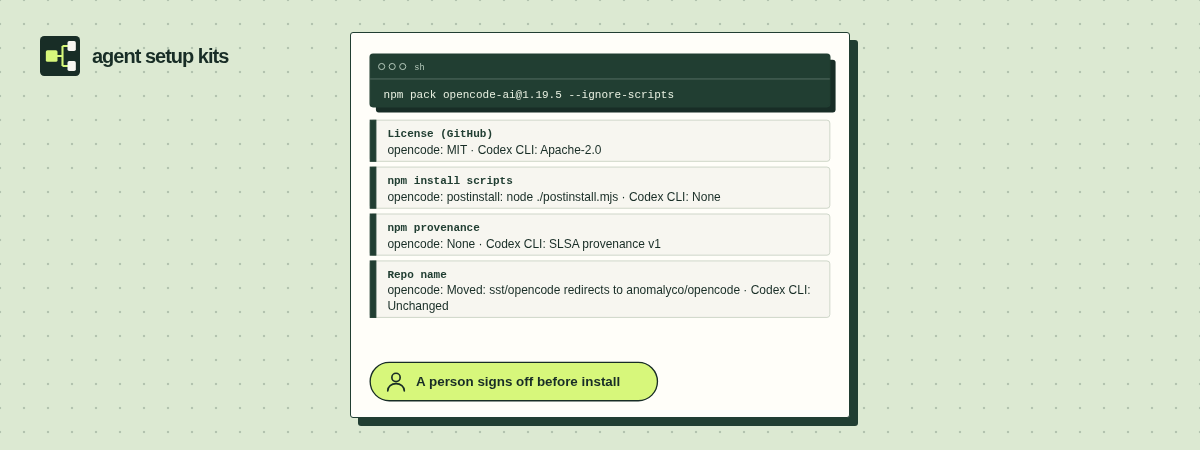
- Human approval: a person reads the record, opens any install script, and signs off before anything is installed. No sign-off, no install.
Steps
- License and activity. Ask the GitHub API about the repo:
curl -s https://api.github.com/repos/openai/codex | jq '{full_name, license: .license.spdx_id, archived, pushed_at}'
curl -s https://api.github.com/repos/openai/codex/releases/latest | jq '{tag_name, published_at}'
Watch for a redirect. Our request for sst/opencode came back as anomalyco/opencode, so the repo had moved. Check the new owner is who you expect.
- Package metadata. For npm packages, read the registry entry without installing:
npm view opencode-ai license repository scripts dist.attestations --jsonA missing repository field means the package does not say where its code lives. An empty dist.attestations means no provenance. Provenance "allows developers to verify where and how your package was built before they download it" (npm provenance).
- Install scripts. npm runs
preinstall,installandpostinstallduringnpm install. Download the package without running anything and read the script:
npm pack opencode-ai@1.19.5 --ignore-scripts
tar xzf opencode-ai-1.19.5.tgz && cat package/postinstall.mjs
With --ignore-scripts, "npm does not run scripts specified in package.json files" (npm install). If the README says curl ... | sh, download that script to a file and read it first.
- Scorecard.
curl -s https://api.securityscorecards.dev/projects/github.com/openai/codex | jq '.score, .checks[] | {name, score}'. A 404 means no published result, not a bad one. - Default permissions. Read the README or docs for what the agent may do without asking: edit files, run shell commands, reach the network.
- Sign-off. Put the record in front of a person. They approve, reject or ask for more.
What our checks showed
| Check | opencode | Codex CLI | ||
|---|---|---|---|---|
| License (GitHub) | MIT | Apache-2.0 | ||
| Last release | v1.19.5, 2026-10-28 | rust-v0.166.0, 2026-10-29 | ||
| Archived, security policy | No, SECURITY.md present | No, SECURITY.md present | ||
| Repo name | Moved: sst/opencode redirects to anomalyco/opencode | Unchanged | ||
npm repository field | Missing | Set to openai/codex | ||
| npm provenance | None | SLSA provenance v1 | ||
| npm install scripts | postinstall: node ./postinstall.mjs | None | ||
| README install script | `curl ... \ | bash. We found no checksum check in it. Adds a PATH line to shell config unless --no-modify-path` | `curl ... \ | sh`. Checks SHA256 against a published sums file. Adds a marked PATH block to a shell profile |
| Scorecard | No published result (404) | Aggregate score 6 of 10 (result dated 2026-10-26, checked 2026-10-30). Code-Review 0 ("Found 0/30 approved changesets"), Maintained 10, Security-Policy 10, Token-Permissions 0 | ||
| Default permissions (README) | Default "build" agent is "full-access". The "plan" agent "Denies file edits by default" and "Asks permission before running bash commands" | Not covered in the README; see its docs |
We read opencode's 189-line postinstall script instead of running it. It checks the CPU and C library, picks the matching platform package, copies its binary into place and runs it with --version. If the binary is missing it runs npm install --ignore-scripts for that one package. We found nothing else in it. The Linux binary package it pulls is about 214 MB unpacked.
None of this makes either tool unsafe. It tells you what will happen at install, which is what a person needs to approve it.
Things to know
- Star counts and open issue counts are weak signals. Codex's GitHub open issue count, which includes pull requests, was 25,732.
- A Scorecard of 0 on a check can reflect how a project works, such as merging without formal review approvals, not a flaw in the code.
- Some agent packages are not open source even when the code is visible. In npm metadata on 2026-10-30, @anthropic-ai/claude-code 2.1.314 listed its license as "SEE LICENSE IN README.md", and @qwen-code/qwen-code 0.26.4 had no license field. Check the LICENSE file.
- Pin the version you vetted. A later release has new code and new scripts.
- Reading an install script takes minutes. Run it only after you have read it.
Takeaway
Before installing an open-source agent, check its license, activity, install scripts, provenance and default permissions, then have a person sign off. Our two candidates both passed the basics and differed on install-time details that only showed up when we read the scripts.
Next step: run the five checks on the next agent you plan to try, and read its install script before you run it.
How we check the tools we list is on our verification page.
Good setups, worth keeping. Request email updates on the home page, then confirm by email. No subscription starts until you confirm. Or find an agent for the job.