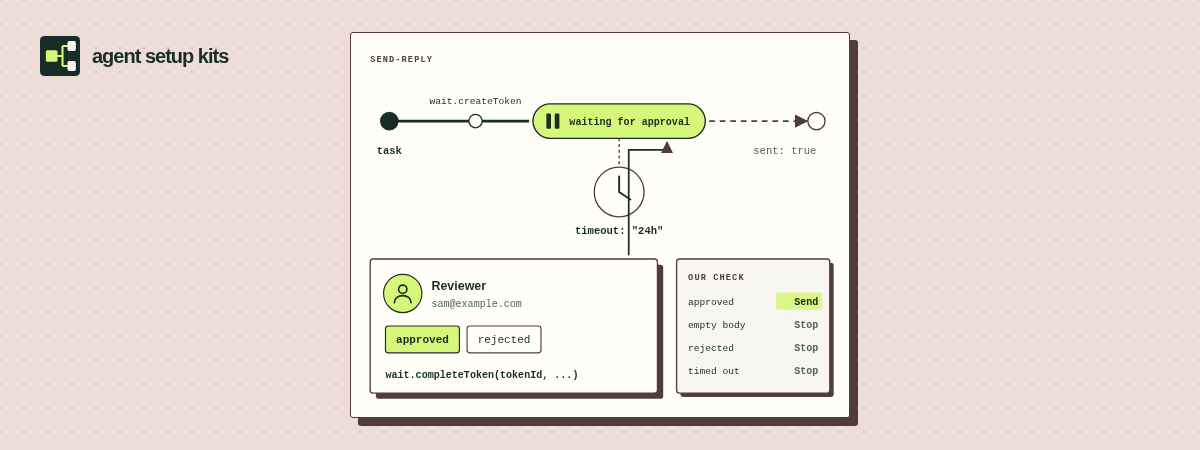
To add human approval to a Trigger.dev task, create a waitpoint token with wait.createToken(), show its ID to a reviewer, and pause the run with wait.forToken() until your backend completes the token. Then check the reviewer's answer yourself, because result.ok only means the token was completed, not that anyone said yes.
We checked this on @trigger.dev/sdk 4.8.3: the task below type-checks against the SDK, and its approval check stopped on an empty reply, a rejection and a timeout.
What it is (checked on 2026-10-30)
Trigger.dev runs long background tasks written in TypeScript, either on its cloud or self-hosted. The repository is Apache-2.0 licensed (LICENSE), and the npm package @trigger.dev/sdk is MIT licensed. The latest SDK on npm is 4.8.3, published on 2026-10-30.
The wait for token docs describe waitpoint tokens as a way to pause runs for "approval workflows" and "human-in-the-loop processes".
Based on Trigger.dev, by Trigger.dev and contributors.
The setup at a glance
- Trigger: your app starts the task, for example when an agent drafts a reply to a support ticket.
- Permissions: whatever the task does after approval, such as sending the reply. Nothing before the wait should change anything outside the task.
- Output: the task result says whether it sent and who approved it.
- Human approval: a signed-in reviewer approves or rejects the draft. Your backend records their name and completes the token.
Step 1: Pause the task for a decision
import { task, wait } from "@trigger.dev/sdk";

type Approval = { decision: "approved" | "rejected"; reviewer: string };

export const sendReply = task({
  id: "send-reply",
  run: async (payload: { ticketId: string; draft: string }) => {
    const token = await wait.createToken({
      timeout: "24h",
      tags: [`ticket:${payload.ticketId}`],
    });

    // Show token.id and the draft on your review screen here.

    const result = await wait.forToken<Approval>(token);

    if (!result.ok) {
      return { sent: false, reason: "timed out" };
    }
    if (result.output.decision !== "approved" || !result.output.reviewer) {
      return { sent: false, reason: "rejected or incomplete" };
    }
    // Only now do the thing that matters.
    return { sent: true, reviewer: result.output.reviewer };
  },
});
The docs say a token without a timeout never times out. Set one, and treat a timeout as a no.
Step 2: Complete the token from your backend
When the reviewer clicks a button, your server checks who they are, then calls:
await wait.completeToken<Approval>(tokenId, {
  decision: "approved",
  reviewer: "sam@example.com",
});
The reviewer's name should come from your login system, not from the form.
What our test showed
We didn't run the task on Trigger.dev, because that needs an account. We type-checked the task above with TypeScript 5 against the 4.8.3 SDK, which passed. Then we ran its approval check against each result shape the docs describe:
| Token result | Our check |
|---|---|
Completed with decision: "approved" and a reviewer | Send |
Completed with an empty body (the docs say the output is then {}) | Stop |
Completed with decision: "rejected" | Stop |
Timed out (ok: false) | Stop |
The second row is why the check matters. TypeScript types result.output as Approval, but the type is only what you expect. A POST with no body still completes the token.
Things to know
- Each token has a
urlthat completes it with the POST body as its output. The docs use it as a webhook for another service, with no auth header in the example. Treat the URL like a password and don't show it in the review screen. - The
publicAccessTokenfromcreateToken()lets a browser complete the token directly. That skips your server's check on who the reviewer is, so for approvals, complete it from your backend. idempotencyKeyreturns the same token when the key is reused, and "the token will be completed with the same payload". A key likeapprove-<ticketId>would let a second draft for the same ticket reuse the first approval. If you use a key, include the draft's version.wait.listTokens()filters by status (WAITING,COMPLETED,TIMED_OUT) and tags, which helps you build a "waiting for review" list.
Takeaway
Waitpoint tokens give a Trigger.dev task a real pause for a person's decision. Set a timeout, complete the token only from your backend, and check the decision and reviewer in code before anything goes out.
Next step: add a waitpoint before the one step in your task that sends, posts or charges, then test it with an empty reply and a timeout.
Good setups, worth keeping. Request email updates on the home page, then confirm by email. No subscription starts until you confirm. Or find an agent for the job.
Part of: Which setup should I use to add human approval to an agent?