An agent that reads web pages wastes most of its input on menus, banners and footers. We ran trafilatura on three saved test pages and counted what it kept. It kept all 19 facts we had planted and cut the text to about a third of the HTML. The one thing it kept that we did not want was the reader comments, which it includes by default.
The human step: a person picks which pages the agent may read and looks over the cleaned text before the agent relies on it. In this test our script did the extraction and the counting, with no network use.
Based on Trafilatura, by Adrien Barbaresi and contributors, under the Apache 2.0 licence, using its extract function. Checked 2026-10-31 with trafilatura 2.3.1.
The set-up
We wrote three small pages and saved them as files, so we knew exactly what each one held:
| Page | Main content | Boilerplate around it |
|---|---|---|
| Blog post | A build-time story with a list | Cookie banner, menu, sidebar with an advert, related posts, newsletter box, footer |
| Docs page | Rate limits, a table and a code sample | Menu, search box, table of contents, feedback buttons, footer |
| Recipe | Ingredients and method lists | Promo bar, menu, share links, advert, reader comments, footer |
For each page we listed the facts an agent would need (19 in all, such as "200 g red lentils" or the time.sleep line) and the boilerplate strings it should not see (17, such as "Popular posts" or the code "SOUP20").
The script compares three outputs. The baseline keeps every piece of text and drops only script and style, which is what a quick tag-strip does. Then trafilatura's extract with Markdown output, first with its defaults and then with include_comments=False. The usage docs say "include_comments and include_tables are activated by default", so the second run tests that switch.
Install is one package, trafilatura==2.3.1, which brought in lxml, htmldate, dateparser and a few others. In our venv that came to about 55 MB.
The code
import re
from html.parser import HTMLParser
import trafilatura

FACTS = {
    "blog.html": ["22 minutes", "9 minutes", "8 parallel jobs", "6 minutes",
                  "under 2 minutes", "lock file changes"],
    "docs.html": ["status 429", "Retry-After header in seconds", "60", "600",
                  'time.sleep(int(response.headers["Retry-After"]))', "per key, not per IP"],
    "recipe.html": ["40 minutes and serves 4", "200 g red lentils", "1 litre vegetable stock",
                    "ground cumin", "simmer for 25 minutes", "Blend half", "3 days"],
}
JUNK = {
    "blog.html": ["cookies", "Popular posts", "Try Example Cloud", "You might also like",
                  "Subscribe", "All rights reserved"],
    "docs.html": ["Search the docs", "Getting started", "Webhooks", "Was this page helpful",
                  "Changelog"],
    "recipe.html": ["Free delivery", "Pin it", "SOUP20", "Lovely recipe", "10 more minutes",
                    "Privacy"],
}

class Strip(HTMLParser):
    """Baseline: keep all text, drop only script and style."""
    def __init__(self):
        super().__init__()
        self.parts, self.skip = [], False
    def handle_starttag(self, tag, attrs):
        self.skip = tag in ("script", "style")
    def handle_endtag(self, tag):
        self.skip = False
    def handle_data(self, data):
        if not self.skip and data.strip():
            self.parts.append(data.strip())

def flat(text):
    return re.sub(r"\s+", " ", text)

for name in FACTS:
    html = open(f"pages/{name}", encoding="utf-8").read()
    s = Strip()
    s.feed(html)
    outputs = {
        "strip": "\n".join(s.parts),
        "trafilatura": trafilatura.extract(html, output_format="markdown") or "",
        "no_comments": trafilatura.extract(html, output_format="markdown",
                                           include_comments=False) or "",
    }
    print(f"== {name}: raw HTML {len(html)} chars")
    for label, text in outputs.items():
        kept = [f for f in FACTS[name] if f in flat(text)]
        junk = [j for j in JUNK[name] if j in flat(text)]
        lost = [f for f in FACTS[name] if f not in kept]
        print(f"{label}: {len(text)} chars, facts {len(kept)}/{len(FACTS[name])}, "
              f"junk {len(junk)}/{len(JUNK[name])}, lost {lost}, junk kept {junk}")
open(f"out-{name[:-5]}.md", "w").write(outputs["no_comments"] + "\n")venv/bin/python -c "import trafilatura; print('trafilatura', trafilatura.__version__)"
venv/bin/python clean.py
for f in out-blog.md out-docs.md out-recipe.md; do echo "== $f"; cat "$f"; doneWhat happened
The run took under a second for all three pages. It wrote out-blog.md, out-docs.md and out-recipe.md.
| Page | Raw HTML | Tag-strip | Trafilatura | No comments |
|---|---|---|---|---|
| Blog post | 2,070 chars | 1,118 | 685 | 685 |
| Docs page | 1,502 | 652 | 490 | 490 |
| Recipe | 1,257 | 680 | 469 | 380 |
| Output | Facts kept | Boilerplate kept |
|---|---|---|
| Tag-strip | 19 of 19 | 16 of 17 |
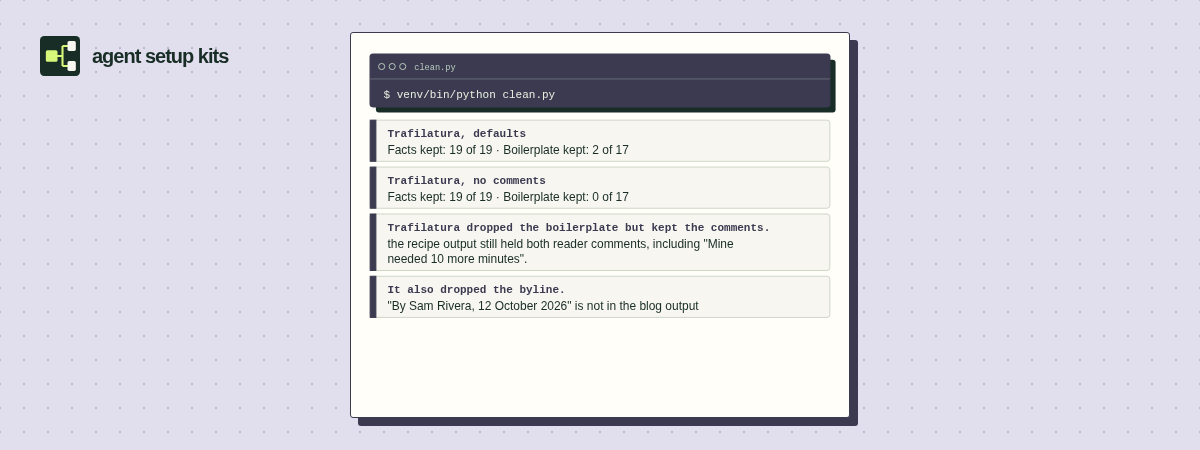
| Trafilatura, defaults | 19 of 19 | 2 of 17 |
| Trafilatura, no comments | 19 of 19 | 0 of 17 |
Nothing we planted was lost. All 19 facts came through in every output, including the docs table, which came out as a Markdown table, and the code sample, which came out as a fenced block with its indentation intact.
The tag-strip kept almost all the clutter. It removed the HTML but left the cookie text, menus, advert, newsletter box and footer. The one string it missed was "Search the docs", and only because that text sits in an input's placeholder attribute.
Trafilatura dropped the boilerplate but kept the comments. With its defaults, the recipe output still held both reader comments, including "Mine needed 10 more minutes". An agent could read that as part of the recipe. With include_comments=False they were gone.
It also dropped the byline. "By Sam Rivera, 12 October 2026" is not in the blog output, and the docs page's "Last updated" line is not in its output either. The docs say with_metadata=True adds metadata to the output. We did not test that here.
What this test does not show
- Real sites. Our pages are small and clean, with clear
header,mainandfootertags. Real pages are larger, messier and often built by scripts that trafilatura does not run. - Pages we did not write. The facts and boilerplate lists are ours, so the test checks what we chose to plant.
- Fetching. We read saved files. Downloading pages brings its own limits, and you should respect each site's terms.
- Other settings. We did not test
with_metadata,include_linksor the faster modes.
What to set up
- Turn comments off with
include_comments=Falseunless your agent needs them. - Use Markdown output, so tables and code stay readable for a model.
- Ask for metadata if author or date matter, since the main text leaves them out.
- Plant a few known facts in a test page and check they survive any change of extractor or settings.
- Keep the raw HTML next to the cleaned text, so you can check what was dropped.
Takeaway
On three saved test pages, trafilatura kept every fact we planted and cut the text an agent would read to about a third of the raw HTML. A plain tag-strip kept the facts too, but also nearly all the clutter. The default that mattered was comments: turn them off, or your agent may read a visitor's note as part of the page.
Next step: run trafilatura with include_comments=False on one page your agent reads, and compare its output with the page before you switch your agent over.
How we check the tools we list is on our verification page.
Good setups, worth keeping. Request email updates on the home page, then confirm by email. No subscription starts until you confirm. Or find an agent for the job.