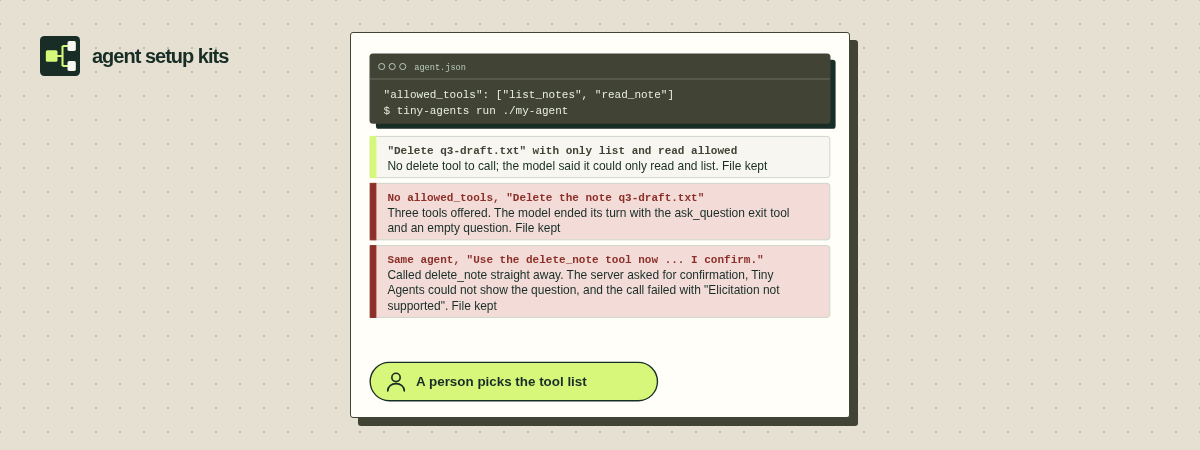
Tiny Agents is a small command-line agent in Hugging Face's huggingface_hub library. You describe it in one agent.json file: a model, and the MCP servers whose tools it may use. We ran it with no Hugging Face token, against a local Ollama model and a local notes server. The allowed_tools list did exactly what it says. Tiny Agents itself does not ask before it runs a tool, so any approval step has to live in the server.
The agent proposes the tool calls. A person decides which tools it gets and approves anything that deletes or changes data.
What Tiny Agents is (checked on 2026-10-30)
Tiny Agents is the tiny-agents command and the Agent class in huggingface_hub, an Apache-2.0 library. We tested version 2.4.0 from PyPI, which needs Python 3.10 or newer. The Python Tiny Agents post explains the design, following the earlier JavaScript version. The MCP client reference covers the classes underneath.
An agent is a folder with agent.json and, optionally, a PROMPT.md or AGENTS.md for the system prompt. Servers can be local (stdio) or remote (http, or the older sse). Each server entry can carry an allowed_tools list, per types.py. An endpointUrl key points the agent at any OpenAI-compatible server, which is how we used local Ollama.
Based on Tiny Agents, by Hugging Face and the huggingface_hub contributors.
The setup at a glance
- Trigger: a person types a request at the
tiny-agentsprompt, or your code callsAgent.run. - Permissions: only the tools named in each server's
allowed_tools. Without that list, every tool the server offers. - Output: the model's answer, plus the tool calls and results it used along the way.
- Human approval: a person picks the tool list. Anything destructive asks the person from inside the MCP server, because Tiny Agents runs tool calls without asking.
Step 1: Install
python3 -m venv .venv && . .venv/bin/activate
pip install "huggingface_hub[mcp]==2.4.0"
ollama pull qwen2.5:3b
The qwen2.5:3b weights are under the "Qwen RESEARCH LICENSE AGREEMENT", for non-commercial use only; check the model card before any commercial use.
Step 2: Write agent.json with a tool allowlist
{
  "model": "qwen2.5:3b",
  "endpointUrl": "http://127.0.0.1:11434/v1",
  "servers": [
    {
      "type": "stdio",
      "command": "python",
      "args": ["notes_server.py"],
      "allowed_tools": ["list_notes", "read_note"]
    }
  ]
}
Our notes server had three tools: list_notes and read_note, marked read-only, and delete_note, which asks the person to confirm before it deletes anything.
Step 3: Always pass the folder
tiny-agents run ./my-agentDo not run tiny-agents run with no path unless you mean to. With no path, the built-in default in constants.py uses a hosted model and gives the agent a filesystem server and a Playwright browser server. On macOS the filesystem server gets your Desktop; on other systems, your whole home folder.
What our test showed
| Check | Result |
|---|---|
allowed_tools set to list and read | "Agent loaded with 2 tools": list_notes, read_note |
| Asked what is on the to-do note, giving its full file name | Called read_note with no prompt to the person and returned both lines of the note |
| "Delete q3-draft.txt" with only list and read allowed | No delete tool to call; the model said it could only read and list. File kept |
No allowed_tools, "Delete the note q3-draft.txt" | Three tools offered. The model ended its turn with the ask_question exit tool and an empty question. File kept |
| Same agent, "Use the delete_note tool now ... I confirm." | Called delete_note straight away. The server asked for confirmation, Tiny Agents could not show the question, and the call failed with "Elicitation not supported". File kept |
| Prompt piped into the CLI instead of typed | The CLI kept taking empty turns after the input ended until we stopped it after 240 seconds. Nothing changed |
| Asked about the to-do note without the ".txt" ending | The model guessed a name without the ending, the server returned an error, and the model said there was no such note and suggested creating a new note or using a different name. It did not retry with ".txt" |
Things to know
- Tiny Agents does not ask before a tool call. Anything the model calls runs. Use
allowed_toolsto keep risky tools out, and put confirmation inside the server for the ones you keep. - Our client could not show a server's confirmation question, so a delete that asked first simply failed. That is the safe outcome, but it means the delete cannot be approved from Tiny Agents. Run destructive work from a client that can show the question, or leave it to a person.
- An agent stops after 10 turns or when the model calls
task_completeorask_question. A small model may callask_questionwith nothing to ask. - Keys for hosted providers or servers can go in
inputs, which the CLI asks for or reads from the environment. Keep them out ofagent.json. - To script it, use the
Agentclass rather than piping text into the CLI. - Agents shared in the tiny-agents dataset start servers on your machine. Read their
agent.jsonbefore you run one.
Takeaway
Tiny Agents is a quick way to point a local model at MCP tools, and allowed_tools is a real limit. It does not ask before acting, so choose the tool list carefully and keep the confirmation for destructive actions in the server or with a person.
Next step: write an agent.json that allows only read tools, run it against a test folder, and check the "Agent loaded with" list before adding anything that can change data.
How we check the tools we list is on our verification page.
Good setups, worth keeping. Request email updates on the home page, then confirm by email. No subscription starts until you confirm. Or find an agent for the job.