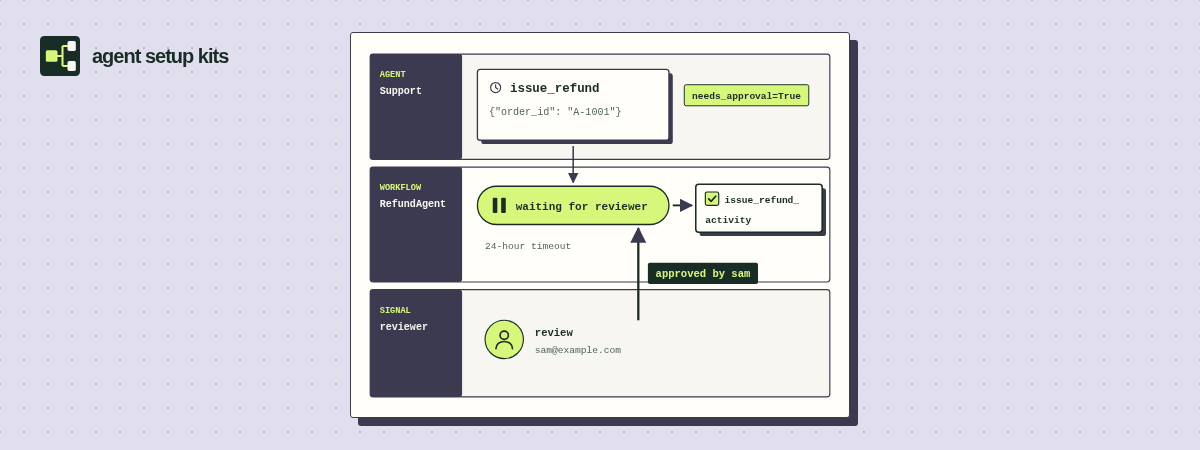
To hold a risky agent action for a person in Temporal, mark the tool with needs_approval=True in the OpenAI Agents SDK, then have the workflow wait for a reviewer's signal with workflow.wait_condition() and a timeout. Approve or reject the paused tool call from that signal, and resume the run.
We tested this in Temporal's time-skipping test server with a stand-in model: the refund ran only when a named reviewer approved, and a rejection, a missing reviewer and a 24-hour silence all left it untouched.
What it is (checked on 2026-10-30)
Temporal runs workflows that survive crashes and restarts by replaying their history. The Python SDK is MIT licensed (LICENSE), and the latest on PyPI is 1.35.0, uploaded on 2026-10-28, for Python 3.10 or later.
The OpenAI Agents integration now lives in its own package, temporalio-openai-agents 1.1.0, from the ai-integrations repository (MIT, LICENSE). Its README says to import it as temporalio.openai_agents and to drop the older openai-agents extra on temporalio. It runs model calls as Temporal activities.
The OpenAI Agents SDK is MIT licensed. Its latest release on PyPI is 0.24.0, but temporalio-openai-agents 1.1.0 requires openai-agents>=0.22,<0.23, so we tested on 0.22.3.
Based on the Temporal Python SDK, by Temporal and contributors, and the OpenAI Agents SDK, by OpenAI and contributors.
The setup at a glance
- Trigger: your app starts a
RefundAgentworkflow with a customer's request. - Permissions: the agent can propose a refund, but the payment call sits in an activity that runs only after approval.
- Output: the workflow returns who approved, or why nothing happened.
- Human approval: a signed-in reviewer sees the pending refund and your backend sends a
reviewsignal with their decision and name.
Step 1: Install
pip install temporalio==1.35.0 temporalio-openai-agents==1.1.0pip resolves openai-agents to 0.22.3 to match the pin.
Step 2: Write the workflow
from datetime import timedelta
from temporalio import activity, workflow

with workflow.unsafe.imports_passed_through():
    from agents import Agent, Runner, function_tool


@activity.defn
async def issue_refund_activity(order_id: str) -> str:
    # Your payment call goes here.
    return f"refund issued for {order_id}"


@function_tool(needs_approval=True)
async def issue_refund(order_id: str) -> str:
    """Refund an order."""
    return await workflow.execute_activity(
        issue_refund_activity, order_id, start_to_close_timeout=timedelta(seconds=30)
    )


@workflow.defn
class RefundAgent:
    def __init__(self) -> None:
        self.decision: dict | None = None
        self.pending: list[str] = []

    @workflow.signal
    def review(self, decision: dict) -> None:
        self.decision = decision

    @workflow.query
    def waiting_for(self) -> list[str]:
        return self.pending

    @workflow.run
    async def run(self, request: str) -> str:
        agent = Agent(name="Support", instructions="Handle refund requests.", tools=[issue_refund])
        result = await Runner.run(agent, request)
        if not result.interruptions:
            return f"no approval needed: {result.final_output}"

        self.pending = [i.raw_item.arguments for i in result.interruptions]
        try:
            await workflow.wait_condition(lambda: self.decision is not None, timeout=timedelta(hours=24))
        except TimeoutError:
            return "timed out, nothing refunded"

        state = result.to_state()
        approved = self.decision.get("decision") == "approved" and bool(self.decision.get("reviewer"))
        for item in state.get_interruptions():
            state.approve(item) if approved else state.reject(item)
        result = await Runner.run(agent, state)
        return f"{'approved by ' + self.decision['reviewer'] if approved else 'rejected'}: {result.final_output}"
The integration's README warns that plain @function_tool tools run inside the workflow, so they must not do network or other I/O. That's why the tool hands the payment to an activity.
Step 3: Send the decision
Your review screen reads waiting_for with a query, and your backend sends the signal once it knows who the reviewer is:
await handle.signal(RefundAgent.review, {"decision": "approved", "reviewer": "sam@example.com"})Take the reviewer's name from your login system, not from the form.
What our test showed
We ran each case in WorkflowEnvironment.start_time_skipping(), which the testing docs say fast-forwards timers and conditional timeouts. The model was the integration's TestModel, scripted to call issue_refund for order A-1001, so no API key was needed.
| Signal | Workflow result | Refund activity ran |
|---|---|---|
approved, reviewer sam | "approved by sam: Done." | Yes |
rejected, reviewer sam | "rejected: Done." | No |
approved, no reviewer | "rejected: Done." | No |
| None, test clock moved 25 hours | "timed out, nothing refunded" | No |
The query returned the pending call, {"order_id": "A-1001"}, in every case, so a reviewer sees what they're approving.
Things to know
- The model's closing message said "Done." after a rejection too. Report the outcome from your own code, as the workflow does here, not from the agent's text.
- The version pin matters. Installing openai-agents 0.24.0 next to temporalio-openai-agents 1.1.0 gave a pip dependency conflict, so let pip choose.
- Always pass a timeout to
wait_condition. Without one, the workflow keeps waiting until a signal arrives. - The OpenAI Agents SDK human-in-the-loop docs note that approvals are run-wide, including tools inside nested agents, so check
interruptionson the outer run. - Temporal's message passing docs cover signals, queries and updates. The docs call an update "a trackable synchronous request", which suits a review screen that needs confirmation.
Takeaway
Temporal keeps the agent's run alive while a person decides, and the Agents SDK marks which tool call needs that decision. Check the decision and reviewer in code, set a timeout, and keep the risky call in an activity.
Next step: mark the one tool in your agent that moves money or sends messages with needs_approval=True, then run the four cases above in the time-skipping test server.
Good setups, worth keeping. Request email updates on the home page, then confirm by email. No subscription starts until you confirm. Or find an agent for the job.
Part of: Which setup should I use to add human approval to an agent?