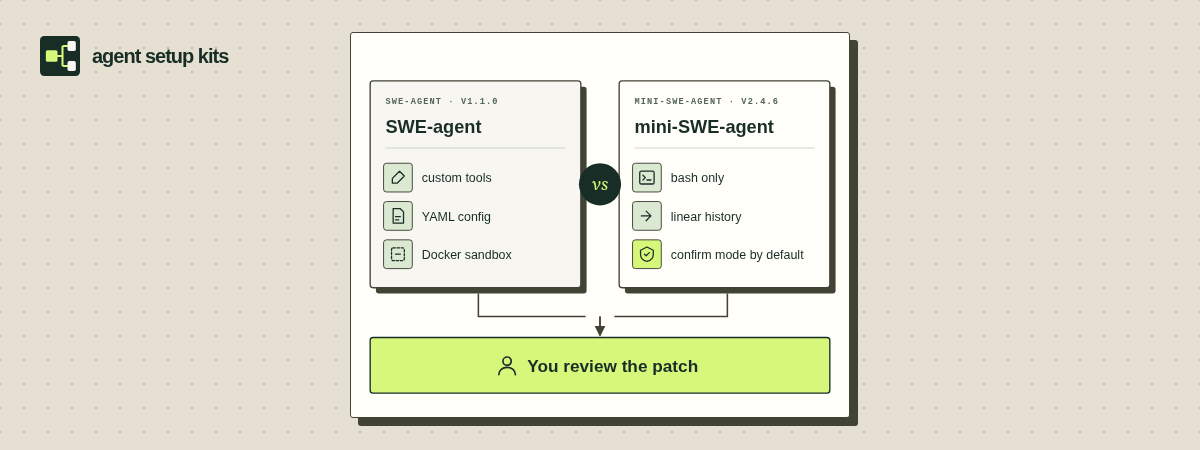
For most people who want an agent to fix a GitHub issue, the answer is mini-SWE-agent, because the SWE-agent team itself now recommends it over the original. The full SWE-agent still makes sense when you need custom tools, different history processors, or heavy YAML configuration.
This guide explains the difference, shows how each one runs on an issue, and names the step where a person checks the work.
Based on SWE-agent and mini-SWE-agent, by the SWE-agent team (John Yang, Carlos E. Jimenez, Alexander Wettig, Kilian Lieret, Shunyu Yao, Karthik Narasimhan, and Ofir Press), an academic project started at Princeton and maintained by researchers from Princeton and Stanford. Both are MIT licensed. The research paper is on arXiv. We checked both repos on 2026-10-28.
What the SWE-agent team says now
The top of the SWE-agent README carries a warning: most development effort is on mini-SWE-agent, which "has superseded SWE-agent," and their "general recommendation is to use mini-SWE-agent instead of SWE-agent going forward." The SWE-agent docs site shows the same message in its banner.
The release pages tell the same story. The latest SWE-agent release is v1.1.0, published in May 2025. mini-SWE-agent's latest is v2.4.6, published in July 2026. The SWE-agent repo still gets commits, so it is not abandoned, but new features land in mini.
How they differ
The mini-SWE-agent FAQ lays out the differences:
| mini-SWE-agent | SWE-agent | |
|---|---|---|
| Tools | Bash only, no tool-calling interface | Configurable tool bundles |
| History | Completely linear, each step appends | Configurable history processors |
| Actions | Each runs as an independent subprocess.run | Stateful shell session |
| Config | Simple YAML | "Very powerful yaml configuration without touching code" |
| Good for | Quick local CLI work, simple control flow, stable sandboxing, fine-tuning or RL without overfitting to a scaffold | Experimenting with tools and history processors |
Both, per the FAQ, perform well on SWE-bench and include a trajectory browser so you can replay what the agent did.
One practical consequence of mini's design: since each action is independent, the agent cannot cd into a directory or export a variable and have it persist to the next step. The FAQ says this is deliberate and that the high benchmark scores show it is not a problem in practice. If your task truly needs a persistent shell, that is a reason to pick SWE-agent.
Pick mini-SWE-agent if
- You want a command-line helper on your own machine for real issues.
- You want the agent to ask before each command (more on this below).
- You want something small enough to read end to end.
- You are building your own agent and want a simple base to extend.
Pick SWE-agent if
- You need custom tools beyond bash, or want to test different tools.
- You want to tune history processing or parsing through YAML alone.
- You are reproducing published SWE-agent research or configs.
- You need EnIGMA, the cybersecurity mode; the README says to use SWE-agent 0.7 for it while EnIGMA is updated for 1.0.
Running SWE-agent on one issue
The hello world tutorial fixes a test issue in a Docker sandbox, so install Docker first. Installation is from source, per the install docs: clone the repo, then pip install --editable .. A single run looks like this:
sweagent run \
  --agent.model.name=claude-sonnet-4-20250514 \
  --agent.model.per_instance_cost_limit=2.00 \
  --env.repo.github_url=https://github.com/SWE-agent/test-repo \
  --problem_statement.github_url=https://github.com/SWE-agent/test-repo/issues/1
That command is copied from the tutorial; swap in a current model your provider offers. Keys go in environment variables or a .env file, never in the command. per_instance_cost_limit caps model spend per issue, so keep it.
When the run finishes, SWE-agent saves a .patch file and prints its path. You read the patch, then decide whether to apply it.
Running mini-SWE-agent on one issue
mini is a CLI you run in a repo with a task. Per the mini CLI docs, it has three modes:
- confirm (
/c): the model proposes a command and you press Enter to run it or type a reason to reject it. - yolo (
/y): commands run immediately. - human (
/u): you type the commands yourself.
mini starts in confirm mode by default. You can switch modes at any time, and Ctrl+C interrupts the agent. A --cost-limit flag caps spend.
Our mini-SWE-agent kit runs it in a disposable Docker workspace, so even approved commands cannot reach the rest of your machine.
The human approval step
Neither tool should change your real repository without you:
- SWE-agent has two action flags, per the command line tutorial:
--actions.apply_patch_locallyapplies a successful patch to local files, and--actions.open_propens a pull request automatically. The docs ask you to use these "responsibly (on your own repositories or after careful consideration)." Our advice: leave both off at first, read the saved patch, and apply it yourself. - mini-SWE-agent gives you a yes or no on every command in confirm mode. Stay there until you trust a setup, and use yolo only inside a throwaway container.
- Either way, the fix goes through a normal pull request and review before merge.
Next step
Start with mini-SWE-agent in confirm mode on one small, well-described issue, and read every command before you press Enter. Our step-by-step mini-SWE-agent kit gives you the Docker setup, and you can find an agent for the job for other coding setups.
Good setups, worth keeping. Request email updates on the home page, then confirm by email. No subscription starts until you confirm.