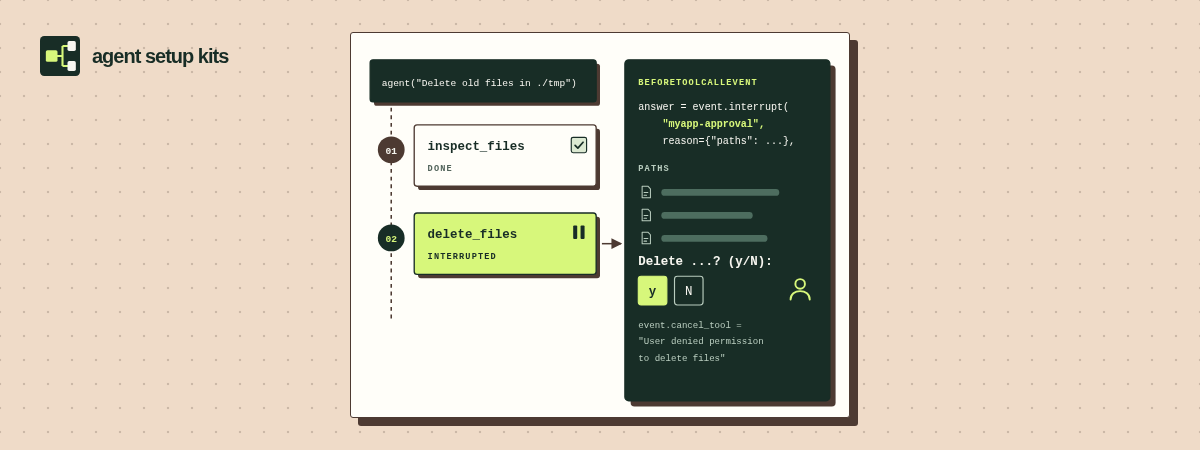
To build a tool-using agent with Strands Agents, install strands-agents, decorate Python functions with @tool, and pass them to Agent(tools=[...]). Tools run as soon as the model calls them, so add a BeforeToolCallEvent hook that calls event.interrupt() on risky tools and waits for a person's answer.
We tested this on 1.62.0. Without the hook, a delete tool ran straight away. With it, the run paused, and the tool only ran after a person answered yes.
What it is (checked on 2026-10-29)
Strands Agents is an open-source SDK for building AI agents in Python and TypeScript. It's Apache-2.0 licensed, and its NOTICE file names Amazon.com, Inc. as the copyright holder. The latest Python release on PyPI is 1.62.0 (uploaded 2026-10-21), and it needs Python 3.10 or newer.
The README lists Amazon Bedrock, Anthropic, OpenAI and Gemini among its model providers. If you don't pass a model, the Python Agent uses Bedrock. In 1.62.0 the default model ID is global.anthropic.claude-sonnet-4-6, so you need AWS credentials unless you pass another model.
The README also points beginners to a fully assembled starter package. This guide uses the plain SDK so you can see where approval fits.
Based on Strands Agents, by Amazon and contributors.
Step 1: Install
python -m venv .venv
. .venv/bin/activate
pip install strands-agents
Step 2: Give the agent tools
from strands import Agent, tool

@tool
def inspect_files(paths: list[str]) -> dict:
    """Inspect files at the given paths."""
    ...

@tool
def delete_files(paths: list[str]) -> bool:
    """Delete files at the given paths."""
    ...

agent = Agent(
    system_prompt="You delete files older than 5 days",
    tools=[inspect_files, delete_files],
    callback_handler=None,
)
The docstring becomes the tool's description, so write it for the model: what the tool does and what it changes.
Step 3: Add an approval hook
This follows the pattern in the interrupts docs:
from typing import Any
from strands.hooks import BeforeToolCallEvent, HookProvider, HookRegistry

class ApprovalHook(HookProvider):
    def register_hooks(self, registry: HookRegistry, **kwargs: Any) -> None:
        registry.add_callback(BeforeToolCallEvent, self.approve)

    def approve(self, event: BeforeToolCallEvent) -> None:
        if event.tool_use["name"] != "delete_files":
            return
        answer = event.interrupt(
            "myapp-approval",
            reason={"paths": event.tool_use["input"]["paths"]},
        )
        if answer.lower() != "y":
            event.cancel_tool = "User denied permission to delete files"
Then pass hooks=[ApprovalHook()] to the Agent.
Step 4: Answer the interrupt
When the hook interrupts, the run stops with stop_reason == "interrupt". Show the person the reason, then send their answer back:
result = agent("Delete old files in ./tmp")

while result.stop_reason == "interrupt":
    responses = []
    for interrupt in result.interrupts:
        answer = input(f"Delete {interrupt.reason['paths']}? (y/N): ")
        responses.append({
            "interruptResponse": {"interruptId": interrupt.id, "response": answer}
        })
    result = agent(responses)
The person answering is the safety step. Show them the exact paths, not the model's summary, and treat anything except "y" as a no, as the hook above does.
What our test showed
We ran this on 1.62.0 with a stand-in model that always asked to delete a.txt (no real model or credentials):
| Setup | Result |
|---|---|
| No hook | delete_files ran straight away |
| Hook, person answers "y" | Run stopped with interrupt; the tool ran once after the answer |
| Hook, person answers "n" | Run stopped with interrupt; the tool never ran |
Things to know
From the interrupts docs:
BeforeToolsEventcan interrupt a whole batch of tool calls at once, which is handy when the model asks for several risky calls together.- Interrupt names must be unique per event, so prefix them with your app name. The
reasonand the person's response must both be JSON-serializable. - When the model calls several tools at once, the ones you don't interrupt still run. Only the interrupted call waits. So your hook needs to cover every risky tool by name, not just the one you expect the model to use.
- If you log or alert from an
AfterToolsEventhook, it can fire more than once for one model message when a per-tool interrupt splits a batch. Make that hook safe to run twice. - Interrupts don't work for direct tool calls such as
agent.tool.my_tool(). - A tool can also ask for approval itself with
@tool(context=True)andtool_context.interrupt(...).
Takeaway
Strands tools run without asking by default. Add a BeforeToolCallEvent hook that interrupts on every tool that changes something, show the person the exact arguments, and treat anything but "y" as a no.
Next step: list your agent's tools, mark which ones write, delete, send or spend, and put those names in your approval hook before you connect a real model.
Good setups, worth keeping. Request email updates on the home page, then confirm by email. No subscription starts until you confirm. Or find an agent for the job.
Part of: Which setup should I use to add human approval to an agent?