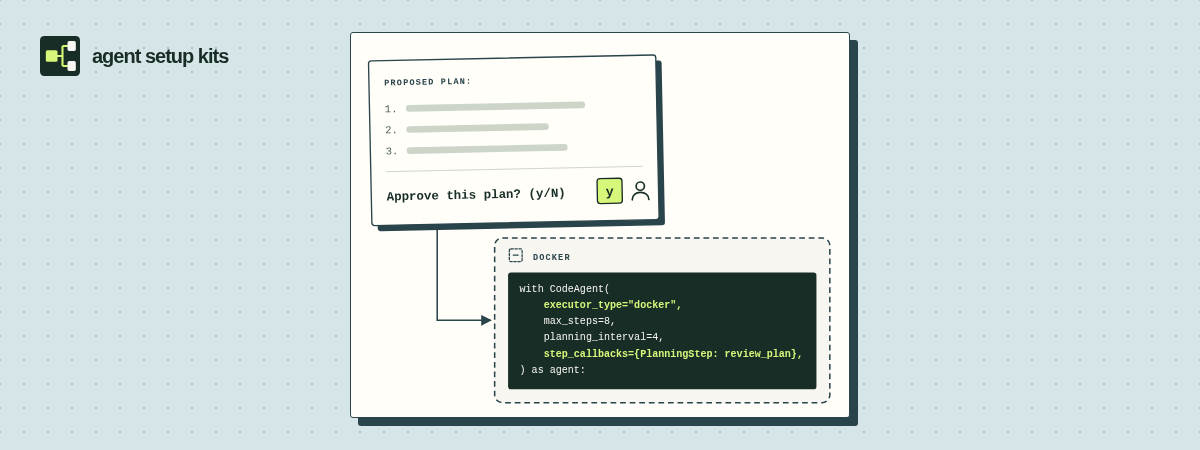
A smolagents CodeAgent writes and runs Python code to do its work, so set it up with a real sandbox, a step cap, and a stop for a person to approve its plan. In v1.26.0 that means executor_type="docker" (or another supported sandbox), max_steps, and a planning callback that raises an exception when you reject the plan.
The agent proposes a plan. You approve it before any code runs.
What smolagents is (checked on v1.26.0)
smolagents is an Apache-2.0 agent library from Hugging Face. Its CodeAgent "writes its actions in code (as opposed to 'agents being used to write code')." There's also a ToolCallingAgent that writes actions as JSON or text.
Version 1.26.0 was released on 2026-05-29, and the repository was still receiving commits in October 2026 (last push 2026-10-22). PyPI lists Python 3.10 or newer.
Based on smolagents, by Hugging Face and contributors.
Why the sandbox isn't optional
The README is direct: "you should run agent code in a sandbox." It also warns that the built-in LocalPythonExecutor "is not a security sandbox", and that it "can be bypassed and must not be used as a security boundary."
The local executor is the default (executor_type="local" in v1.26.0). So unless you change it, model-written code runs in your own Python process with your files and environment variables in reach.
Supported options in v1.26.0 are blaxel, e2b, modal (managed cloud sandboxes) and docker (on your own machine). This guide uses Docker, so nothing leaves your machine except the model calls.
Step 1: Install, pinned
You need Docker running. Then:
pip install "smolagents[docker]==1.26.0"Step 2: Run the agent in Docker with a step cap
The secure code execution guide shows the pattern: add executor_type="docker" and use the agent as a context manager, so the container is cleaned up when the agent finishes.
from smolagents import CodeAgent, InferenceClientModel

with CodeAgent(
    model=InferenceClientModel(),
    tools=[],
    executor_type="docker",
    max_steps=8,
) as agent:
    print(agent.run("Can you give me the 100th Fibonacci number?"))
Things to know about this setup, from the docs and the v1.26.0 code:
max_stepsdefaults to 20. Set it lower for small jobs.- Only the code runs in the sandbox. The guide says this approach sends the generated code to the sandbox and returns only the output, while the model and tools stay in your local environment. Tools you pass in still run on your machine, so give the agent only tools you'd be happy for it to call.
- No multi-agent support in this mode, according to the guide. For multi-agent systems it describes running the whole system inside a sandbox instead.
additional_authorized_importscontrols which Python modules the agent's code may import. Keep that list short.
Your model API key stays in your environment. Don't pass it in as a tool argument or put it in the prompt.
Step 3: Approve the plan before any action
smolagents can make a plan before it acts. Set planning_interval, and the agent writes a planning step on step 1 and every N steps after that. The plan customization example registers a step callback on PlanningStep so a person can approve, modify or cancel the plan.
We tested this on v1.26.0 with a stub model and found something worth knowing:
- Calling
agent.interrupt()inside the planning callback did not stop the next action. In_run_stream, the interrupt flag is checked at the start of each loop, and the action step for the same loop runs straight after the plan. In our test, the agent ran its code and returned an answer after we had "interrupted" it. - Raising an exception in the callback stopped the run before any action ran. Only the planning call reached the model.
So for a hard stop, raise:
from smolagents.memory import PlanningStep

class PlanRejected(Exception):
    pass

def review_plan(step, agent):
    print("\nPROPOSED PLAN:\n" + step.plan)
    if input("Approve this plan? (y/N) ").strip().lower() != "y":
        raise PlanRejected("Plan rejected by reviewer")

with CodeAgent(
    model=InferenceClientModel(),
    tools=[],
    executor_type="docker",
    max_steps=8,
    planning_interval=4,
    step_callbacks={PlanningStep: review_plan},
) as agent:
    try:
        print(agent.run("List the first 10 prime numbers."))
    except PlanRejected as e:
        print(e)
A person reads the plan and types y before the first action, and again at every re-plan. Anything other than y stops the run. If you want to edit the plan instead, the plan customization example shows how to change it and continue with agent.run(task, reset=False), which keeps the agent's memory.
Step 4: Check the answer before it's used
final_answer_checks takes a list of functions that receive the final answer, the agent's memory and the agent, and return whether the answer is accepted. Use one for mechanical checks, such as "is this a number" or "does this file exist". A person still reads the answer before anything downstream uses it.
How this compares
If you want an agent that calls tools you define as functions rather than running model-written code, see our OpenAI Agents SDK kit.
Takeaway
smolagents' CodeAgent is compact and capable, but its default executor is not a security boundary. Pin v1.26.0, run code in Docker or another supported sandbox, cap steps, and make the plan callback raise when a person says no. Our test showed interrupt() alone is not enough.
Next step: run the plan-approval script above on a harmless task, reject the first plan, and confirm that no code ran.
How we check the tools we list is on our verification page.
Good setups, worth keeping. Request email updates on the home page, then confirm by email. No subscription starts until you confirm. Or find an agent for the job.