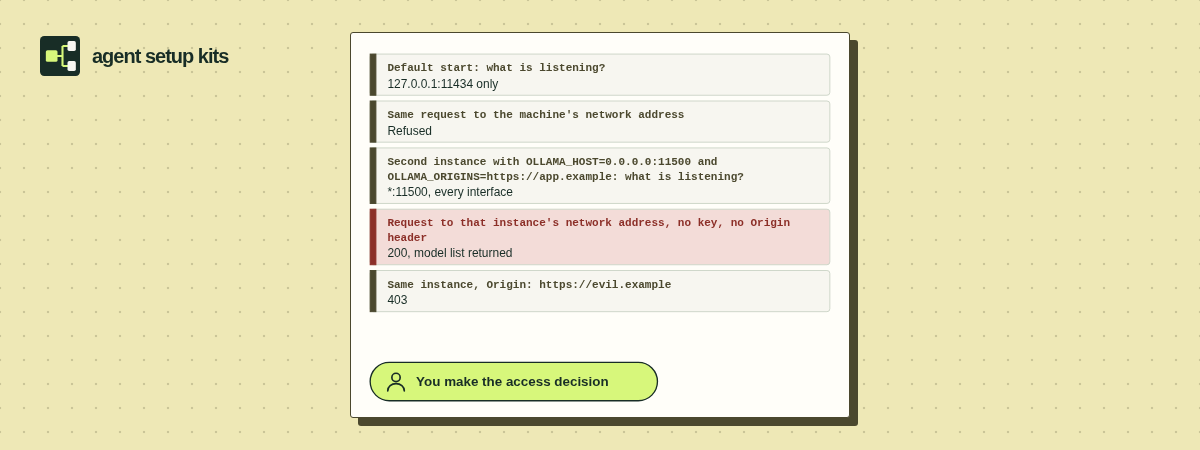
Running models yourself keeps prompts and files on your own machine, but only if the model server stays private. Ollama listens on 127.0.0.1 by default, so only the same machine can reach it. One environment variable opens it to the network. We tested both settings and the browser origin check, and found that the origin check does not stop a script.
You decide which machines may reach the model. The agent only uses the address you give it.
Based on Ollama, by the Ollama contributors, and its FAQ.
What Ollama's docs say (checked 2026-10-30)
- "Ollama binds 127.0.0.1 port 11434 by default. Change the bind address with the
OLLAMA_HOSTenvironment variable." - The FAQ's Linux example sets
Environment="OLLAMA_HOST=0.0.0.0:11434"in the systemd service. That address means every network interface. - "Ollama allows cross-origin requests from
127.0.0.1and0.0.0.0by default. Additional origins can be configured withOLLAMA_ORIGINS." - For remote access, the FAQ points to a proxy such as Nginx, or tunnelling apps.
- The FAQ sections on exposing and proxying Ollama do not name a password or key setting for the server itself. Plan your access control outside Ollama.
What we tested
Ollama 0.40.13, started with a clean environment. We checked listeners with ss -ltn and sent requests to the /api/tags endpoint, which lists installed models, with curl.
| Test | Result |
|---|---|
| Default start: what is listening? | 127.0.0.1:11434 only |
Request to /api/tags from the same machine, no key or token | 200, model list returned |
| Same request to the machine's network address | Refused |
Request with Origin: https://evil.example | 403 |
Request with Origin: http://127.0.0.1 | 200 |
Second instance with OLLAMA_HOST=0.0.0.0:11500 and OLLAMA_ORIGINS=https://app.example: what is listening? | *:11500, every interface |
| Request to that instance's network address, no key, no Origin header | 200, model list returned |
Same instance, Origin: https://app.example | 200 |
Same instance, Origin: https://evil.example | 403 |
We stopped the 0.0.0.0 instance a few seconds after the test and confirmed only 127.0.0.1:11434 was left.
What that means
- The default is the safe setting. On 127.0.0.1, the network address was refused.
- 0.0.0.0 answers anyone who can reach the port. Our request from the network address had no key and still got the model list back.
OLLAMA_ORIGINSis a browser rule, not a lock. It blocked requests that carried an unknownOriginheader, which is what a web page sends.curlsends noOriginheader and was answered. Use it to control which web pages can call Ollama, not who can reach it.
Why this matters more for agents
An agent setup usually has a config line with the model server's address, often http://127.0.0.1:11434 for Ollama. When that server sits on a shared machine, a home lab or a rented server, it can be tempting to switch the bind address to 0.0.0.0 so a second machine can use it. In our test, that one change was enough for a plain request from the network to get the model list, with no key asked for. Anyone who can reach the port can use your hardware and your models, so make the access decision on purpose.
A safer way to reach it from another machine
Keep Ollama on 127.0.0.1 and forward a local port over SSH from the machine that needs it:
ssh -L 11434:127.0.0.1:11434 you@model-serverThe OpenSSH manual describes -L as: "Specifies that connections to the given TCP port or Unix socket on the local (client) host are to be forwarded to the given host and port, or Unix socket, on the remote side." Your agent then uses http://127.0.0.1:11434 on its own machine. We did not test the tunnel itself; our test machine has no SSH server.
If several machines must share one server, put a proxy in front that checks who is calling, and keep Ollama itself on 127.0.0.1 behind it.
Checklist
- Run
ss -ltn | grep 11434(orlsof -i :11434on a Mac). You want127.0.0.1:11434. - If you see
0.0.0.0or*, find whereOLLAMA_HOSTis set (systemd override,launchctl, shell profile) and decide whether you need it. - Set
OLLAMA_ORIGINSonly to the web apps that need it. Do not treat it as access control. - Reach a remote server through an SSH tunnel or an authenticating proxy, not an open port.
- Repeat the check after upgrades and after editing service files.
Takeaway
Self-hosted AI is only private while the server is. Ollama starts on 127.0.0.1, and that is where it should stay. Use a tunnel or an authenticating proxy for remote access, and remember that the origin setting only governs browsers.
Next step: run ss -ltn | grep 11434 on every machine where you run Ollama today.
How we check the tools we list is on our verification page.
Good setups, worth keeping. Request email updates on the home page, then confirm by email. No subscription starts until you confirm. Or find an agent for the job.