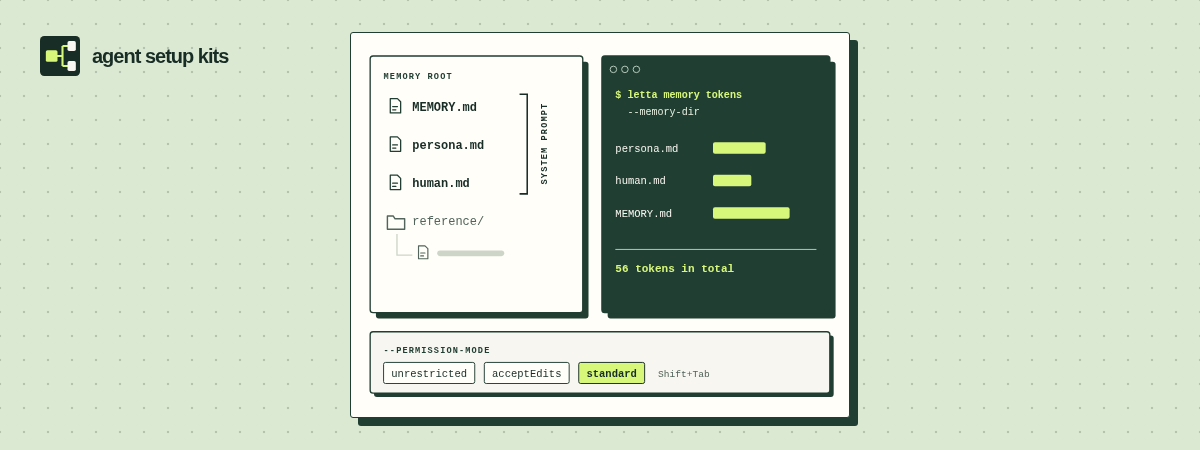
To self-host Letta today, install the Letta Code CLI from npm and run it with the local backend, or start letta server --backend local for an always-on App Server. Its memory is a folder of Markdown files in git that you can read and diff. The interactive CLI starts in unrestricted mode, so switch to standard before you give it real work.
Older guides show a Python or Docker "Letta server" with memory blocks over an API. That server is retired. We checked the new setup on 0.34.33 and ran its memory tools on a sample folder.
What it is (checked on 2026-10-30)
The letta-ai/letta README now says the current source lives in letta-ai/letta-code. The old V1 API server sits on an archive branch, and active projects should move. Letta Code is Apache-2.0 licensed (LICENSE), and its README says it comes from the creators of MemGPT.
The latest npm release is 0.34.33, published on 2026-10-30. The package asks for Node.js 22, 24 or 26.
Based on Letta Code, by Letta and contributors.
The setup at a glance
- Trigger: you message the agent in the terminal, or an app sends it a message through the App Server.
- Permissions: the agent's built-in tools run on the machine where Letta runs, including shell commands and file edits.
- Output: replies, file changes, and updates to its own memory files.
- Human approval: in
standardmode, a person approves shell commands, edits and sub-agents before they run.
Step 1: Install and connect a model
From the self-hosting docs:
npm install -g @letta-ai/letta-code
letta --backend local connect ollama
You can connect a hosted provider instead, for example letta --backend local connect anthropic --api-key "$ANTHROPIC_API_KEY". With the local backend, messages, memory and provider settings stay on your machine and you don't need a Letta account. Prompts still go to whichever model provider you connect.
Step 2: Start with approvals on
The permissions docs say the interactive CLI starts in unrestricted mode, which auto-allows tool calls unless a deny rule blocks them. Pick a stricter mode:
letta --permission-mode standardstandard asks before shell commands, edits and sub-agents. strict asks before every tool call, including reads. In the terminal, Shift+Tab cycles between unrestricted, acceptEdits and standard.
Add deny rules that apply every session in .letta/settings.json:
{
  "permissions": {
    "allow": ["Bash(pnpm lint)", "Bash(pnpm test)", "Read(src/**)"],
    "deny": ["Bash(rm -rf:*)", "Bash(git push --force:*)", "Read(.env)"]
  }
}
The person answering each prompt is the approval step. Read the exact command before you say yes.
Step 3: Run the App Server (optional)
To keep agents on one always-on machine and reach them from your own app:
letta server --backend local --listen ws://127.0.0.1:4500The CLI help lists --ws-auth options for listeners that aren't on loopback. Keep it on 127.0.0.1 until you've set up a token. The docs add that self-hosted agents aren't backed up for you, so back up their state yourself.
Step 4: Read the memory
The MemFS docs describe memory as a git repository of Markdown files. Files at the memory root, such as persona.md and human.md, load into the system prompt on every turn. Folders with their own MEMORY.md index stay out of context until the agent opens them. There's no vector search by default.
You can teach the agent with /remember always use pnpm in this repo, then check what it saved with /memory, as the memory docs describe. From the shell, letta memory diff, letta memory backup and letta memory tokens help you review changes and size.
What our test showed
We installed 0.34.33 on Node.js 24.22.1. We didn't connect a model, so this covers install and the memory tools, not a full agent run:
| Test | Result |
|---|---|
npm install -g @letta-ai/letta-code | Failed on our box while building node-pty; it installed with --ignore-scripts |
letta --version | 0.34.33 (Letta Code) |
letta memory tokens --memory-dir on a sample folder | Counted persona.md, human.md and MEMORY.md (56 tokens in total); the file in reference/ wasn't counted |
That last row matches the docs: only root files sit in the prompt. Our install workaround skips native build steps, so the terminal UI may not work that way. Install normally on your own machine.
Things to know
- Dreaming runs background sub-agents that rewrite memory. The docs say the "Agent reviews before applying" option uses more tokens and "does not ask you for approval". Run
letta memory diffafter it runs. - A tool call that targets another agent's memory folder is denied, even in
unrestrictedmode. --tools "Read,Glob,Grep"loads only read tools, which is a safe way to try it on a real repo.
Takeaway
Self-hosted Letta is now the Letta Code CLI and App Server, not the old API server. Its memory is plain files you can read, diff and back up. Start in standard mode with deny rules, because the default lets tools run without asking.
Next step: run your first session with --permission-mode standard --tools "Read,Glob,Grep", then open the memory folder and read what it saved.
Good setups, worth keeping. Request email updates on the home page, then confirm by email. No subscription starts until you confirm. Or find an agent for the job.