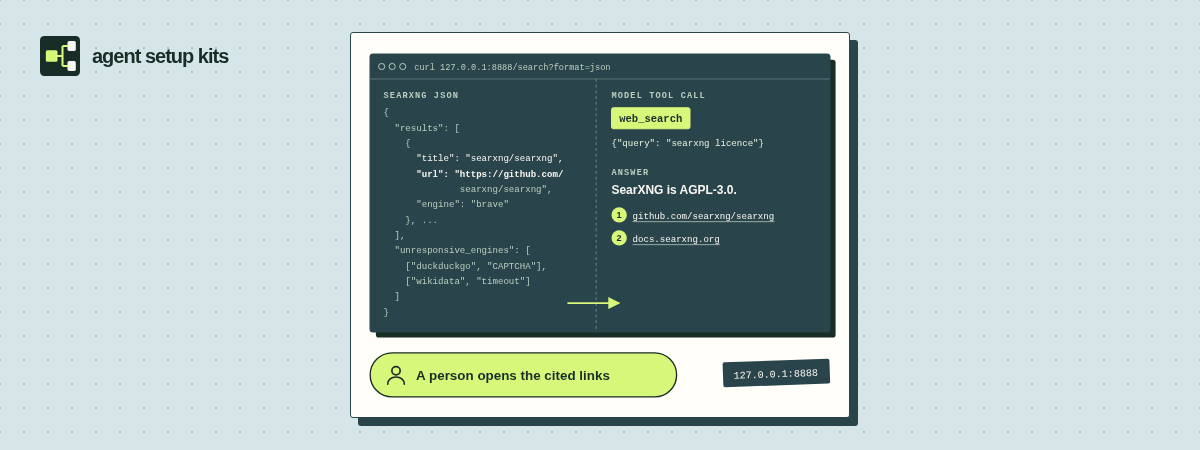
To give a local agent web search without a search API key, run your own SearXNG instance, add json to its allowed formats, and wrap the /search endpoint in a small web_search tool. The agent then queries your instance, and your instance queries the search engines for it.
We tested this on a Linux box without Docker: SearXNG from source, Ollama with a 1.5B Qwen model, and a short Python tool. The search side worked well. The model was the weak link, as our table shows.
What it is (checked on 2026-10-30)
SearXNG is a metasearch engine: it sends your query to many search engines and merges the results. It is released under the GNU Affero General Public License v3, so if you change the code and offer the service to others, you must share your changes. There are no numbered releases. We ran the master branch, which reported the version string 2026.10.30+1cd13d9.
The project documents a step by step install from source and a container install. We used the source route.
Based on SearXNG, by SearXNG and contributors.
The setup at a glance
- Trigger: the agent decides it needs current facts and calls web_search with a query.
- Permissions: network access to 127.0.0.1:8888 only. The tool can read search results. It cannot open pages, log in or post.
- Output: up to five results, each a title, a URL and a short snippet, passed back to the model.
- Human approval: a person reads the answer and opens the cited links before the answer is used anywhere. Search snippets can be stale, so this check is not optional.
Step 1: Run SearXNG from source
Clone the repository, create a Python virtual environment and install requirements.txt plus requirements-server.txt. Then write your own settings file that builds on the defaults:
use_default_settings: true
server:
  secret_key: "a-long-random-string"
  bind_address: "127.0.0.1"
  port: 8888
  limiter: false
search:
  formats:
    - html
    - json
Point SEARXNG_SETTINGS_PATH at that file and start the web app with python -m searx.webapp. The install guide says that "for a minimal setup you need to set server:secret_key", and the code backs that up: outside debug mode, the app logs an error and exits if the key is still the shipped value, "ultrasecretkey".
Step 2: Turn on the JSON format
The Search API page says: "Requesting an unset format will return a 403 Forbidden error. Be aware that many public instances have these formats disabled." That is why you want your own instance. The formats list lives under the search settings.
curl 'http://127.0.0.1:8888/search?q=searxng&format=json'The response has results, answers, suggestions, infoboxes and unresponsive_engines. That last field matters for agents: it tells you which engines failed for this query.
Step 3: Wrap it as a tool
Our tool calls /search with format=json and returns the first five results, each trimmed to the title, the URL and 200 characters of snippet. We served Ollama locally, imported a Qwen2.5 1.5B Instruct GGUF file from Hugging Face as described on the import page, and passed the tool in the tools field of /api/chat, as shown in the tool calling docs. Our loop allows four rounds of tool calls per question.
What our test showed
| Case | What happened |
|---|---|
| format=json enabled | HTTP 200 with 37 results for a test query, merged from brave and google cse |
| format=csv, not enabled | HTTP 403, as the docs say |
| engines=brave | 24 results, all from brave |
| categories=it | 61 results from github, stackoverflow, mdn, docker hub and gentoo |
| Default general search | DuckDuckGo returned a CAPTCHA and Wikidata timed out. Both were listed in unresponsive_engines, and results still came back from the others |
| Tool call round trip | About 3 seconds per search |
| Model with a soft prompt ("Answer using web_search") | Skipped the tool and answered from memory. It called SearXNG "GPL". The licence file says AGPL-3.0 |
| Model told to "Always call web_search first" | Called the tool once and got AGPL right |
| "Latest Docling version on PyPI?" | Called the tool, then answered 2.139.0. That came from a stale snippet. PyPI listed 2.145.0 that day |
Things to know
- Search snippets go stale. The last row of our table is the main lesson. The tool worked and the model repeated what it was given, but the snippet was out of date. For facts like versions and prices, add a second tool that opens the source page, or have the reviewer open it.
- Small models skip tools. With a weak prompt, our 1.5B model answered from memory and got the licence wrong. Say plainly that it must search first, and check the log for an actual tool call.
- Engines fail all the time. Read unresponsive_engines and log it. If every engine fails, the tool should return an error the model can see, not an empty list it can read as "no results".
- Keep it on localhost. We bound to 127.0.0.1 and left the limiter off. The limiter page says the limiter needs a Valkey database, and the server settings cover public_instance. Read both before you open the port to anyone else.
- Privacy has limits. Your instance hides you from the search engines behind it, but those engines still see queries from your server's IP address. Your agent's questions are also in your own logs.
- We did not test the container route. Our box had no Docker, so this guide covers the source install only.
Takeaway
SearXNG makes a good search tool for a local agent: one JSON endpoint, no search API key, and a clear list of engines that failed. Most of the risk sits with the model. It may skip the search, and when it does search, a stale snippet goes straight into the answer. Keep a person on the final check.
Next step: run SearXNG on localhost with json enabled, add a web_search tool that also returns unresponsive_engines, and have a reviewer open every cited link before an answer leaves the box.
Good setups, worth keeping. Request email updates on the home page, then confirm by email. No subscription starts until you confirm. Or find an agent for the job.