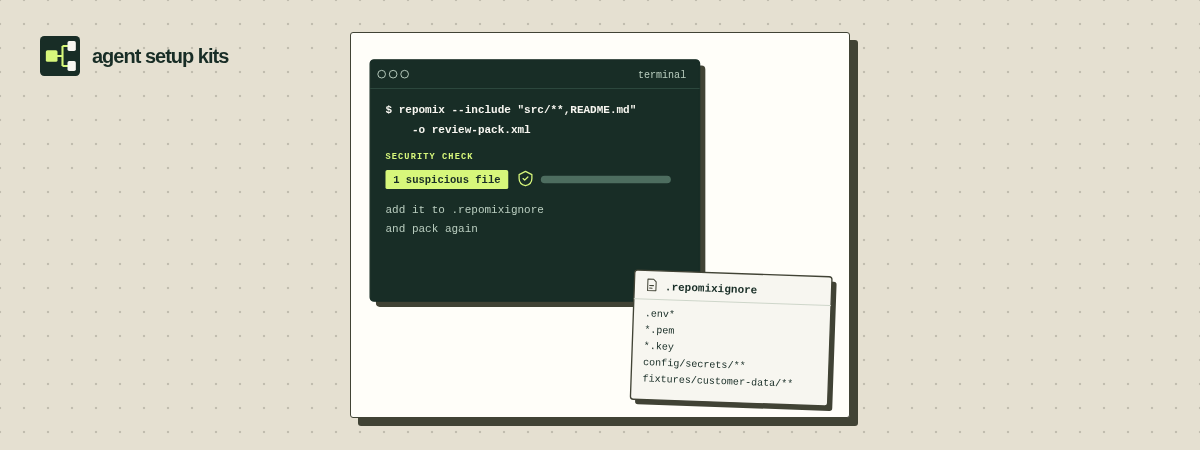
Repomix turns a repository into one AI-friendly file you can hand to a model for review. To do it safely, pack only the folders the review needs, add a .repomixignore for anything sensitive, keep the built-in security check on, and read the output before you share it.
The tool is quick: one command, one file. The care goes into what ends up in that file, because once you paste or upload it, it has left your machine.
Based on Repomix, by Kazuki Yamada and contributors, MIT licensed. We checked v1.18.1, released 21 September 2026. Options can change between releases, so check repomix --help on your version.
What Repomix does
Per its README, Repomix:
- packs your files into a single output,
repomix-output.xmlby default, with Markdown, JSON and plain text also available through--style - counts tokens per file and in total, so you can see whether the pack fits a model's context
- respects
.gitignore,.ignoreand.repomixignorefiles - runs Secretlint to "detect files matching known credential formats and leave them out of the output"
- can shrink code with
--compress, which uses Tree-sitter to keep key structures such as classes and functions
Step 1: Install or run it once
You can try it without installing:
npx repomix@latestOr install it with npm (npm install -g repomix), yarn, bun, or Homebrew (brew install repomix). Running repomix in a project folder writes repomix-output.xml to that folder.
Before you run it in a repo you didn't write, look for a repomix.config.* file. The README says a Repomix config "is code, not just data": a .ts or .js config runs when loaded, and input.processors runs external commands.
Step 2: Pack only what the review needs
A whole-repo pack is rarely what you want. Narrow it with include patterns:
repomix --include "src/**,README.md" -o review-pack.xml--include takes comma-separated glob patterns, and -i or --ignore adds patterns to leave out, for example -i "**/*.test.ts,docs/**". If you only need the shape of the code, --compress keeps signatures and structure, and --no-files produces metadata only.
To check size before you send anything, --token-count-tree shows the file tree with token counts. In scripts, --token-budget <number> exits with a non-zero code when the pack is over the limit; the README notes the output is still generated.
Step 3: Keep sensitive files out with ignore rules
Create a .repomixignore at the project root. It uses .gitignore syntax:
# .repomixignore
.env*
*.pem
*.key
config/secrets/**
fixtures/customer-data/**
The README lists the order of precedence, highest first: custom patterns from the config or --ignore, then ignore files (.repomixignore, .ignore, .gitignore, .git/info/exclude), then the built-in defaults such as node_modules and .git. Binary files are left out of the content by default, though their paths still appear in the directory tree.
Ignore rules are your main control. Think of anything that is in the repo but shouldn't leave it: local env files, keys, internal hostnames in config, test fixtures copied from production.
Step 4: Keep the security check on
The Secretlint check runs by default. After packing, Repomix prints a "Security Check" section listing any suspicious files and asks you to review them.
Two things to keep in mind:
- It looks for known credential formats. A password in a custom format, an internal URL or a customer's name won't match. Your ignore rules and your own read-through cover those.
- The README offers
--no-security-checkandsecurity.enableSecurityCheck: false, with a note that disabling it "may expose sensitive information". Leave it on for anything you plan to share.
If the check flags a file, decide whether it belongs in the pack at all, add it to .repomixignore if not, and pack again.
Step 5: Read the pack before you send it
This is the human approval step. Open the output file and skim it before it goes anywhere:
- Check the directory structure section at the top. Is every folder one you meant to include?
- Search the file for words like
key,token,password,secretand your company's internal domain names. - Confirm the token count suits the model you're using.
- Only then paste or upload it, using a tool your team has approved for this code.
Leave the output file out of version control. Add repomix-output.* (or your custom output name) to .gitignore, and delete the pack when the review is done.
Packing someone else's repository
Repomix can pack a remote repo with --remote user/repo, and --remote-branch pins a branch, tag or commit. By default, "a cloned repository's config is never loaded". Opting in with --remote-trust-config shows you the config and asks first on an interactive terminal, but the README notes that the prompt is skipped with --force and in non-interactive shells such as CI. Leave that option off unless you have read the config and trust the repository.
The takeaway
Repomix makes packing a repo for an AI review a single command. The safe version adds a few habits: include only what's needed, keep a .repomixignore, leave the Secretlint check on, read the output yourself, and keep packs out of git.
Next step
For reviews that run on every pull request instead of a one-off pack, see our Claude PR review kit. Read how we verify kits, or find an agent for the job.
Good setups, worth keeping. Request email updates on the home page, then confirm by email. No subscription starts until you confirm.