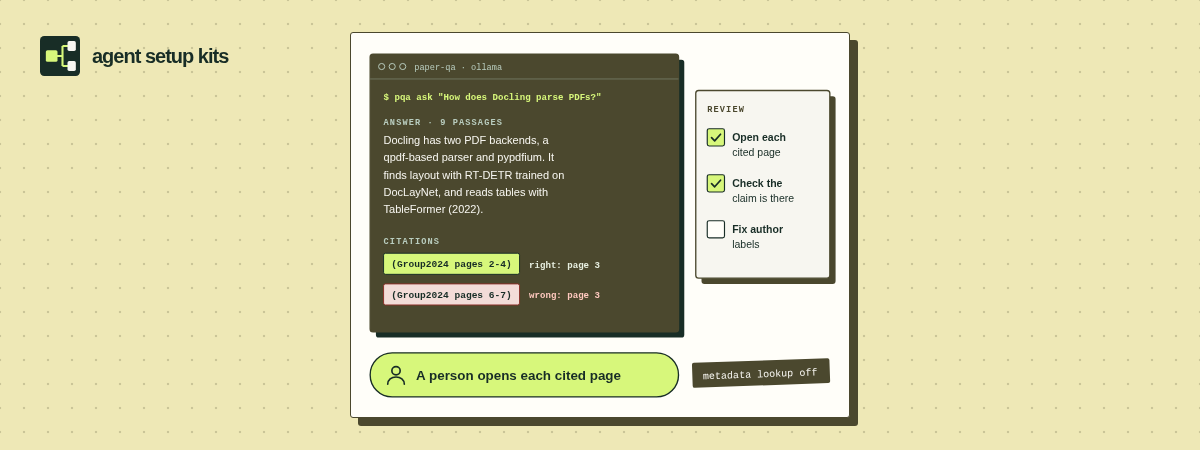
To get cited answers over your own PDFs with no cloud model, install paper-qa, point llm, summary_llm and embedding at Ollama, and also set agent_llm to your Ollama model. The README's Ollama example leaves agent_llm out, and in our test that made the run fail quietly.
We ran paper-qa 2026.8.12 on a CPU-only Linux box with a 3B Qwen model and nomic-embed-text in Ollama, over one PDF: the Docling technical report. With every model set locally, the answer was correct, but one of its two citations pointed at the wrong pages. It took about five and a half minutes.
The qwen2.5:3b weights are under the "Qwen RESEARCH LICENSE AGREEMENT", for non-commercial use only; check the model card before any commercial use.
What it is (checked on 2026-10-30)
PaperQA2 answers questions over a folder of papers. It indexes the PDFs, pulls the passages that match, summarises each one against the question, and writes an answer with citations. It is released under the Apache License 2.0, so you can use and change it, keeping the licence and notices. PyPI listed 2026.8.12, for Python 3.11 or newer. The team describes the method in a paper on arXiv.
Based on PaperQA2, by FutureHouse and contributors.
The setup at a glance
- Trigger: a person asks a question about the papers in one folder.
- Permissions: read access to that folder, plus local calls to Ollama. With metadata lookup on, it also calls public paper metadata services.
- Output: an answer with numbered citations to a document and page range.
- Human approval: a person opens each cited page and checks the claim before the answer goes into a report or a decision.
Step 1: Install and add your papers
Install with pip install paper-qa, then put your PDFs in one folder. We used the Docling technical report because its claims are easy to check by hand.
Step 2: Point every model at Ollama
The README's Ollama example sets llm, summary_llm and embedding to Ollama models, each with a model_list config pointing at localhost:11434. Copy that, then add an AgentSettings with agent_llm and agent_llm_config set the same way. We served qwen2.5:3b and nomic-embed-text from Ollama.
Why this matters: the agent is the part that decides which tool to call next. In the installed package, agent_llm defaults to an OpenAI GPT-4o model. The README's settings table lists openai/gpt-6-sol. Either way, it is not local unless you set it.
Step 3: Pin fhlmi for agent mode
paper-qa 2026.8.12 asks for fhlmi 0.45.0 or newer, so the installer picked fhlmi 1.10.1, the newest release. Agent mode then crashed at once: "'LiteLLMModel' object has no attribute 'get_router'". We checked the published wheels: 0.45.0 and 0.46.0 contain get_router, and 0.47.0 onward do not. Pinning fhlmi==0.46.0 fixed it. The fhlmi PyPI page lists the release dates.
What our test showed
| Case | What happened |
|---|---|
| Latest fhlmi, agent mode | Crashed in 2 seconds with the get_router error |
| Metadata lookup on (the default) | Failed after 52 seconds: Semantic Scholar returned 429 Too Many Requests |
| README example as written, no OpenAI key | Finished in 17 seconds with "I cannot answer this question due to having no papers." The log showed the real cause: OpenAI calls with no API key |
| All four models on Ollama, metadata lookup off | 327 seconds, 9 passages used, a correct answer |
| Answer, checked against the PDF | Right on both PDF backends (a qpdf-based parser and pypdfium), the RT-DETR layout model trained on DocLayNet, and TableFormer from 2022 |
| Citations | The backend claim cited pages 2 to 4, which is right (page 3). The model claims cited pages 6 to 7, but RT-DETR and the 2022 date appear only on page 3. The author label read "Group2024" instead of the real authors, because metadata lookup was off |
Things to know
- Check the page, not just the citation. Our answer was right, yet one citation sent the reader to the wrong pages. A reviewer who only skimmed pages 6 and 7 would not find the claim.
- Read the log, not just the answer. "No papers" was wrong. The papers were there. The agent model could not run. Treat that message as a setup error until you have checked.
- Metadata services have rate limits. The README says that for 100 or more papers you will likely want Crossref and Semantic Scholar API keys, set as CROSSREF_API_KEY and SEMANTIC_SCHOLAR_API_KEY. We turned lookup off with parsing.use_doc_details set to false, which costs you proper author names in citations.
- We also turned off multimodal parsing. Our text-only model could not use page images. If you leave it on, check which model it calls.
- Embeddings default to OpenAI too. The README says the default is text-embedding-3-small. Set embedding explicitly.
- CPU is slow but workable. About 5.5 minutes for one question over one paper. A GPU or a bigger machine would change that a lot.
Takeaway
PaperQA2 runs fully local and gave us a correct answer over a real paper, with one citation pointing at the wrong pages. Getting there took three changes the README example does not mention: set agent_llm, pin fhlmi for agent mode, and turn off metadata lookup or add keys. Keep a person checking the cited pages, and read the log whenever the answer says it found nothing.
Next step: set all four models to Ollama, pin fhlmi==0.46.0, run one question you already know the answer to, and check every cited page before you trust the setup with new questions.
Good setups, worth keeping. Request email updates on the home page, then confirm by email. No subscription starts until you confirm. Or find an agent for the job.