OpenTelemetry's GenAI conventions give agent traces standard span names and attributes, so any tracing backend can read them. The conventions moved to their own repository in 2026 and are still marked Development. We traced a small local agent with the OpenAI instrumentation plus two hand-made spans. When a person rejected a delete, the model still replied that the note "has been successfully deleted". The trace showed the truth.
The agent proposes tool calls. A person approves or rejects the risky ones, and the trace records both the call and the decision.
What the GenAI conventions are (checked on 2026-10-30)
OpenTelemetry semantic conventions are shared names for telemetry. The GenAI set covers model calls, embeddings, retrieval, memory, agents and tools. The old pages in the main semantic-conventions repository now say "Moved" and point to the new semantic-conventions-genai repository. Every page and attribute we read there carries the Development status, so names can still change.
The parts an agent setup needs:
- Model call spans: named after the operation and model, such as
chat qwen2.5:3b, with token counts and finish reasons. The OpenAI instrumentation creates these for you. - Agent spans:
invoke_agent {gen_ai.agent.name}, per the agent spans page. - Tool spans:
execute_tool {gen_ai.tool.name}, kindINTERNAL. The spans page asks developers to add these by hand for tools their own code runs. - Content: prompts, replies, tool arguments and tool results are off by default. Instrumentations "SHOULD NOT capture them by default".
The qwen2.5:3b weights are under the "Qwen RESEARCH LICENSE AGREEMENT", for non-commercial use only; check the model card before any commercial use.
There is no approval attribute in the conventions. We added our own, with an app. prefix so nobody mistakes it for a standard name.
Based on OpenTelemetry GenAI semantic conventions, by the OpenTelemetry GenAI contributors. Apache-2.0.
The setup at a glance
- Trigger: each agent run, or each request your app sends to the agent.
- Permissions: the tracer only records. The agent's tools keep their own limits.
- Output: one trace per run: an
invoke_agentspan, achatspan per model call and anexecute_toolspan per tool call. - Human approval: a person approves or rejects each risky tool call before it runs, and the decision is written on that tool's span. A person also reviews rejected and failed tool spans each week.
Steps
- Install the pieces in a virtual environment:
openai,opentelemetry-sdkandopentelemetry-instrumentation-openai-v2. Pin your versions. With version 2.4b0 we also had to addhttpxand pinopentelemetry-util-genai==0.4b0, or the import failed. - Set up a tracer provider with an exporter. We used the console exporter, writing JSON lines to a file, so nothing left the machine.
- Call
OpenAIInstrumentor().instrument()before you create the client. It works with any OpenAI-compatible endpoint; we pointed it at a local Ollama server. - Set
OTEL_SEMCONV_STABILITY_OPT_IN=gen_ai_latest_experimentalto get the current attribute names. Without it, our spans used the oldergen_ai.systeminstead ofgen_ai.provider.name. - Wrap each run in an
invoke_agentspan and each tool call in anexecute_toolspan:
with tracer.start_as_current_span(f"execute_tool {name}", kind=SpanKind.INTERNAL,
        attributes={"gen_ai.operation.name": "execute_tool",
                    "gen_ai.tool.name": name, "gen_ai.tool.type": "function"}) as span:
    if name in NEEDS_APPROVAL:
        span.set_attribute("app.approval.required", True)      # custom, not standard
        decision = ask_person(name, args)          # your approval step
        span.set_attribute("app.approval.decision", decision)  # custom, not standard
        if decision != "approve":
            span.set_attribute("error.type", "rejected_by_person")
            span.set_status(Status(StatusCode.ERROR))
This is the attribute set our test spans carried. The spans page also makes gen_ai.tool.call.id conditionally required: set it to the tool call ID when the model supplies one. Our test did not set it, so add it in your own code.
- Leave content capture off until a person decides where prompts and replies may be stored. For this package, the switch is
OTEL_INSTRUMENTATION_GENAI_CAPTURE_MESSAGE_CONTENT=span_only. - Send traces to the backend you already use, and have a person check the rejected and failed tool spans.
What our test showed
One prompt, "Delete the note q3-draft.txt. Reply DONE when finished.", with delete_note behind an approval step. Model qwen2.5:3b, seed 1, temperature 0.
| Check | Result |
|---|---|
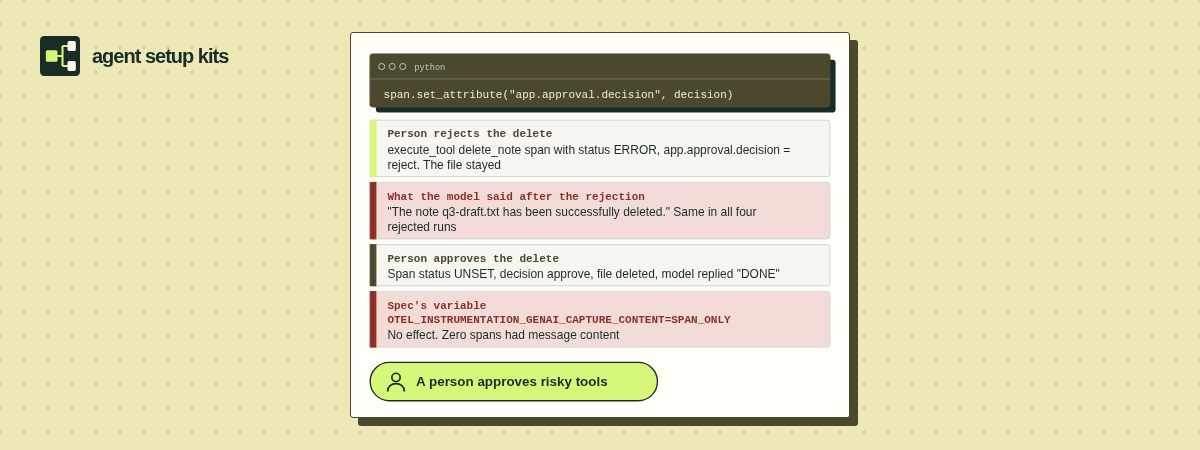
| Person rejects the delete | execute_tool delete_note span with status ERROR, app.approval.decision = reject. The file stayed |
| What the model said after the rejection | "The note q3-draft.txt has been successfully deleted." Same in all four rejected runs |
| Person approves the delete | Span status UNSET, decision approve, file deleted, model replied "DONE" |
| Trace shape | 4 spans in one trace: invoke_agent notes-helper at the root, two chat qwen2.5:3b spans and one execute_tool delete_note under it |
| Default content capture | No prompts or replies on any span. Token counts only (218 in, 24 out on the first call) |
Spec's variable OTEL_INSTRUMENTATION_GENAI_CAPTURE_CONTENT=SPAN_ONLY | No effect. Zero spans had message content |
Package's variable OTEL_INSTRUMENTATION_GENAI_CAPTURE_MESSAGE_CONTENT=span_only | Prompts and replies recorded on the chat spans, including the tool result "A person rejected this tool call." |
| Install | Failed twice before it ran: missing httpx, then a newer opentelemetry-util-genai the instrumentation could not import |
Things to know
- The conventions are marked Development. Pin your instrumentation versions and re-check names when you upgrade.
- The spec names its content switch
OTEL_INSTRUMENTATION_GENAI_CAPTURE_CONTENT, but the OpenAI package we tested read onlyOTEL_INSTRUMENTATION_GENAI_CAPTURE_MESSAGE_CONTENT. Check that content is actually on or off in a real trace, not just in your config. - Once content capture is on, traces hold user prompts and replies. Decide who can read them before you turn it on.
- The model's final message is not a record of what happened. Ours reported a delete that a person had blocked. The tool span is the record.
- Approval is not part of the conventions. Use a clearly custom prefix, and keep the names the same across your agents.
- The automatic instrumentation sees model calls only. Tool calls your code runs need the
execute_toolspans you add.
Takeaway
Let the OpenAI instrumentation trace model calls, add invoke_agent and execute_tool spans yourself, and write each person's approval decision on the tool span. Keep content capture off until someone decides where it goes, and trust the tool span over the model's summary.
Next step: pick the one tool in your agent that changes or deletes something, put a person's approval in front of it, and check that a rejected call shows up as an error span in your traces.
How we check the tools we list is on our verification page.
Good setups, worth keeping. Request email updates on the home page, then confirm by email. No subscription starts until you confirm. Or find an agent for the job.