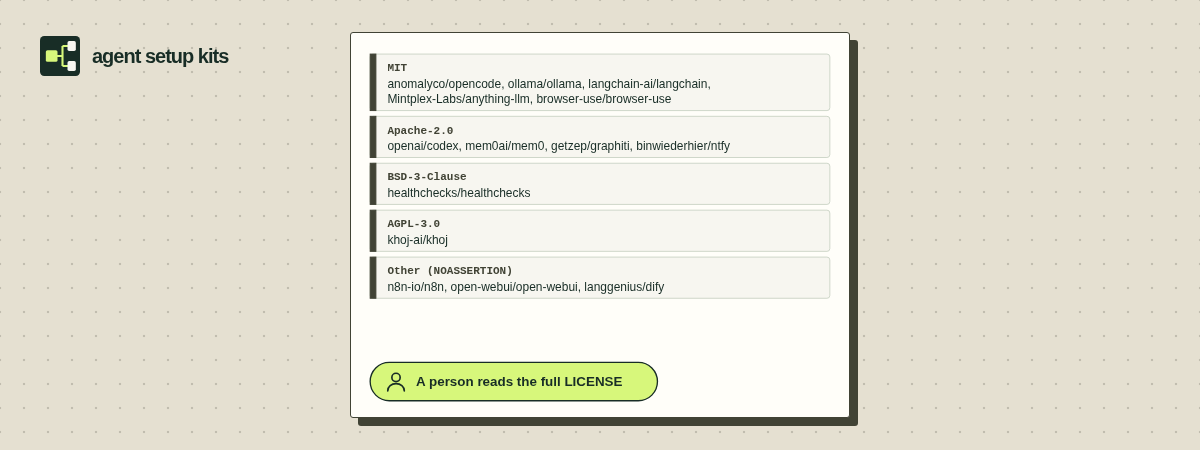
The license on an agent tool decides what you may do with it: run it for your team, change it, sell a service on it, or remove its name. We checked the licenses GitHub detects for 14 popular agent and agent-tool repos. Ten use a permissive license (MIT, Apache-2.0 or BSD-3-Clause), one uses AGPL-3.0, and three were marked "Other". Those three turned out to carry limits on commercial use, multi-tenant hosting or branding.
This is a plain-language guide, not legal advice. For anything you plan to sell or host for others, a person reads the actual license and, where needed, asks a lawyer.
The four kinds you will meet (checked on 2026-10-30)
- MIT: "A short and simple permissive license with conditions only requiring preservation of copyright and license notices" (choosealicense.com). Keep the notice: it "shall be included in all copies or substantial portions of the Software" (MIT text).
- Apache-2.0: permissive like MIT, and "Contributors provide an express grant of patent rights" (choosealicense.com). If you change files, "You must cause any modified files to carry prominent notices stating that You changed the files" (license text).
- AGPL-3.0: strong copyleft with a network clause. "When a modified version is used to provide a service over a network, the complete source code of the modified version must be made available" (choosealicense.com). Running it unmodified for your own team is not what triggers this clause; changing it and offering it to users over a network is.
- Source-available: you can read the code, but the license limits use. The Open Source Definition says a license "must not restrict anyone from making use of the program in a specific field of endeavor. For example, it may not restrict the program from being used in a business" (OSD). Licenses with such limits are not open source by that definition, even when the code is on GitHub.
Based on choosealicense.com, by GitHub and contributors, and the license texts linked above.
The setup at a glance
- Trigger: you are about to adopt, modify or host an agent tool.
- Permissions: the check reads public license data only.
- Output: one line per tool: detected license, what it asks of you, and anything unusual in the LICENSE file.
- Human approval: a person reads the full LICENSE for anything not plainly MIT, Apache-2.0 or BSD, and decides. For commercial hosting, that person brings in legal advice.
Steps
- Ask GitHub which license it detects:
curl -s https://api.github.com/repos/khoj-ai/khoj | jq '.license.spdx_id, .license.name'- If the answer is
NOASSERTION("Other"), GitHub could not match a standard license. Open the LICENSE file and read it all. - Read the README's license section too. A project can be dual licensed in a way the API does not show.
- Look up the identifier in the SPDX list and the plain-language summary on choosealicense.com.
- Write down what you plan to do: run it internally, modify it, host it for customers, rebrand it. Check each against the license.
- A person signs off before the tool goes into a setup others will use.
What our check showed
| License GitHub detected | Repos |
|---|---|
| MIT | anomalyco/opencode, ollama/ollama, langchain-ai/langchain, Mintplex-Labs/anything-llm, browser-use/browser-use |
| Apache-2.0 | openai/codex, mem0ai/mem0, getzep/graphiti, binwiederhier/ntfy |
| BSD-3-Clause | healthchecks/healthchecks |
| AGPL-3.0 | khoj-ai/khoj |
| Other (NOASSERTION) | n8n-io/n8n, open-webui/open-webui, langgenius/dify |
What the three "Other" files say:
- n8n, the Sustainable Use License: "You may use or modify the software only for your own internal business purposes or for non-commercial or personal use." Files with ".ee." in the name need a separate enterprise license.
- Open WebUI, the Open WebUI License: BSD-style terms plus a clause forbidding removal of the "Open WebUI" branding, unless total end users do not exceed "fifty (50) within any rolling thirty (30) day period", or you have permission or an enterprise license.
- Dify, a modified Apache-2.0: "you may not use the Dify source code to operate a multi-tenant environment" without written authorization, and when using its frontend you may not remove or modify "the LOGO or copyright information in the Dify console or applications".
One more catch: the API listed ntfy as Apache-2.0, but its README says it is "dual licensed under the Apache License 2.0 and the GPLv2 License". The API shows one license.
Things to know
- "On GitHub" does not mean open source. Three of our 14 had use limits.
- Permissive licenses still have conditions. Keep the copyright and license notices when you copy or ship the code.
- AGPL matters when you modify the tool and let others use it over a network. Plan for publishing your changes or pick another tool.
- Licenses change between versions. Record the version and license you checked.
- Models, datasets and prompts can carry their own licenses, separate from the code. Check them too.
Takeaway
Check the detected license, read the full file when it says "Other", and match it against what you plan to do. In our check, the permissive licenses were the common case, and the surprises were in the three files GitHub could not classify.
Next step: list the agent tools in your current setup, run the license check on each, and have a person read every file that is not plainly MIT, Apache-2.0 or BSD.
This article explains license terms in plain language and is not legal advice.
How we check the tools we list is on our verification page.
Good setups, worth keeping. Request email updates on the home page, then confirm by email. No subscription starts until you confirm. Or find an agent for the job.