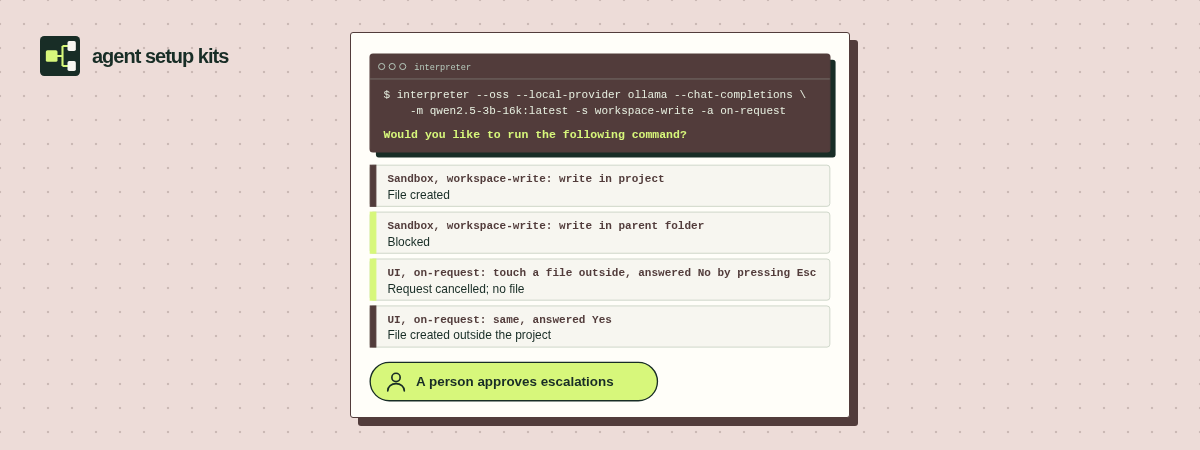
Open Interpreter is no longer the Python chat tool many guides describe: version 0.0.56 is a Rust coding agent forked from OpenAI's Codex CLI, and it runs against a local Ollama model with no account. In our test, its workspace-write sandbox blocked writes outside the project folder, and with -a on-request a command outside the sandbox ran only after we chose Yes.
The agent proposes commands. A person approves anything that leaves the sandbox.
What Open Interpreter is (checked on 2026-10-30)
The Open Interpreter repo now describes itself as a coding agent tuned for low-cost models. It is Apache-2.0 and keeps OpenAI's Codex copyright in its NOTICE file. The last commit we saw was on 2026-10-11, and the current release is rust-v0.0.56. The old open-interpreter package on PyPI (0.4.3, from October 2024) is the previous Python project, so older tutorials won't match.
It supports hosted providers and two local ones, Ollama and LM Studio, per its models docs. We used only Ollama.
Based on Open Interpreter, by the Open Interpreter team and contributors, built on Codex CLI by OpenAI.
The setup at a glance
- Trigger: you type a task in the
interpreterterminal UI, or pass one tointerpreter exec. - Permissions:
--sandbox workspace-writelets commands write only inside the project (plus temp space), with no network. - Output: shell commands and file edits in your project, plus a local session history.
- Human approval: with
-a on-request, anything that needs to leave the sandbox stops at "Would you like to run the following command?" until you pick Yes (y) or No (Esc).
Step 1: Install from the release, not a pipe
The docs suggest curl ... | sh. We read the script first. It downloads a package from GitHub Releases, so we downloaded that file directly and checked its SHA-256 against the digest on the release page:
curl -LO https://github.com/openinterpreter/openinterpreter/releases/download/rust-v0.0.56/open-interpreter-package-x86_64-unknown-linux-musl.tar.gz
sha256sum open-interpreter-package-x86_64-unknown-linux-musl.tar.gz
mkdir oi && tar xzf open-interpreter-package-*.tar.gz -C oi
./oi/bin/interpreter --version
Run it with a clean environment (env -i PATH=... HOME=...) if your shell holds provider keys you don't want it to pick up.
Step 2: Point it at Ollama with enough context
Agent prompts are large. Our first run failed with "request (8477 tokens) exceeds the available context size (8192 tokens)". A model copy with a bigger window fixed it:
printf 'FROM qwen2.5:3b\nPARAMETER num_ctx 16384\n' > Modelfile
ollama create qwen2.5-3b-16k -f Modelfile
interpreter --oss --local-provider ollama --chat-completions \
  -m qwen2.5-3b-16k:latest -s workspace-write -a on-request
The qwen2.5:3b weights are under the "Qwen RESEARCH LICENSE AGREEMENT", for non-commercial use only; check the model card before any commercial use.
Pass the full name with :latest. Without it, Open Interpreter asked Ollama to pull that name from the registry instead of using the local copy.
Step 3: Check the sandbox yourself
interpreter sandbox runs one command under the same policy, with no model involved. Use it before you trust a mode:
interpreter sandbox -c 'sandbox_mode="workspace-write"' -- touch inside.txt
interpreter sandbox -c 'sandbox_mode="workspace-write"' -- touch ../outside.txt
What our test showed
| Test | What happened |
|---|---|
| Sandbox, read-only: write in project | "Read-only file system"; blocked |
| Sandbox, workspace-write: write in project | File created |
| Sandbox, workspace-write: write in parent folder | Blocked |
Sandbox, workspace-write: write to .git/ | Blocked |
Sandbox, workspace-write: write to /tmp | Allowed |
Sandbox, both modes: curl a website | Failed to resolve; no network |
| UI, on-request: touch a file outside, answered No by pressing Esc | Request cancelled; no file |
| UI, on-request: same, answered Yes | File created outside the project |
-a untrusted (listed in the docs) | Rejected: only on-request and never are accepted |
exec asked to create a file, 3B model | Tool calls failed, exit code 0, no file |
The last row matters for scripts. A zero exit code meant the turn finished, not that the work happened. The docs say the same: check the files after exec returns.
Things to know
- In the approval prompt, No is bound to Esc, not a letter: "No, and tell Open Interpreter what to do differently (esc)". Our refusal test was that Esc cancel. We did not test typing
n. exectakes--sandboxbut not-a, despite the exec docs listing it. It ran with approval "never", so the sandbox is the only guard there./tmpis writable in workspace-write mode. When we repeated the sandbox check with the project inside/tmp, the write to its parent folder succeeded, so keep projects outside/tmp.--yoloand--dangerously-bypass-approvals-and-sandboxremove both guards. Use them only inside a throwaway machine.- The first UI run recorded our project as
trustedinconfig.tomlwithout asking. Check that file. - It keeps session history, logs and memories in SQLite files under its home folder. Don't paste secrets into prompts.
- A 3B model was clumsy with tools. Use a larger local model for real work.
Takeaway
Install the release package after checking its digest, run with -s workspace-write -a on-request, test the sandbox with interpreter sandbox, and read every escalation before you pick Yes.
Next step: run the two interpreter sandbox commands above in a scratch Git repo and confirm the outside write is blocked on your machine.
How we check the tools we list is on our verification page.
Good setups, worth keeping. Request email updates on the home page, then confirm by email. No subscription starts until you confirm. Or find an agent for the job.
Part of: Which setup should I use to add human approval to an agent?