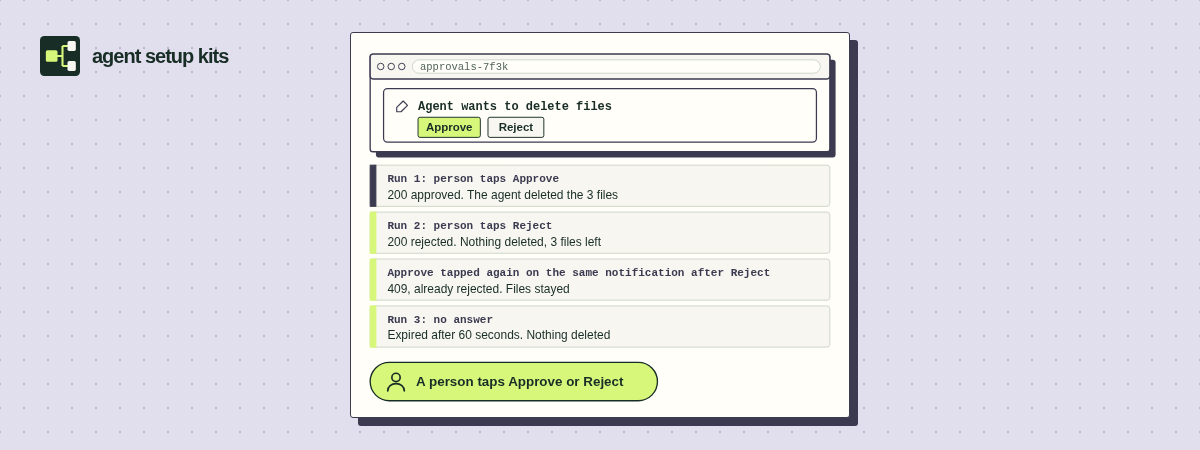
ntfy is an open-source push notification server: anything that can send an HTTP request can put a notification on your phone. Its action buttons can send an HTTP request back when tapped, which makes a simple approval step for an agent. We self-hosted version 2.35.0, locked it so only the agent can post and only the person can read, and had a small agent ask before deleting three files. Approve deleted them. Reject, no answer and a replayed tap all left them in place.
The agent asks. A person taps Approve or Reject, and the agent acts only on Approve.
What ntfy does (checked on 2026-10-30)
You publish a message to a topic with a plain HTTP POST, and every subscriber to that topic gets it, on the phone app, the web app or the command line. Messages can carry a title, a priority, tags and up to three action buttons. The http action "sends a HTTP request when the action button is tapped", POST by default (publish docs). That request is what turns a notification into an approval.
Two lines from the docs shape the setup. On the public server, "the topic is essentially a password", so anyone who guesses it can read or post. And on a self-hosted server, access is open until you change it: the default is read-write, and the docs say "If you are setting up a private instance, you'll want to set this to deny-all" (config docs).
Based on ntfy, by Philipp C. Heckel and contributors. Dual licensed under Apache-2.0 and GPLv2.
The setup at a glance
- Trigger: the agent reaches a step that needs a person, such as deleting files.
- Permissions: the agent can only post to one topic. The person can only read it. Nobody else can do either.
- Output: one notification per request with Approve and Reject buttons, and a log line for each decision.
- Human approval: a person taps Approve or Reject. Each button works once, the request expires after a set time, and no answer means nothing happens.
Steps
- Install the server. We downloaded the Linux release from the v2.35.0 release page (a 32.5 MB archive), checked it against the published checksums and ran the single binary. Other options are on the install page.
- Turn on access control and deny everything by default:
base-url: "https://ntfy.example.com"
listen-http: "127.0.0.1:18821"
cache-file: "/var/lib/ntfy/cache.db"
auth-file: "/var/lib/ntfy/auth.db"
auth-default-access: "deny-all"- Create one user for the agent and one for the person, then grant each one direction on one topic:
ntfy user add agent
ntfy user add nick
ntfy access agent approvals-7f3k write-only
ntfy access nick approvals-7f3k read-only- Give the person a small approval service. When the agent asks, it creates two one-time links, one for Approve and one for Reject, and starts a timer. A link works once. After 60 seconds in our test, the request expired and counted as no.
- Have the agent publish the request with two
httpbuttons pointing at those links:
{
  "topic": "approvals-7f3k",
  "title": "Agent wants to delete files",
  "message": "Could you please approve deleting the files invoices-2024-01.csv, invoices-2024-02.csv, and invoices-2024-03.csv?",
  "priority": 4,
  "tags": ["warning"],
  "actions": [
    {"action": "http", "label": "Approve", "url": "https://approve.example.com/decide/ID/APPROVE-TOKEN", "method": "POST", "clear": true},
    {"action": "http", "label": "Reject", "url": "https://approve.example.com/decide/ID/REJECT-TOKEN", "method": "POST", "clear": true}
  ]
}
The agent posts this to the server root with its own login, then waits on the approval service and acts only if the answer is approved.
- Subscribe to the topic on the person's phone with the person's login. The phone page covers the Android and iOS apps.
What our test showed
The agent made one call to a local model, qwen2.5:1.5b, to write the request. Its sentence is the message above.
| Check | Result |
|---|---|
| Anonymous post or read | 403 both ways |
| Person tries to post, agent tries to read | 403 both ways |
| Agent posts to a different topic | 403 |
| Run 1: person taps Approve | 200 approved. The agent deleted the 3 files |
| Run 2: person taps Reject | 200 rejected. Nothing deleted, 3 files left |
| Approve tapped again on the same notification after Reject | 409, already rejected. Files stayed |
| Run 3: no answer | Expired after 60 seconds. Nothing deleted |
| Approve tapped after it expired | 409, already expired. Files stayed |
The service also has a 410 "expired" answer for a tap that arrives after the timer runs out. Our late tap got 409 instead only because a status check had already marked the request expired, so the service treated it as already decided. | Made-up token | 404 |
We did not use a real phone. A script logged in as the person read the topic and sent each button's request exactly as written, which is what the app does on a tap. We also did not test HTTPS or the push services the apps use.
Things to know
- The approval link is inside the notification. Anyone who can read the topic can approve, so keep reads limited to the person, and make each link work once.
- Old notifications stay readable. After our runs, the person's login could still fetch all 5 earlier messages, links included. The message cache keeps them for 12 hours by default. One-time links are what made the replays fail.
- The phone sends the button's request, not the server. The approval service has to be reachable from the phone, ideally over HTTPS.
- Basic auth sends the password unencrypted. The docs say: "be sure to use HTTPS to avoid eavesdropping and exposing your password."
clear: trueonly removes the notification after the request succeeds. A failed tap leaves it on screen.- Make no answer mean no. Our agent waited, the request expired, and nothing was deleted.
Takeaway
A self-hosted ntfy server with deny-all access, one write-only agent user and one read-only person, plus one-time Approve and Reject links, gave our agent a working approval step. Approve was the only path that deleted anything.
Next step: pick the one action your agent should never take alone, and send it to a person's phone as an Approve or Reject notification before it runs.
How we check the tools we list is on our verification page.
Good setups, worth keeping. Request email updates on the home page, then confirm by email. No subscription starts until you confirm. Or find an agent for the job.
Part of: Which setup should I use to add human approval to an agent?