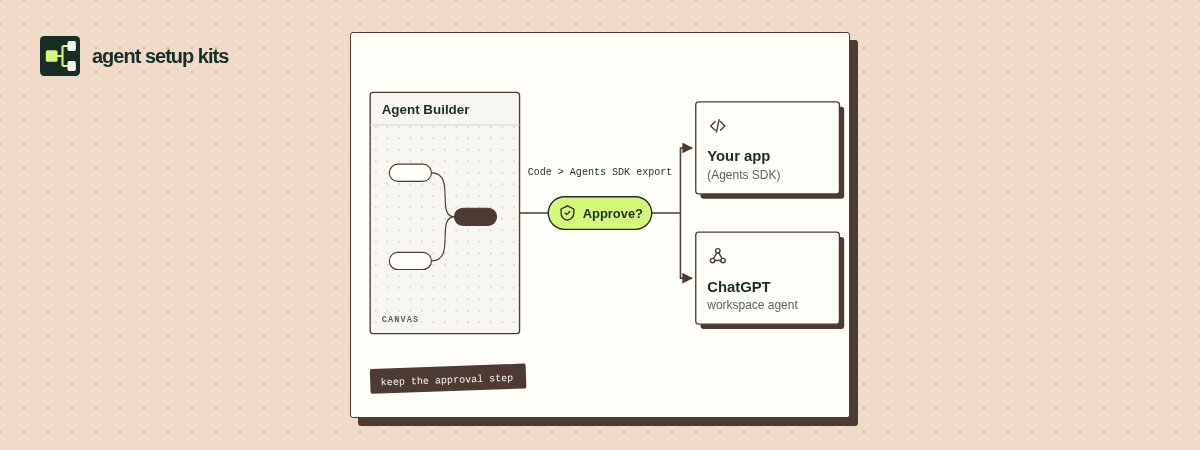
OpenAI is shutting down Agent Builder on November 30, 2026, so any workflow you built on that canvas needs a new home before then. The official path is to export the workflow as Agents SDK code, then either run that code in your own app or paste it into a ChatGPT workspace agent, and test it before you switch over.
This guide walks through the dates, the two migration paths, and the part that is easiest to lose in a move: the step where a person says yes before the agent acts.
What is changing, and when
OpenAI's deprecations page lists two dates for Agent Builder:
- June 3, 2026: deprecation announced.
- November 30, 2026: Agent Builder is scheduled to shut down.
The Agent Builder overview adds that existing users can keep using it during the transition window and that ChatKit remains available. We checked both pages on 2026-10-28. Dates like these can move, so open the deprecations page again on the day you plan your cutover.
If you also use the OpenAI Evals platform, note that the same deprecations page lists Evals going read-only on October 31, 2026 and shutting down on November 30, 2026. OpenAI points to a Promptfoo migration guide for that move.
Step 1: Export every workflow you care about
You can only export while Agent Builder is still up. OpenAI's migration guide gives four steps:
- Open the workflow in Agent Builder.
- Select Code in the top navigation.
- Select Agents SDK in the code dialog.
- Pick TypeScript or Python and copy the complete export.
Save each export in version control with the date and the workflow name. Do this even for workflows you are not sure you will keep. An export costs a few minutes now; rebuilding from memory after the shutdown costs much more.
Read the guide's warning before you trust the export: it "does not convert your workflow graph or guarantee that every behavior transfers unchanged." Treat the export as a strong first draft, not a finished port.
Step 2: Pick a destination
The migration guide offers two paths.
| Agents SDK (your code) | ChatGPT workspace agent | |
|---|---|---|
| Best for, per OpenAI | Building agents through code | Building agents through natural language and sharing with teams |
| What you need | An app to run it in, the SDK, your API key | A ChatGPT Business, Enterprise, or Edu workspace with workspace agents and permission to create agents |
| How you start | Paste the export into your app and install the matching SDK | Create a workspace agent and paste the export into the chat with OpenAI's suggested prompt |
| Known limits | You own runtime config, tools, auth, permissions, and deployment | Workflows with "strong determinism at their core" may not migrate faithfully |
A rough rule: if your workflow has strict branching (if/else, loops, typed data passed between steps), the Agents SDK keeps that logic in code you control. If it is mostly "read this, draft that, let the team use it," a workspace agent may be the lighter move. Either way, test with real inputs from the old workflow.
Step 3: Keep the human approval step
Agent Builder had a Human approval node. The node reference describes it as a way to "defer to end-users for approval," with the example of an email-sending workflow that asks "Would you like me to send this email?" before an MCP node reaches Gmail.
Check whether that gate survived the export. If you moved to the Agents SDK, here is where approval lives now, per the human-in-the-loop docs (Python SDK v0.24.0, checked 2026-10-28):
- Put
needs_approval=Trueon any function tool that changes something (sends, writes, deletes, pays). The run pauses and the pending call appears inresult.interruptions. - Your code converts the result to a
RunState, callsstate.approve(...)orstate.reject(...), then resumes the run. - Local MCP servers take
require_approval. Hosted MCP tools taketool_config={"require_approval": "always"}. - Leave
always_approveoff unless you mean it. The docs explain that a sticky approval can carry forward to later calls of the same tool.
If you moved to a workspace agent, the migration guide says connected apps, authentication, publishing, and permissions "require separate review in ChatGPT." Walk through each connected app and decide which actions should still need a person's yes.
Our OpenAI Agents SDK kit shows the approval pattern end to end: one read tool that runs freely and one write tool that waits for a person, with an offline check that spends no tokens.
Step 4: Rebuild guardrails and branches on purpose
Two more node types deserve a look:
- Guardrails. Agent Builder's guardrail node checked inputs for things like PII and jailbreaks and passed or failed. The Agents SDK has input, output, and tool guardrails. Map each old check to one of these and write a test that trips it.
- If/else and While. These used Common Expression Language in the canvas. In the export, confirm each branch still exists as code and that loops have a clear stop condition.
Step 5: Move any ChatKit embed off the hosted workflow
If your site embeds ChatKit pointed at an Agent Builder workflow ID, the ChatKit guide says you can keep that hosted workflow during the transition window. For migrating before the shutdown, it recommends the advanced integration, where ChatKit talks to your own server and your own Agents SDK code. That server runs on your infrastructure, so plan hosting and auth along with the code.
Step 6: Test, compare, then cut over
The migration guide's own checklist for workspace agents works for both paths:
- Review the generated instructions and capabilities.
- Configure apps, tools, skills, authentication, and connection permissions.
- Preview with representative inputs from the original workflow.
- Compare the new behavior with what the old workflow did.
- Create or deploy only after it matches.
Keep a short list of five to ten real inputs and the outputs you expect. Run them through the old workflow now, while you still can, and save the results. That list becomes your test set after Agent Builder is gone.
Migration checklist
- Export every workflow (Code, Agents SDK, TypeScript or Python) and commit it.
- Save sample inputs and outputs from the live workflow.
- Choose Agents SDK or workspace agent per workflow.
- Re-create each Human approval node as
needs_approvalorrequire_approval, or as a reviewed permission in ChatGPT. - Map guardrail nodes to SDK guardrails and test them.
- Move ChatKit embeds to your own server if they use a hosted workflow ID.
- Re-check the deprecations page before cutover.
Next step
Export one workflow today, then open our first-agent kit for the OpenAI Agents SDK to see where the approval gate goes in code. For more setups like this, find an agent for the job in the library.
Good setups, worth keeping. Request email updates on the home page, then confirm by email. No subscription starts until you confirm.