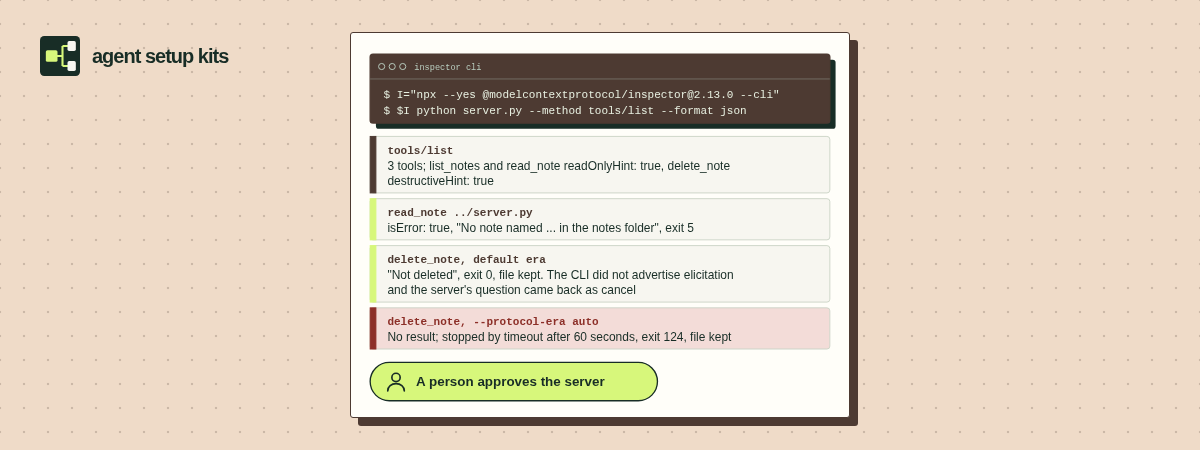
MCP Inspector is the MCP project's own tool for testing servers, and its CLI mode runs one command, prints JSON and exits with a code you can check. We pointed it at a small notes server: it showed each tool's read-only or destructive label, proved a path escape was refused, and confirmed the delete tool did not run without a person's answer. One catch: on the newest protocol the CLI waited on the delete's question, so wrap it in a timeout.
The CLI gathers the facts. A person reads them and approves the server before any agent gets it.
What MCP Inspector is (checked on 2026-10-30)
The MCP Inspector ships as one npm package with three clients: a web UI, a CLI and a terminal UI, per the Inspector docs. It needs Node 22.19.0 or newer and runs through npx. We tested version 2.13.0. The repo says the MCP project is moving its licence from MIT to Apache-2.0 for new contributions. It is free and needs no account for local servers.
Based on MCP Inspector, by the Model Context Protocol project and contributors.
The setup at a glance
- Trigger: you are about to add an MCP server to an agent's client.
- Permissions: the Inspector starts the server on your machine and calls only what you tell it to. Call write tools only on throwaway data.
- Output: JSON for each check, plus an exit code: 0 for success, 5 for a tool error, per the smoke-testing guide.
- Human approval: a person reads the tool list, labels and test results, then decides whether the server goes into the agent's config.
Step 1: Pin the version
npx --yes @modelcontextprotocol/inspector@2.13.0 --cli --helpThe smoke-testing guide says plain npx @modelcontextprotocol/inspector picks up the latest release each time, and that CI should pin an exact version.
Step 2: Connect and list the tools
I="npx --yes @modelcontextprotocol/inspector@2.13.0 --cli"
$I python server.py --method initialize --format json
$I python server.py --method tools/list --format json
$I python server.py --method tools/list --strict
initialize is a connect-only probe. tools/list returns each tool with its annotations, such as readOnlyHint and destructiveHint. --strict reports tool-schema portability problems and exits 6 on a serious one, per the CLI README.
Step 3: Test the calls you depend on
$I python server.py --method tools/call --tool-name read_note --tool-arg name=offsite.txt --format json
$I python server.py --method tools/call --tool-name read_note --tool-arg name=../server.py --format json
echo $?
Try one call that should work and one that should be refused. A tool that returns an error exits 5, so a script can stop on it.
Step 4: Check the destructive tool on throwaway data
timeout 60 $I python server.py --method tools/call --tool-name delete_note --tool-arg name=q3-draft.txt --format json
ls notes
Check the folder afterwards, not only the exit code. The CLI cannot answer a server's question, so a well-built delete tool should refuse to run here. The CLI docs point to the web client or the mcpdo connection client for flows that need elicitation. The protocol eras page says the web client pauses each such round for you to answer. We did not test the web client.
What our test showed
| Check | Result |
|---|---|
initialize, default | Protocol 2025-11-25. --protocol-era auto or modern gave 2026-07-28 |
tools/list | 3 tools; list_notes and read_note readOnlyHint: true, delete_note destructiveHint: true |
tools/list --strict | Exit 0, no portability problems |
read_note offsite.txt | Returned the note, exit 0 |
read_note ../server.py | isError: true, "No note named ... in the notes folder", exit 5 |
delete_note, default era | "Not deleted", exit 0, file kept. The CLI did not advertise elicitation and the server's question came back as cancel |
delete_note, --protocol-era auto | No result; stopped by timeout after 60 seconds, exit 124, file kept |
| Install size | 120 packages, 111 MB in node_modules |
The default-era delete exited 0 even though nothing was deleted. Exit codes say whether a call failed, not whether it did what you wanted, so check the result text and the data too.
Things to know
- The CLI defaults to the older protocol for a server you name on the command line. The protocol eras page says this is deliberate. Test with
--protocol-era autoas well if your agent's client uses the newer one. - Annotations in the list are the server's own claims. Step 3 is how you check them.
- On a machine with no keychain, the Inspector docs say it saves OAuth tokens and stdio
env:values to~/.mcp-inspector/secrets.json, unencrypted unless you supply a key. Read the security page before you test a server with real credentials. - Run every write tool against copies, never real data.
Takeaway
Run the Inspector CLI over a server before an agent sees it: list the tools, test the calls that matter, check the data afterwards, and let a person approve the result.
Next step: pick one MCP server you use and run Steps 2 and 3 against it, saving the JSON so a person can review it.
How we check the tools we list is on our verification page.
Good setups, worth keeping. Request email updates on the home page, then confirm by email. No subscription starts until you confirm. Or find an agent for the job.