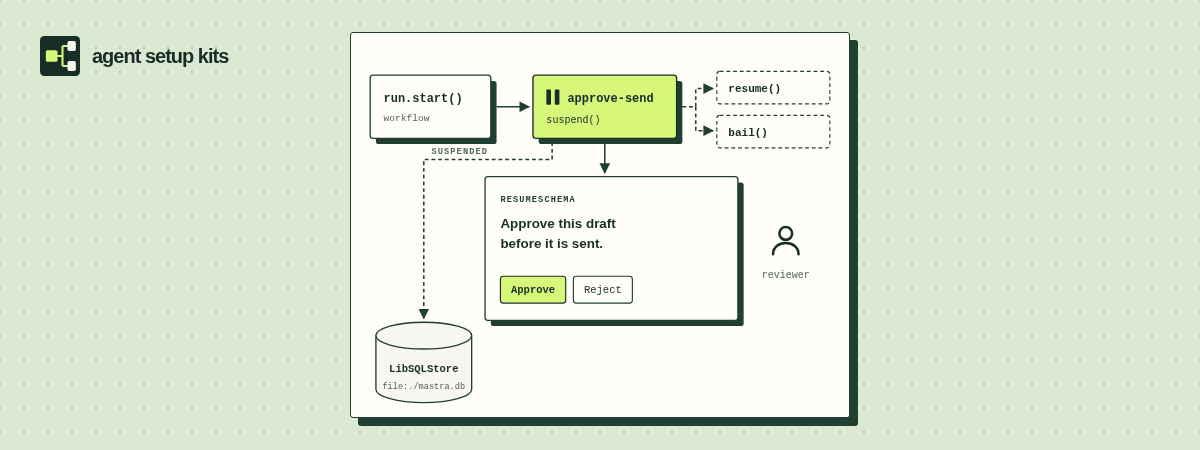
In Mastra, a workflow step can call suspend() to stop and wait for a person, then continue when your app calls resume() with their answer. With storage configured, the paused run is saved, so the approval can come minutes or days later from a different process.
The workflow drafts. A named person approves or rejects. Only then does the step act.
What Mastra is (checked on 1.80.0)
Mastra is a TypeScript framework for agents and workflows. We tested @mastra/core 1.80.0, published on 2026-10-28, with @mastra/libsql 1.27.1 for storage.
On licensing: the licence file says code under any ee/ directory has a separate enterprise licence. Everything else is Apache-2.0. The workflow APIs used here are not in ee/ paths.
Based on Mastra, by Kepler Software, Inc. and contributors.
Step 1: Install, pinned, on Node 22
npm install @mastra/core@1.80.0 @mastra/libsql@1.27.1 zod@mastra/core 1.80.0 declares node >=22.13.0. On Node 20, npm only printed an engine warning, so check node -v yourself. We ran everything below on Node 22.23.4.
Step 2: Write the approval step
The human-in-the-loop docs describe the pattern. A step declares what it sends out when it pauses (suspendSchema) and what it needs to continue (resumeSchema). This is the step we tested:
import { createWorkflow, createStep } from '@mastra/core/workflows'
import { Mastra } from '@mastra/core'
import { LibSQLStore } from '@mastra/libsql'
import { z } from 'zod'

const approval = createStep({
  id: 'approve-send',
  inputSchema: z.object({ to: z.string(), draft: z.string() }),
  outputSchema: z.object({ result: z.string() }),
  suspendSchema: z.object({ reason: z.string(), draft: z.string() }),
  resumeSchema: z.object({ approved: z.boolean(), reviewer: z.string() }),
  execute: async ({ inputData, resumeData, suspend, bail }) => {
    if (resumeData?.approved === false) {
      return bail({ result: `Rejected by ${resumeData.reviewer}` })
    }
    if (!resumeData?.approved) {
      return await suspend({
        reason: 'Approve this draft before it is sent.',
        draft: inputData.draft,
      })
    }
    // Only reached after a person approves. Do the real action here.
    return { result: `Approved by ${resumeData.reviewer}` }
  },
})

const sendUpdate = createWorkflow({
  id: 'send-update',
  inputSchema: z.object({ to: z.string(), draft: z.string() }),
  outputSchema: z.object({ result: z.string() }),
}).then(approval).commit()

export const mastra = new Mastra({
  workflows: { sendUpdate },
  storage: new LibSQLStore({ id: 'store', url: 'file:./mastra.db' }),
})
Three choices matter here:
- The reviewer's name is part of
resumeSchema. That way the result records who approved. - Rejection uses
bail(). The docs saybail()ends the run with asuccessstatus and skips the rest of the step, so a "no" isn't treated as an error. - The real action comes after the approval check. Nothing above that line has side effects.
Step 3: Start, pause, and show the draft
const wf = mastra.getWorkflow('sendUpdate')
const run = await wf.createRun()
const r = await run.start({ inputData: { to: 'team@example.com', draft: 'Weekly update' } })

if (r.status === 'suspended') {
  const [stepPath] = r.suspended
  console.log(run.runId, r.steps[stepPath[0]].suspendPayload)
}
In our test, the run came back as suspended, with suspended set to [["approve-send"]] and the payload holding the reason and the draft. Store the runId alongside the draft you show the reviewer.
Step 4: Resume later, from another process
The suspend and resume docs say suspension saves a snapshot to your configured storage, which persists across restarts. We tested this by exiting the process after the start and resuming in a new one:
const state = await wf.getWorkflowRunById(runId)   // status: 'suspended'
const run = await wf.createRun({ runId })
const r = await run.resume({
  step: 'approve-send',
  resumeData: { approved: true, reviewer: 'nick' },
})
What we saw on 1.80.0:
- Approving returned
successwith the approved result. - Rejecting returned
successwith the "Rejected by" result, throughbail(). - Trying to resume a run that had already finished threw
MastraError: This workflow run was not suspended. A second click on an old approval link can't run the step twice, but your app should catch that error and show a clear message.
Your app also has to check that the person sending resumeData is allowed to approve. Mastra takes whatever reviewer name you pass it.
Running a review routine
- Check for suspended runs regularly so none sit waiting forever.
- Show the reviewer the exact payload, not a summary.
- Log the reviewer and the decision from the run result.
- Back up the storage database like any other app data.
Takeaway
suspend() is the approval gate, resume() carries the person's answer, bail() handles a "no", and storage keeps the paused run safe until someone decides. Pin 1.80.0, run Node 22, and keep every side effect after the approval check.
Next step: add one approval step to a workflow that sends or changes something, then start a run, stop the process and approve it from a fresh one.
How we check the tools we list is on our verification page.
Good setups, worth keeping. Request email updates on the home page, then confirm by email. No subscription starts until you confirm. Or find an agent for the job.
Part of: Which setup should I use to add human approval to an agent?