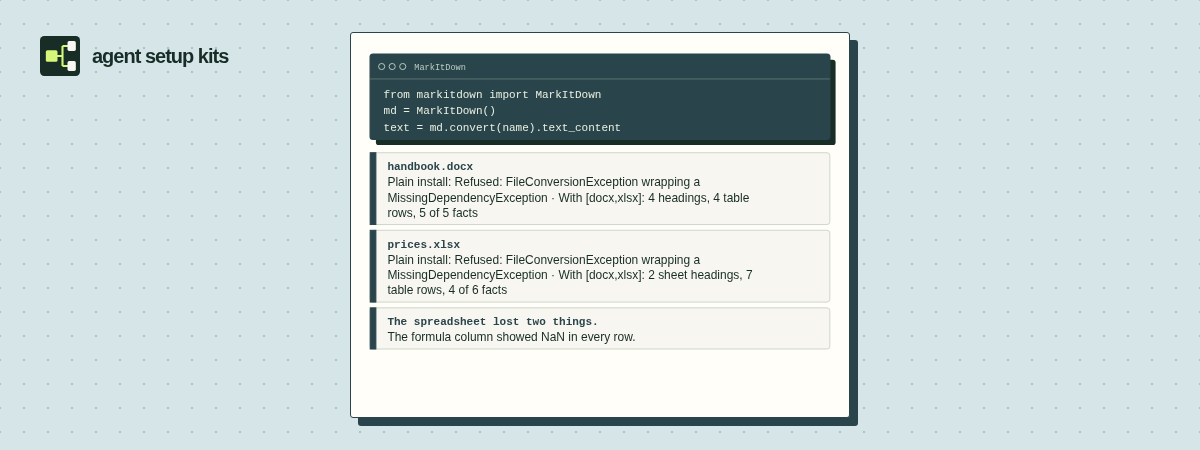
We wrote the same small supplier handbook as an HTML page, a Word file and a spreadsheet, then converted each to Markdown with MarkItDown 0.1.9. A plain install with no extras converted the HTML with every heading, table row and planted fact, and refused the DOCX and XLSX with a clear error. With the docx and xlsx extras, all three converted. The Word file kept all 4 headings and 5 facts; the spreadsheet lost its formula results and showed 18.40 as 18.4.
The human step: a person decides which files an agent may convert, and reads the Markdown next to the original before it goes into an index. In our test a script wrote the files, converted them and counted what survived; nothing was indexed.
Based on MarkItDown, by Microsoft and the MarkItDown contributors, under the MIT licence, checked with version 0.1.9 (PyPI). Checked 2026-10-31.
What MarkItDown is
MarkItDown is a Python library and command line tool that turns files into Markdown for language models. The README at v0.1.9 says it focuses on "preserving important document structure and content as Markdown (including: headings, lists, tables, links, etc.)", and that its output "may not be the best option for high-fidelity document conversions for human consumption."
The same README lists optional dependencies per format: [docx] "Installs dependencies for Word files" and [xlsx] "Installs dependencies for Excel files". Its own install line uses [all]. We tested what a plain pip install markitdown gives you, and what the two extras add.
The test files
One script wrote the content three ways:
- handbook.html: an H1, three H2 sections, a bullet list, a three-row price table with a header row, a bold word and a link.
- handbook.docx: the same headings, list, table and bold word, written with python-docx. No link.
- prices.xlsx: a "Prices" sheet with a merged title cell, the same three rows and a fourth column of formulas (
=C3*2and so on), plus a "Contacts" sheet with one name, role and phone number. Written with openpyxl.
We planted facts we could search for: "2,400 euros", "Tuesday to Thursday", the bay code "4471", the price "18.40", "14 days" and the link for the HTML; the title, "Tent pegs", "18.40", the formula result "36.8", "Ana Ruiz" and the phone number for the spreadsheet.
The converter script
We ran this once with the plain install and once with markitdown[docx,xlsx]==0.1.9, each in its own virtual environment:
# Converts each test file with MarkItDown and counts what survived.
import importlib.metadata as m, os, sys
from markitdown import MarkItDown

label = sys.argv[1]
os.makedirs(f"out_{label}", exist_ok=True)
FACTS = {
    "handbook.html": ["2,400 euros", "Tuesday to Thursday", "4471", "18.40", "14 days", "https://example.com/returns"],
    "handbook.docx": ["2,400 euros", "Tuesday to Thursday", "4471", "18.40", "14 days"],
    "prices.xlsx": ["Price list 2027", "Tent pegs", "18.40", "36.8", "Ana Ruiz", "+351 210 000 147"],
}
print(f"[{label}] markitdown {m.version('markitdown')}")
md = MarkItDown()
for name, facts in FACTS.items():
    try:
        text = md.convert(name).text_content
    except Exception as e:
        print(f"  {name}: FAILED {type(e).__name__}:")
        for line in str(e).strip().splitlines():
            if line.strip():
                print("     ", line.strip()[:300])
        continue
    open(f"out_{label}/{name}.md", "w").write(text)
    lines = text.splitlines()
    heads = [l for l in lines if l.startswith("#")]
    rows = [l for l in lines if l.startswith("|") and not set(l) <= set("|-: ")]
    found = [f for f in facts if f in text]
    print(f"  {name}: headings {len(heads)}, table rows {len(rows)}, facts {len(found)} of {len(facts)}"
          f", missing {[f for f in facts if f not in text]}")
"Table rows" counts Markdown table lines, leaving out the | --- | separator lines and empty rows.
What our test showed
| File | Plain install | With [docx,xlsx] |
|---|---|---|
| handbook.html | 4 headings, 4 table rows, 6 of 6 facts | Same |
| handbook.docx | Refused: FileConversionException wrapping a MissingDependencyException | 4 headings, 4 table rows, 5 of 5 facts |
| prices.xlsx | Refused: FileConversionException wrapping a MissingDependencyException | 2 sheet headings, 7 table rows, 4 of 6 facts |
Two runs gave the same counts and the same Markdown. The whole script, which also wrote the files, took 1.2 seconds of wall time in the second run.
The plain install refuses, and says why. Each refusal was a FileConversionException wrapping a MissingDependencyException. The DOCX one read, in part: "DocxConverter recognized the input as a potential .docx file, but the dependencies needed to read .docx files have not been installed. To resolve this error, include the optional dependency [docx] or [all] when installing MarkItDown." The XLSX error was the same with xlsx. It did not return empty text.
HTML came through whole. Headings became # and ##, the list became * items, the table kept its header row, and the link survived.
The Word table lost its header. The DOCX Markdown had every heading and fact, but the table started with an empty header row, | | | |, and "Item | Unit | Price" became the first data row. The DOCX converter turns the file into HTML with mammoth first; our python-docx table did not mark a header row, which appears to be why.
The spreadsheet lost two things. Each sheet became a ## heading and a table, so "Ana Ruiz" and the phone number survived. But:
- The merged title "Price list 2027" became the first column header, followed by "Unnamed: 1", "Unnamed: 2" and "Unnamed: 3".
- Prices stored as numbers with a 0.00 format came out as 18.4, 12.9 and 31.
- The formula column showed NaN in every row.
The XLSX converter reads sheets with pd.read_excel(..., engine="openpyxl"). Our file stored the formulas with an empty value, <c r="D3"><f>C3*2</f><v></v></c>, because openpyxl wrote it and nothing calculated it. So the NaN appears to come from our file having no stored result, not from MarkItDown dropping one. We did not test a file saved by Excel.
MarkItDown and Docling
Our earlier Docling article tested a 9-page PDF, not these files, so this is not a head-to-head. Docling took 46.2 seconds with OCR on and 8.2 seconds with it off, and recovered text from an image-only page only with OCR. MarkItDown did these three small text-based files in about a second, with no models to download, but our test gave it nothing to OCR. If your files are scans or complex PDFs, test Docling; if they are HTML and Office files with a text layer, MarkItDown with the right extras is the lighter start.
What this test does not show
- PDF, PPTX, images or audio. We tried three formats only.
- Real-world files. Ours were small and clean. Nested tables, tracked changes, comments and charts were not tested.
- Files saved by Excel or Word. Ours came from python-docx and openpyxl.
- Untrusted input. The README warns that MarkItDown "performs I/O with the privileges of the current process" and says to sanitise inputs. We converted only our own files.
- The plugin and LLM features. We used the default converters only, with no model.
What to set up
- Install the extras you need, such as
markitdown[docx,xlsx], and check that each format converts before you build on it. A plain install read only the HTML in our test. - Catch the conversion error and log the file name, so a refused file does not drop out of your index unnoticed.
- Compare one converted file of each type with the original: table headers, numbers and formula cells.
- Store results in spreadsheets before converting, or export them to values, if formulas matter.
- Convert only files you chose, with the narrowest call the README suggests, such as
convert_local().
Takeaway
MarkItDown converted our HTML, Word and Excel test files to clean Markdown in about a second, but only after we added the docx and xlsx extras; the plain install read just the HTML and said so. The Word file kept every heading and fact, with its table header pushed down a row. The spreadsheet kept its text but lost the 0.00 number format and showed NaN where our file had no stored formula results.
Next step: convert one real file of each type you plan to feed an agent, and compare the numbers in the Markdown with the original.
How we check the tools we list is on our verification page.
Good setups, worth keeping. Request email updates on the home page, then confirm by email. No subscription starts until you confirm. Or find an agent for the job.