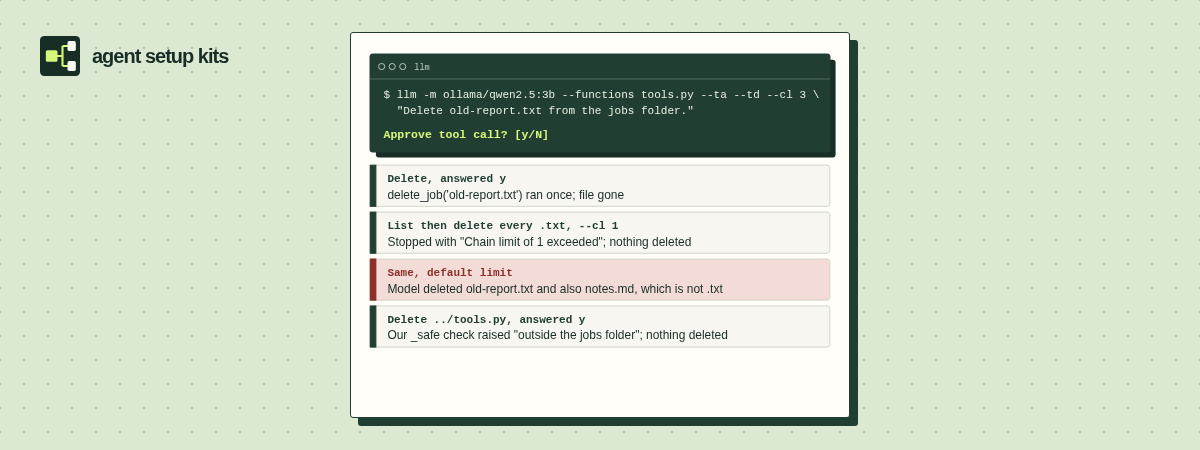
The llm command-line tool lets a model call Python functions you write, and version 0.36 has two flags that keep those calls in check: --ta asks you to approve every tool call, and --cl caps how many tool calls can chain. In our test with a local 3B model, a delete only happened after our script answered "y" at the prompt, and a path outside the allowed folder was refused by the tool's own code. One warning: asked to delete every .txt file, with the default chain limit and every call approved, the model also deleted notes.md, which is not a .txt file.
The model asks. You approve each call that changes something; in our test a script typed the answers.
What llm is (checked on 2026-10-30)
LLM is a command-line tool and Python library for talking to language models. Version 0.36 went up on PyPI on 2026-09-22. It's Apache-2.0. The llm-ollama plugin (0.19.1, Apache-2.0, by Sergey Alexandrov) adds models running in Ollama.
Tools are Python functions. The tools docs carry a plain warning: be careful which tools you enable when the model might see untrusted content such as web pages or email, and watch for the "lethal trifecta" of private data, malicious instructions and a way to send data out.
Based on LLM, by Simon Willison and contributors.
The setup at a glance
- Trigger: you run one
llmcommand with a prompt. - Permissions: only the functions you pass with
--functions, limited in code to one folder. - Output: the model's answer, plus each tool call and result shown with
--td. - Human approval:
--tastops before every tool call and waits for you to type y.
Step 1: Install, pinned
ollama pull qwen2.5:3b
python -m venv .venv && source .venv/bin/activate
pip install llm==0.36 llm-ollama==0.19.1
llm models list | grep qwen
The qwen2.5:3b weights are under the "Qwen RESEARCH LICENSE AGREEMENT", for non-commercial use only; check the model card before any commercial use.
Run it with a clean environment if your shell holds provider keys you don't want it to see. LLM can read keys such as an OpenAI key from the environment.
Step 2: Write tools that limit themselves
Put the limit in the function, not in the prompt. This tools.py can only touch files inside jobs/:
import pathlib as _pathlib
_ROOT = _pathlib.Path("jobs").resolve()

def _safe(name: str):
    p = (_ROOT / name).resolve()
    if _ROOT not in p.parents:
        raise ValueError("outside the jobs folder")
    return p

def list_jobs() -> str:
    "List the files in the jobs folder with their sizes in bytes."
    return "\n".join(f"{p.name} {p.stat().st_size}" for p in sorted(_ROOT.iterdir()))

def delete_job(name: str) -> str:
    "Delete one file from the jobs folder by name."
    _safe(name).unlink()
    return f"deleted {name}"
The docstring becomes the tool description the model sees. Note the underscores: llm offers the model every callable in the file whose name doesn't start with _, including imports. Our first version used from pathlib import Path, and llm tools list --functions tools.py showed Path as a tool. Import modules under an underscore name, then check with that command before you run anything.
Step 3: Run with approval and a chain limit
llm -m ollama/qwen2.5:3b --functions tools.py --ta --td --cl 3 \
  "Delete old-report.txt from the jobs folder."
--td shows each tool call and result. --ta asks "Approve tool call? [y/N]" before each one. --cl sets how many chained tool responses are allowed; the default is 5 and 0 means unlimited.
One catch: the approval prompt needs a real terminal. When we piped "y" in through stdin, llm printed Error: and ran nothing, which fails safe. Our test answered the prompt through a pseudo-terminal from a short Python script instead.
What our test showed
Every row comes from our 2026-10-31 rerun with the same scripts; the raw output of the first run on 2026-10-30 was not saved.
| Test | What happened |
|---|---|
List the folder, --td | One list_jobs call, correct file list and sizes |
| Delete, answered n | Nothing deleted; the model replied "It seems like the operation was cancelled." |
| Delete, answered y | delete_job('old-report.txt') ran once; file gone |
List then delete every .txt, --cl 1 | Stopped with "Chain limit of 1 exceeded"; nothing deleted |
| Same, default limit | Model deleted old-report.txt and also notes.md, which is not .txt; the script approved every call |
llm tools list on our first draft (rebuilt with from pathlib import Path) | Path (an import) listed as a tool next to ours |
Delete ../tools.py, answered y | Our _safe check raised "outside the jobs folder"; nothing deleted |
The default-limit row is a warning. The model called notes.md a .txt file and deleted it, and our script approved that call like every other. Approval only protects you if you read each call before you type y, and a tool that should only remove .txt files should check the extension itself. The last row shows why approval alone isn't enough. Our script approved a bad request on purpose, and only the check in code stopped it.
Things to know
- Logging is on by default. Every prompt, response and tool result goes into a local SQLite file;
llm logs pathshows where. Use-nto skip one prompt orllm logs offto stop. Don't put secrets in tool output. - If a tool needs an API secret, the docs recommend storing it with
llm keys setand reading it withllm.get_key(), so the secret isn't logged with the tool call. llm tools listalso shows plugin tools. llm-ollama 0.19.1 addsollama_web_searchandollama_web_fetch; they're only used if you pass them with-T.- Small local models make clumsy tool calls. Keep each tool narrow and give it a clear error.
Takeaway
Pin llm 0.36, put the limits inside each function, run with --ta and a low --cl, and read every tool call before you type y. In our rerun, approving every call without reading it let the model delete notes.md, a file the request never covered.
Next step: write one read-only tool for a folder you care about and run it with --td to watch what the model asks for.
How we check the tools we list is on our verification page.
Good setups, worth keeping. Request email updates on the home page, then confirm by email. No subscription starts until you confirm. Or find an agent for the job.