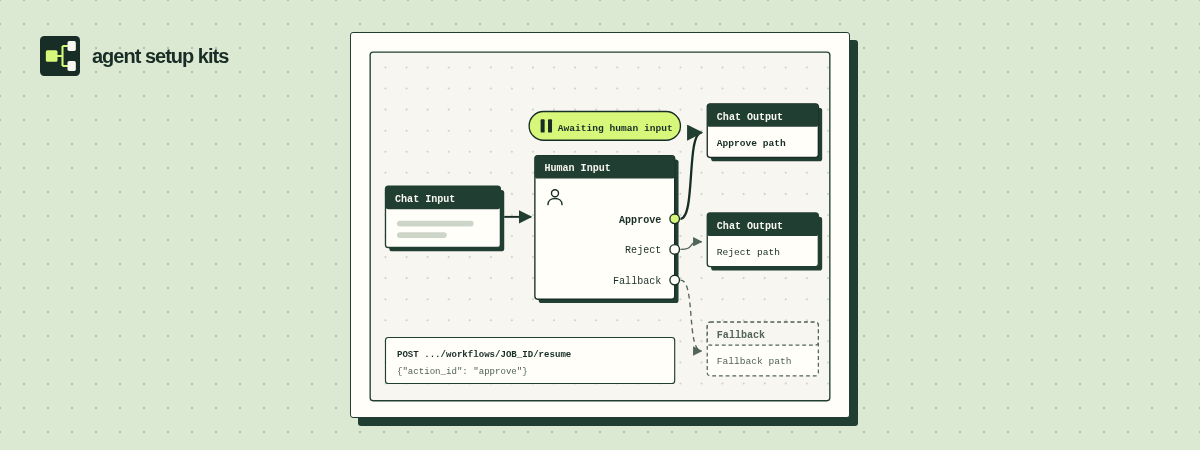
To add human approval to Langflow, put a Human Input node between the step that drafts something and the step that acts on it, run the flow in background mode, and resume it with the person's choice. Each choice, such as Approve or Reject, becomes its own branch, so only the path the reviewer picked runs.
We tested this on a local Langflow 1.13.0 server through the v2 Workflow API: approve, reject, a made-up action, a replayed answer, two late answers and two runs in different sessions.
What it is (checked on 2026-10-30)
Langflow is a visual builder for agent and LLM flows that you can also run by API. It is released under the MIT licence. The latest release on PyPI is 1.13.0, which supports Python 3.10 to 3.14.
The human-in-the-loop guide describes two ways to pause a run. The first is the Human Input component, a node on the canvas with one output per choice. The second is the "Requires approval" toggle on an agent's tools, described on the agent tools page, which pauses the run when the agent tries to call that tool. The Workflow API that resumes a paused run is marked Beta in the Workflow API reference.
Based on Langflow, by Langflow and contributors.
The setup at a glance
- Trigger: a POST to /api/v2/workflows with mode set to background, carrying the draft as input_value.
- Permissions: a Langflow API key in the x-api-key header. The flow itself needs no outside accounts.
- Output: the chat output on the branch the reviewer picked. The other branches do not run.
- Human approval: a reviewer reads the prompt from the paused run and sends approve or reject to the resume endpoint. Nothing downstream of the Human Input node runs before that.
Step 1: Build the flow
Our test flow had four parts:
- Chat Input, which receives the draft reply.
- Human Input, with the draft wired into its Input field and the default User Choices, Approve and Reject.
- An "Approve path" Chat Output on the Approve branch. In a real flow this is where the send or publish step goes.
- A "Reject path" Chat Output on the Reject branch.
The component docs say each label maps to a stable action_id: "Request Changes becomes request_changes". To handle no answer at all, turn on Enable Fallback, set a Timeout, and connect the new Fallback output.
Step 2: Start the run in background mode
Send the flow id and the draft. The API answers at once with a job id, and the job status changes to suspended once the Human Input node is reached.
curl -X POST http://127.0.0.1:7860/api/v2/workflows \
  -H "x-api-key: $LANGFLOW_API_KEY" -H "Content-Type: application/json" \
  -d '{"flow_id": "FLOW_ID", "mode": "background", "input_value": "Draft reply: a fix ships Friday."}'
Step 3: Read the pause and resume it
The events stream at /api/v2/workflows/JOB_ID/events carries a human_input_required event. That event holds the request_id, the prompt, the allowed decisions and the timeout. Your review screen shows the prompt, and the reviewer's click sends:
curl -X POST http://127.0.0.1:7860/api/v2/workflows/JOB_ID/resume \
  -H "x-api-key: $LANGFLOW_API_KEY" -H "Content-Type: application/json" \
  -d '{"request_id": "REQUEST_ID", "decision": {"action_id": "approve"}}'
Poll GET /api/v2/workflows?job_id=JOB_ID until the status is completed, then read which output ran.
What our test showed
| Case | What happened |
|---|---|
| Resume with "approve" | Only the Approve path output ran. Status: completed |
| Resume with "reject" | Only the Reject path output ran |
| Resume with "send_anyway" | HTTP 422, "decision.action_id is not one of the pending request's allowed_decisions" |
| Same approval sent twice | HTTP 409, "Job is not suspended, already resumed, or the request_id is stale" |
| Approve sent after a 1-minute timeout, fallback on | Rerouted to the Fallback path, not the Approve path |
| Approve sent after a 1-minute timeout, fallback off | Completed with no output from any branch |
| New run in the same session while one is paused | The older paused run was cancelled |
| New run in a different session | The other session's paused run stayed suspended |
Things to know
- The timeout is checked when the answer arrives. The docs say that with no decision before the timeout, "Langflow routes to this Fallback output". In the source, hitl.py calls this a "Lazy timeout (no background watchdog)", and the component's own help text says the run "stays paused until a response arrives or the server's suspended-run deadline expires it". In our test, the late runs sat suspended past the minute and only moved when an answer came in. If nobody ever answers, the Fallback branch never runs, so a reminder or expiry job has to live outside the flow.
- A late "approve" with no fallback does nothing. That is a safe default, but your app should tell the reviewer their answer came too late.
- Give each item its own session_id. A new run in the same session cancels the paused one, which is useful for a chat but can silently drop a pending approval in a queue of tickets.
- Set the timeout where it sticks. In our flow, built by API rather than in the editor, the timeout saved in the flow JSON was not used: the pause reported 259200 seconds, the 3-day default. Passing it as a tweak keyed by the component id worked. Check timeout_seconds in the pause event before relying on it.
- We did not test "Requires approval" on agent tools. That path needs a model provider key, and our test ran without one. The agent tools page says the decision is stored in chat history.
- Protect the API key and the flows. The security page advises you to assume code executed by Langflow could be malicious when you expose it to others. Anyone with the key can also resume a paused run, so keep approval calls on your own server.
Takeaway
Langflow's Human Input node gives you a real gate: only the branch a person picks runs, made-up and replayed answers are refused, and late answers go to the fallback. The parts to plan for are outside the flow: nobody gets reminded when a pause sits unanswered, and a rerun in the same session cancels the earlier pause.
Next step: add a Human Input node in front of the one step in your flow that sends, posts or writes, give each run its own session_id, and resume it from a review page you control.
Good setups, worth keeping. Request email updates on the home page, then confirm by email. No subscription starts until you confirm. Or find an agent for the job.
Part of: Which setup should I use to add human approval to an agent?