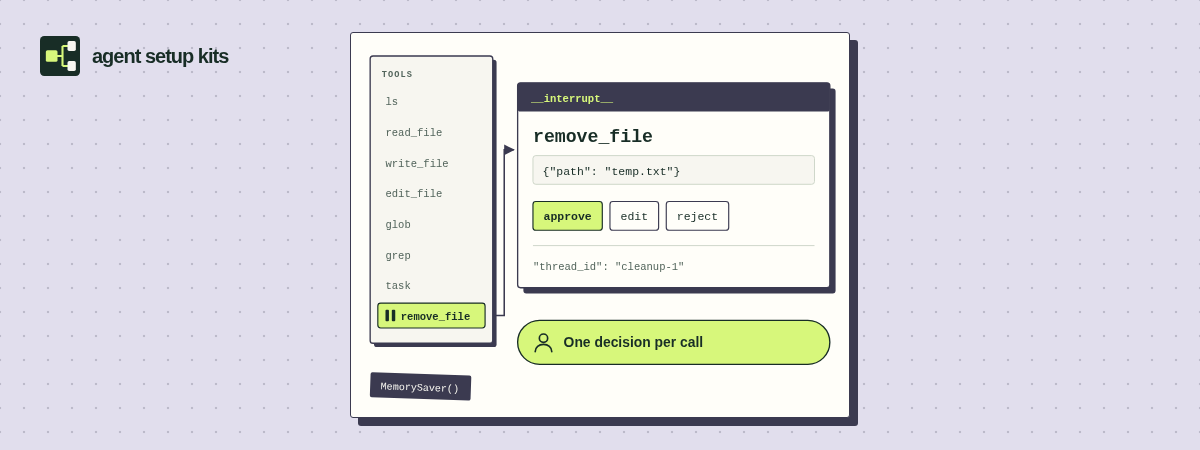
To run LangChain Deep Agents, call create_deep_agent() with a model and your tools, then invoke it with a message. To make it stop before risky tools, list them in interrupt_on and add a checkpointer. The run pauses, a person approves, edits or rejects, and you resume with Command(resume=...).
We tested this on deepagents 0.7.32 with a stand-in model. Without interrupt_on, a delete tool ran at once. With it, the run paused, and a rejected call never ran.
What it is (checked on 2026-10-30)
Deep Agents is LangChain's ready-made agent built on LangGraph. The README describes it as the full package for long tasks: planning, file tools, context management and sub-agents. It's MIT licensed. The latest release on PyPI is 0.7.32 (uploaded 2026-10-23), for Python 3.11 or newer.
The README's security note is worth reading first: Deep Agents follows a "trust the LLM" model. "The agent can do anything its tools allow." Limits belong in your tools and sandbox, not in the prompt.
Based on Deep Agents, by LangChain and contributors.
The setup at a glance
- Trigger: your code sends the agent a task.
- Permissions: the built-in file tools, plus whatever tools you add.
- Output: the agent's messages, and any files it wrote.
- Human approval: every tool you list in
interrupt_onwaits for a person's decision.
Step 1: Install
python -m venv .venv
. .venv/bin/activate
pip install deepagents
Pass a model explicitly. Relying on the default model is deprecated.
Step 2: Build the agent with approval
This follows the human-in-the-loop docs:
from langchain.tools import tool
from langgraph.checkpoint.memory import MemorySaver
from deepagents import create_deep_agent

@tool
def remove_file(path: str) -> str:
    """Delete a file from the filesystem."""
    ...

agent = create_deep_agent(
    model="anthropic:claude-sonnet-5",
    tools=[remove_file],
    interrupt_on={
        "remove_file": True,
        "write_file": {"allowed_decisions": ["approve", "reject"]},
    },
    checkpointer=MemorySaver(),
)
The checkpointer is required. It saves the paused run so you can pick it up again.
Step 3: Run, review, resume
from langgraph.types import Command

config = {"configurable": {"thread_id": "cleanup-1"}}
result = agent.invoke(
    {"messages": [{"role": "user", "content": "Delete temp.txt"}]}, config=config)

if result.get("__interrupt__"):
    req = result["__interrupt__"][0].value
    for action in req["action_requests"]:
        print(action["name"], action["args"])
    decisions = [{"type": "reject", "message": "No. Do not retry."}]
    result = agent.invoke(Command(resume={"decisions": decisions}), config=config)
The person reading those printed arguments is the approval step. Use the same thread_id to resume. When the model asks for several flagged tools at once, they arrive in one batch, and you give one decision per call, in order.
What our test showed
We ran this on 0.7.32 with a stand-in chat model that asked to call remove_file on temp.txt (no real model or key):
| Setup | Result |
|---|---|
No interrupt_on | remove_file ran straight away |
interrupt_on, decision approve | Run paused with the path shown; the tool ran once after resume |
interrupt_on, decision reject | The tool never ran; the model got "User rejected the tool call for remove_file with reason: No. Do not retry." |
Choices offered with True | approve, edit, reject, respond |
The tools the model saw were ls, read_file, write_file, edit_file, delete, glob, grep, task and our remove_file. Two things stood out. There was no execute tool, because the default backend can't run shell commands. And there was no planning (to-do list) tool in this default setup, even though the README talks about planning. If you need one, check the docs for your version.
Things to know
From the human-in-the-loop docs:
- Use
rejectto deny an action. Don't userespondfor that. Its text can look to the model like the tool worked.respondis for "ask the user" style tools. - Edit arguments lightly. The docs warn that big edits can make the model rethink and call tools again.
- In Python, a
whenpredicate on a tool's config pauses only some calls, such as writes outside one folder. That needslangchain1.3.3 or newer. - Sub-agents follow the top-level
interrupt_onunless you give them their own.
By default, the built-in file tools write to the agent's state, not your disk. Files last for one thread. That's a safe place to start. Once you connect a real filesystem or a sandbox that runs commands, put write_file, edit_file, delete and execute in interrupt_on.
Takeaway
Deep Agents gives you a capable agent in one call, and it will use every tool you give it. List each tool that writes, deletes or runs commands in interrupt_on, add a checkpointer, and make reject the answer for anything you don't want done.
Next step: print the tool list your agent actually gets, and add every name that changes something to interrupt_on before you swap in a real backend.
Good setups, worth keeping. Request email updates on the home page, then confirm by email. No subscription starts until you confirm. Or find an agent for the job.
Part of: Which setup should I use to add human approval to an agent?