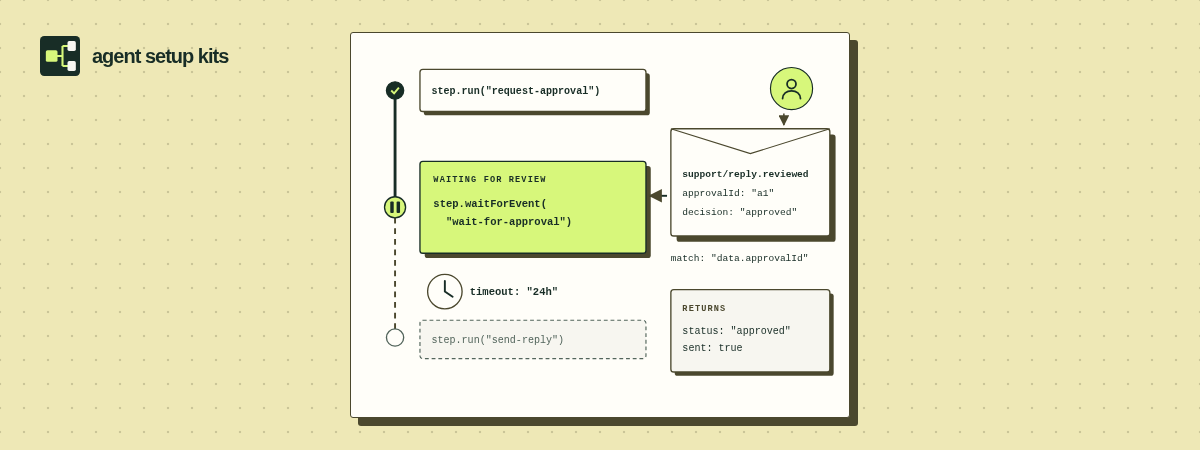
To make an Inngest function wait for a person, call step.waitForEvent() with a timeout and a match field, then send an approval event from your backend when the reviewer decides. A timeout returns null, so treat null and anything other than a clear yes as "don't send".
We ran the function below on the Inngest dev server with six test runs: one approval went out, and five other cases (a rejection, a vague payload, a wrong ID, no answer and an early answer) all stopped.
What it is (checked on 2026-10-30)
Inngest runs durable functions made of steps, with retries, sleeps and waits handled by the Inngest server. The TypeScript SDK is Apache-2.0 licensed (LICENSE). The latest SDK on npm is 4.26.2, published on 2026-10-29, and needs Node.js 20 or later.
The Inngest server and CLI, which include the dev server we tested with, use a different licence: the Server Side Public License, with each release becoming available under Apache-2.0 on its third anniversary (LICENSE). Check that before you self-host the server.
Inngest's human-in-the-loop guide uses step.waitForEvent() to "pause agent execution for human approval, then resume or abort based on the response".
Based on Inngest, by Inngest and contributors.
The setup at a glance
- Trigger: a
support/reply.draftedevent, sent when an agent drafts a reply to a ticket. - Permissions: only the
send-replystep touches anything outside the function, and it runs after approval. - Output: the run returns whether the reply was sent and who approved it.
- Human approval: a signed-in reviewer approves or rejects the draft. Your backend checks who they are and sends a
support/reply.reviewedevent with the decision.
Step 1: Write the function
import { Inngest } from "inngest";

export const inngest = new Inngest({ id: "support-app" });

export const replyApproval = inngest.createFunction(
  { id: "reply-approval", triggers: [{ event: "support/reply.drafted" }] },
  async ({ event, step }) => {
    const { approvalId, ticketId, draft } = event.data;

    await step.run("request-approval", async () => {
      // Post the draft and approvalId to your review screen here.
      return { approvalId };
    });

    const approval = await step.waitForEvent("wait-for-approval", {
      event: "support/reply.reviewed",
      match: "data.approvalId",
      timeout: "24h",
    });

    if (!approval) return { status: "timed_out", sent: false };
    if (approval.data.decision !== "approved" || !approval.data.reviewer) {
      return { status: "not_approved", sent: false };
    }

    await step.run("send-reply", async () => {
      // Your send call goes here, using ticketId and draft.
    });
    return { status: "approved", sent: true, reviewer: approval.data.reviewer };
  }
);
match: "data.approvalId" means only a review event with the same approvalId as the triggering event resumes this run. The reference also accepts an if expression for stricter matching, but not both at once.
Step 2: Send the decision from your backend
When the reviewer clicks a button, your server checks their login and sends:
await inngest.send({
  name: "support/reply.reviewed",
  data: { approvalId: "a1", decision: "approved", reviewer: "sam@example.com" },
});
The reviewer's name should come from your login system, not from the form.
Step 3: Test it locally
We served the function with createServer from inngest/node on port 3000 and started the dev server with npx inngest-cli@1.49.0 dev --no-discovery. A PUT to http://localhost:3000/api/inngest registered the function. We then posted events to the dev server's /e/ endpoint and read each run's start and end times from its API. For the test only, we set the timeout to 40 seconds.
What our test showed
| Review event | Run ended | Reply sent |
|---|---|---|
decision: "approved", reviewer sam | About 5 seconds in, when the event arrived | Yes |
approved: true, no decision or reviewer | About 5 seconds in | No |
decision: "rejected" | About 5 seconds in | No |
Approval with a different approvalId | At the 40-second timeout | No |
| No review event | At the 40-second timeout | No |
| Approval sent in the same request as the draft event | At the 40-second timeout | No |
The second row shows why the check in Step 1 names its fields. The event matched and resumed the run, but its payload wasn't in the shape the code expects, so nothing went out.
The last row matches the step.waitForEvent guide: "The wait only sees events sent after it starts listening." An approval that arrives too early is lost, and the run waits out its timeout.
Things to know
- Set a timeout every time, and treat
nullas a no. The reference lists durations such as"24h"or"7d", or an absolute date. - Show the review screen only after the wait has started, which is why the request step comes first. If an answer can arrive earlier, the guide says to check the external state before waiting.
- A review event is just an event. Send it from your backend after checking the reviewer, and keep your event key on the server.
- Inside a
group.parallel()race, a losingstep.waitForEvent()is not cancelled and keeps the run going until its timeout, per the reference. - The testing docs say to mock
waitForEventsteps with@inngest/test. With @inngest/test 1.0.0 and inngest 4.26.2, our mocked event failed with "Event not found in triggers: undefined", so we tested on the dev server instead.
Takeaway
step.waitForEvent() gives an Inngest function a real pause for a person's decision. Match on an ID, set a timeout, start the wait before you ask, and check the decision and reviewer in code before the step that sends.
Next step: put a wait in front of the one step in your function that sends, posts or charges, then run the six cases above on the dev server.
Good setups, worth keeping. Request email updates on the home page, then confirm by email. No subscription starts until you confirm. Or find an agent for the job.
Part of: Which setup should I use to add human approval to an agent?