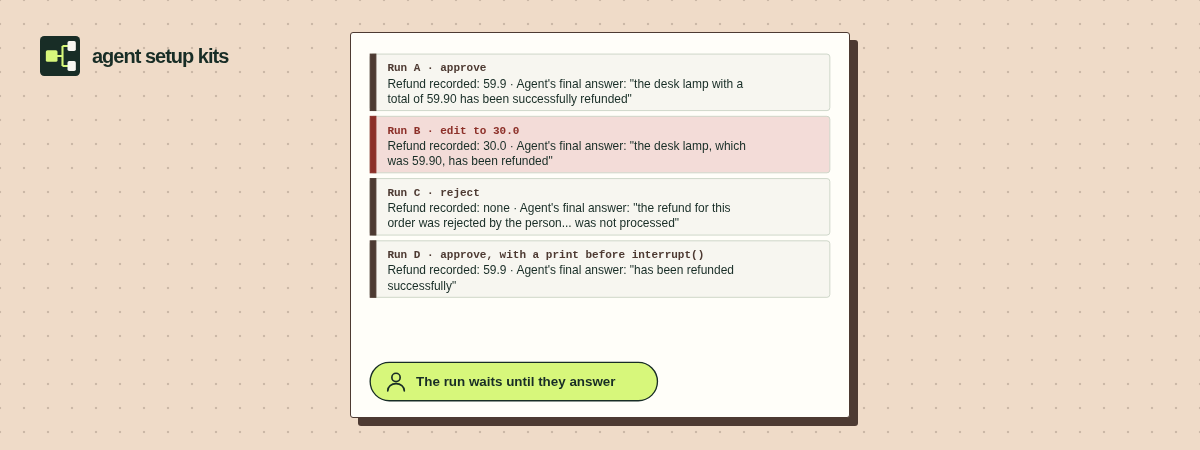
Human in the loop AI means the agent stops before an action and waits for a person. In LangGraph that is one call, interrupt(), plus a checkpointer that remembers where the run stopped. We paused a local agent before a refund and tried the three answers a person usually needs: approve, edit and reject. All three worked. Two details caught us: the tool's code runs again on resume, and after an edit the agent described the wrong amount.
A person approves, changes or refuses every refund before any money moves. The run waits until they answer.
Based on LangGraph, by LangChain and contributors. MIT licence per GitHub on 2026-10-30.
How LangGraph pauses (checked 2026-10-30)
From LangGraph's interrupts docs:
- Calling
interrupt(payload)inside a node or tool stops the run and handspayloadto your app. - "Checkpointing keeps your place: the checkpointer writes the exact graph state so you can resume later."
- "
thread_idis your pointer": the samethread_idin the config loads the paused run. - You resume with
Command(resume=value), andvaluebecomes whatinterrupt()returns. - "When execution resumes... the runtime restarts the entire node from the beginning." So "side effects called before
interruptmust be idempotent", or better, placed after it.
The agent
One fake order (1042, a desk lamp, total 59.9), a lookup tool and a refund tool that pauses first. The refund appends to a list instead of moving money.
from langchain_ollama import ChatOllama
from langchain_core.tools import tool
from langgraph.prebuilt import create_react_agent
from langgraph.checkpoint.memory import InMemorySaver
from langgraph.types import interrupt, Command
import common

@tool
def lookup_order(order_id: str) -> str:
    """Look up an order."""
    return common.lookup(order_id)

@tool
def issue_refund(order_id: str, amount: float) -> str:
    """Refund money on an order. A person must approve."""
    d = interrupt({"order_id": order_id, "amount": amount})
    if d["action"] == "reject": return "The person rejected this refund. Nothing was refunded."
    if d["action"] == "edit": amount = d["amount"]
    return common.refund(order_id, amount)

agent = create_react_agent(ChatOllama(model="qwen2.5:3b", temperature=0),
                           [lookup_order, issue_refund], checkpointer=InMemorySaver())
cfg = {"configurable": {"thread_id": "t-1"}, "recursion_limit": 12}
out = agent.invoke({"messages": [("user", "Order 1042 arrived damaged. Look it up, then refund its total of 59.90.")]}, cfg)
while "__interrupt__" in out:
    print("paused:", agent.get_state(cfg).next, out["__interrupt__"][0].value)
    out = agent.invoke(Command(resume=decision_from_person()), cfg)
The qwen2.5:3b weights are under the "Qwen RESEARCH LICENSE AGREEMENT", for non-commercial use only; check the model card before any commercial use.
decision_from_person() stands in for your approval screen. It returns {"action": "approve"}, {"action": "edit", "amount": 30.0} or {"action": "reject"}.
One warning from langgraph 1.2.19: "create_react_agent has been moved to langchain.agents. Please update your import to from langchain.agents import create_agent. Deprecated in LangGraph V1.0 to be removed in V2.0." It still works today. We kept it to avoid installing the larger langchain package. interrupt() itself is part of LangGraph and is not affected.
What happened in four runs
| Run | Decision | Paused state | Refund recorded | Agent's final answer |
|---|---|---|---|---|
| A | approve | next=('tools',), payload {'order_id': '1042', 'amount': 59.9} | 59.9 | "the desk lamp with a total of 59.90 has been successfully refunded" |
| B | edit to 30.0 | same | 30.0 | "the desk lamp, which was 59.90, has been refunded" |
| C | reject | same | none | "the refund for this order was rejected by the person... was not processed" |
| D | approve, with a print before interrupt() | same | 59.9 | "has been refunded successfully" |
Each run left five checkpoints on its thread, read with get_state_history.
Run B is the one to remember. The person cut the refund to 30.0, and our tool returned "refunded 30.0 on order 1042". The agent's answer still read as a full refund. If that text goes to a customer, it is wrong.
Run D shows the restart rule. Our print, placed before interrupt(), appeared twice: once before the pause and once after the resume. Anything placed there, such as sending a notice or writing a record, would happen twice.
In a separate test with the prompt "refund the full amount", without the number, the same model proposed 100.0. Stating the total in the prompt fixed it here, and the payload let a person see the amount either way.
What we learned
- Put the risky action after
interrupt(). Code before it runs again on resume. - Let the person edit, not just approve. A partial refund is a common real answer, and the edit path took one line in the tool.
- Say what changed in the tool result. After an edit, return text the model cannot misread, such as "The person changed the amount to 30.0; only 30.0 was refunded", and check the record yourself.
InMemorySaverforgets on exit. It is fine for a test. For a pause that lasts until someone checks a queue, use a checkpointer that writes to a database.- Keep a recursion limit. We set 12, so a confused run stops.
Takeaway
Human in the loop AI in LangGraph is interrupt(), a checkpointer and a thread_id. Approve, edit and reject all worked on a small local model. Keep side effects after the pause, and check what actually happened instead of trusting the agent's summary.
Next step: add interrupt() to your riskiest tool, try an edit, and compare the agent's answer with your records.
How we check the tools we list is on our verification page.
Good setups, worth keeping. Request email updates on the home page, then confirm by email. No subscription starts until you confirm. Or find an agent for the job.
Part of: Which setup should I use to add human approval to an agent?