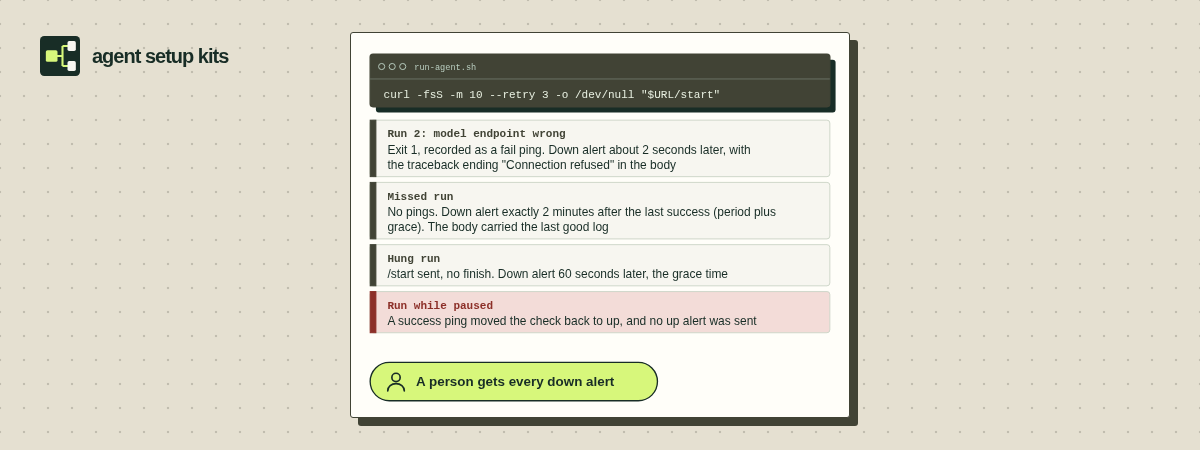
A scheduled agent can fail without anyone noticing: the model endpoint is down, the job hangs, or cron never starts it. Healthchecks is an open-source monitor that expects a ping on every run and alerts you when one does not arrive. We self-hosted version 5.0.3 and pointed a small nightly agent at it. A failed run alerted within about 2 seconds with the error log attached, a missed run alerted at period plus grace, and a hung run alerted when its grace time ran out.
The agent runs on its own. A person gets each alert and decides whether to re-run it, fix it or pause it.
What Healthchecks does (checked on 2026-10-30)
Healthchecks is a "cron job and background task monitoring service, written in Python & Django", licensed BSD-3-Clause. Each job gets a check with its own ping URL. The job pings that URL when it runs. If the pings stop, or the job reports a failure, Healthchecks marks the check down and sends alerts through the integrations you set up, such as email or a webhook. You can use the hosted service or run it yourself; we ran it ourselves.
The signals an agent run needs, from the docs:
- Start: append
/startto the ping URL when the run begins. If a job "sends a "start" signal but does not send a "success" signal within its configured grace time", it is marked down (run time docs). - Success or failure: ping the plain URL on success, or append
/failor the exit status. "Healthchecks.io will interpret exit status 0 as success and all non-zero values as failures" (failure docs). - Logs: send the run's output as the request body. Healthchecks keeps "the first 100 kB (100000 bytes)" of it (log docs).
- Schedule: Simple (Period and Grace Time), Cron or OnCalendar. Grace Time is "the additional time to wait before sending an alert when a check is late" (check docs).
Based on Healthchecks, by Pēteris Caune and contributors. BSD-3-Clause.
The setup at a glance
- Trigger: the agent's own schedule (cron, a systemd timer or a scheduler). Healthchecks only watches.
- Permissions: the agent gets only its own ping URL, no API key, so it cannot change its check or silence its alerts.
- Output: one check per scheduled agent, with a run history, durations and the last log.
- Human approval: a person receives every down alert, reads the attached log and decides to re-run, fix or pause. Only a person pauses a check, with the sticky pause option on if the agent must stay stopped. Pausing through the API needs the project's API key, so keep that key away from the agent.
Steps
- Run Healthchecks. We used the v5.0.3 release in a Python 3.12 virtual environment with the default SQLite database:
pip install -r requirements.txt,./manage.py migrate, then./manage.py runserverfor the web app. The self-hosting docs cover production setups.runserveris for development only. - Start
./manage.py sendalerts. Without it, checks change state but nobody is alerted. - Create one check per agent. Set the period to the agent's schedule and the grace time to its longest normal run plus some slack, or use a cron expression with the server's time zone.
- Add an alert channel and assign it to the check. Self-hosted email needs SMTP settings; we used a webhook. To reach a listener on 127.0.0.1 we had to set
INTEGRATIONS_ALLOW_PRIVATE_IPS=True. - Wrap the agent so every run reports start, result and log. We read the check's UUID from a file:
#!/bin/sh
# usage: run-agent.sh <ollama-port>
URL="http://127.0.0.1:18813/ping/$(cat ./uuid.txt)"
curl -fsS -m 10 --retry 3 -o /dev/null "$URL/start"
python3 ./agent.py "$1" > ./run.log 2>&1
code=$?
curl -fsS -m 10 --retry 3 --data-binary @./run.log "$URL/$code"
echo " exit=$code"
This is the exact script from our test. The port argument tells the agent where the local model server is; we passed a wrong port for Run 2 to make it fail. The last echo only prints the exit code for the test log. In your copy, put your own ping URL in URL, drop the argument if your agent does not need it, and the echo is optional.
- Decide who gets the alert and what they do with it. Write it in the check's description.
What our test showed
Check: period 60 seconds, grace 60 seconds, webhook to a local listener. The agent made one call to a local model, qwen2.5:1.5b, to summarize "3 orders shipped, 1 refund pending."
| Run | Result |
|---|---|
| Run 1: normal | Exit 0, reply "Three orders have been shipped, while one refund is pending." Status up, duration 3.22 seconds |
| Run 2: model endpoint wrong | Exit 1, recorded as a fail ping. Down alert about 2 seconds later, with the traceback ending "Connection refused" in the body |
| Run 3: normal | Up alert about 1 second later |
| Missed run | No pings. Down alert exactly 2 minutes after the last success (period plus grace). The body carried the last good log |
| Hung run | /start sent, no finish. Down alert 60 seconds later, the grace time |
| Person pauses | API call POST /api/v3/checks/<uuid>/pause with the project's API key in the X-Api-Key header set the status to paused |
| Run while paused | A success ping moved the check back to up, and no up alert was sent |
Every alert came from sendalerts. When we started it, it warned "No SMTP configuration, cannot send email", so email alerts would have failed without SMTP.
Things to know
- A ping after a pause un-pauses the check by default. If a person pauses an agent to stop it, the agent's next run resumes monitoring. The docs describe an "Ignore the ping, stay in the paused state" option that makes the pause stick.
- Grace time also limits run length once you send
/start. Set it above your slowest normal run, or long runs will alert. - Logs travel with the alert. Keep secrets and personal data out of the agent's output, or send less of it.
- With overlapping runs and run IDs, only the most recently started run is timed, per the docs.
- Monitoring tells you a run failed. It does not check whether the agent's output was right. Review that separately.
Takeaway
Give every scheduled agent a check, ping /start and the exit status with the log attached, and run sendalerts. A failed run, a missed run and a hung run each reached a person in our test. That person decides what happens next.
Next step: pick your one agent that runs unattended, wrap it with the script above, and make sure a named person gets its down alert.
How we check the tools we list is on our verification page.
Good setups, worth keeping. Request email updates on the home page, then confirm by email. No subscription starts until you confirm. Or find an agent for the job.