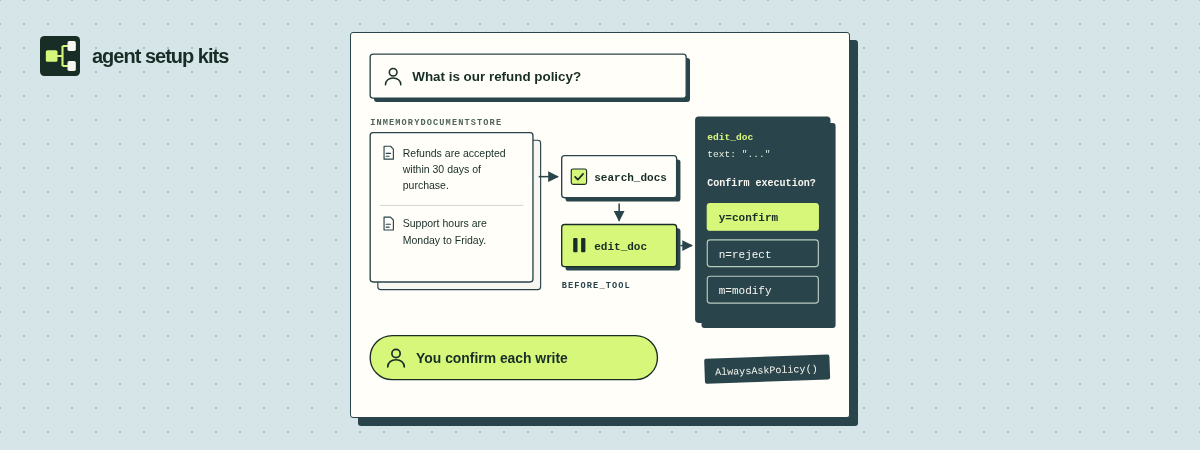
To build a Haystack agent over your docs, wrap a retriever in a ComponentTool and pass it to Haystack's Agent component with a chat generator. Tools run as soon as the model calls them, so add a ConfirmationHook on every tool that writes, and a person confirms, rejects or edits the call first.
We tested this on haystack-ai 3.4.1 with a stand-in model. Without the hook, an edit tool ran at once. With it, the edit ran only after a confirm, and never after a reject.
What it is (checked on 2026-10-30)
Haystack is an open-source framework for building LLM apps from components and pipelines. It's Apache-2.0 licensed and maintained by deepset. The latest release on PyPI is haystack-ai 3.4.1 (uploaded 2026-10-21), and it needs Python 3.11 or newer.
The Agent component runs a loop: the chat model picks a tool, the tool runs, the result goes back to the model, and so on until an exit condition is met. The default limit is 100 steps (max_agent_steps).
Based on Haystack, by deepset and contributors.
The setup at a glance
- Trigger: a person asks a question.
- Permissions: read access to your document store, plus any write tools you add.
- Output: an answer built from retrieved docs.
- Human approval: a person confirms each write tool call before it runs.
Step 1: Install
python -m venv .venv
. .venv/bin/activate
pip install haystack-ai
Step 2: Load docs and make a search tool
This uses the in-memory store so you can try it without a database:
from haystack import Document
from haystack.document_stores.in_memory import InMemoryDocumentStore
from haystack.components.retrievers.in_memory import InMemoryBM25Retriever
from haystack.tools import ComponentTool

store = InMemoryDocumentStore()
store.write_documents([
    Document(content="Refunds are accepted within 30 days of purchase."),
    Document(content="Support hours are Monday to Friday."),
])

search_docs = ComponentTool(
    component=InMemoryBM25Retriever(document_store=store, top_k=1),
    name="search_docs",
    description="Search the company docs.",
)
ComponentTool turns any Haystack component into a tool. To hand the agent a whole retrieval pipeline instead, use PipelineTool.
Step 3: Add a write tool and the approval hook
The pattern comes from the human-in-the-loop docs:
from typing import Annotated
from haystack.tools import tool
from haystack.components.agents import Agent
from haystack.components.generators.chat import OpenAIChatGenerator
from haystack.dataclasses import ChatMessage
from haystack.hooks.human_in_the_loop import (
    AlwaysAskPolicy, BlockingConfirmationStrategy,
    ConfirmationHook, SimpleConsoleUI,
)

@tool
def edit_doc(text: Annotated[str, "The new text"]) -> str:
    """Replace a doc's text."""
    ...

strategy = BlockingConfirmationStrategy(
    confirmation_policy=AlwaysAskPolicy(),
    confirmation_ui=SimpleConsoleUI(),
)

agent = Agent(
    chat_generator=OpenAIChatGenerator(model="gpt-5.4-mini"),
    tools=[search_docs, edit_doc],
    system_prompt="Answer only from search_docs results.",
    hooks={"before_tool": [
        ConfirmationHook(confirmation_strategies={"edit_doc": strategy}),
    ]},
)

result = agent.run(messages=[ChatMessage.from_user("What is our refund policy?")])
print(result["messages"][-1].text)
The OpenAI generator needs an OPENAI_API_KEY. Swap in any Haystack chat generator you use.
Step 4: Answer the prompt
When the model calls edit_doc, the console shows the tool name and its arguments and asks: Confirm execution? (y=confirm / n=reject / m=modify). The person at that prompt is the approval step. Read the arguments, not the model's summary of them.
What our test showed
We ran this on 3.4.1 with a stand-in chat generator that first called search_docs, then asked to call edit_doc (no real model or API key):
| Setup | Result |
|---|---|
| No hook | edit_doc ran straight away |
| Hook, person confirms | edit_doc ran once |
| Hook, person rejects | edit_doc never ran; the model got "Tool execution for 'edit_doc' was rejected by the user." |
| Search for "refunds" | Returned the refunds doc |
| Search for "refund policy" | Returned nothing |
That last row matters. BM25 matches words, and "refund" is not "Refunds". If your agent says it found nothing, check the query it sent before you blame the docs. An embedding retriever, or a system prompt that asks for several phrasings, will close that gap.
Things to know
From the Haystack docs:
confirmation_strategiestakes one tool name, a tuple of names, or"*"for every tool without a more specific entry. A"*"entry is a good safety net.- Besides
AlwaysAskPolicy, there'sAskOncePolicy(asks once per tool and argument combination) andNeverAskPolicy(turns asking off without removing the hook). - The person only sees the arguments the model produced. Values injected from agent state through
inputs_from_statearen't shown, because that happens at run time. Don't hide risky values there. - The console UIs block the run while they wait. For a web app, the docs show a custom strategy that sends the request to your UI and waits for the answer.
Takeaway
Haystack makes a docs agent short to build: a retriever becomes a tool, and Agent runs the loop. Tools still run without asking, so put a ConfirmationHook on every tool that writes, and test a few real questions to see what your retriever misses.
Next step: write five questions your team actually asks, run them through the agent, and check which ones came back empty before you add any write tools.
Good setups, worth keeping. Request email updates on the home page, then confirm by email. No subscription starts until you confirm. Or find an agent for the job.