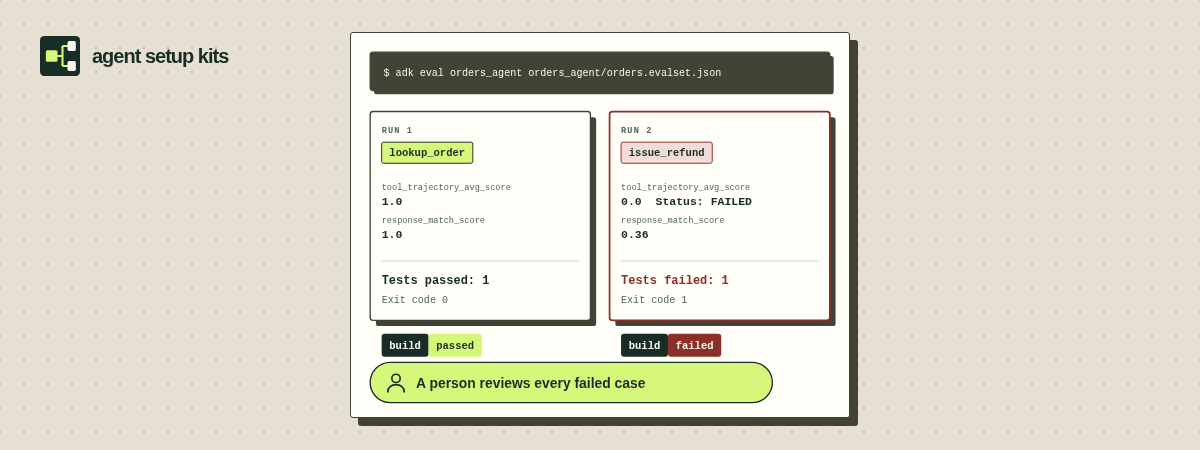
To test a Google ADK agent, write an evalset file with sample questions, the tool calls you expect and a reference answer, then run adk eval <agent_folder> <evalset> with a config that sets pass thresholds. When an agent calls the wrong tool, the run fails and exits with code 1, so you can block a release in CI.
We tested this on google-adk 2.13.0 with a stand-in model. The same evalset passed when the agent looked up an order and failed when it issued a refund instead.
What it is (checked on 2026-10-30)
The Agent Development Kit is Google's open-source framework for building agents. The Python package is Apache-2.0 licensed (LICENSE). The latest release on PyPI is 2.13.0, uploaded on 2026-10-23, and it needs Python 3.11 or later.
ADK's evaluation docs describe three ways to run evals: the adk web UI, pytest with AgentEvaluator, and the adk eval command. This guide uses the command, because it fits a build step.
Based on the Agent Development Kit, by Google and contributors.
The setup at a glance
- Trigger: you run
adk evallocally or in CI before a release. - Permissions: the agent runs for real during the eval, so its tools run too. Point them at test data.
- Output: a pass or fail summary per eval set, a result file under
.adk/eval_history/, and an exit code. - Human approval: a person reviews every failed case before release, and signs off on any change to the expected tool calls in the evalset.
Step 1: Install with the eval extra
pip install "google-adk[eval]"Plain pip install google-adk isn't enough. On our first run, adk eval stopped with "Eval module is not installed, please install via pip install "google-adk[eval]"".
Step 2: Write an evalset
Each eval case is a session with one or more turns. A turn holds the user's message, the expected tool calls and a reference answer. This one checks that an order question is answered with a lookup, not a refund:
{
  "eval_set_id": "orders",
  "eval_cases": [{
    "eval_id": "status_not_refund",
    "conversation": [{
      "invocation_id": "inv-1",
      "user_content": {"role": "user", "parts": [{"text": "Where is order 123?"}]},
      "final_response": {"role": "model", "parts": [{"text": "Order 123 shipped on Oct 20."}]},
      "intermediate_data": {
        "tool_uses": [{"name": "lookup_order", "args": {"order_id": "123"}}],
        "intermediate_responses": []
      }
    }],
    "session_input": {"app_name": "orders_agent", "user_id": "user", "state": {}}
  }]
}
The docs suggest capturing real sessions in adk web and saving them as eval cases, rather than writing long ones by hand.
Step 3: Set thresholds and run
Save the pass bars in test_config.json:
{"criteria": {"tool_trajectory_avg_score": 1.0, "response_match_score": 0.8}}Then run:
adk eval orders_agent orders_agent/orders.evalset.json \
  --config_file_path=orders_agent/test_config.json --print_detailed_results
The agent folder's __init__.py must import a module named agent that defines root_agent.
What our test showed
We ran the same evalset twice. To keep it offline and repeatable, we replaced the model with a small stand-in class: in one mode it called lookup_order, and in the other it called issue_refund.
| Agent behaviour | tool_trajectory_avg_score | response_match_score | Summary | Exit code |
|---|---|---|---|---|
Called lookup_order, answered with the status | 1.0 | 1.0 | Tests passed: 1 | 0 |
Called issue_refund instead | 0.0 | 0.36 | Tests failed: 1 | 1 |
With --print_detailed_results, the failed run listed each metric with its score and threshold, for example "tool_trajectory_avg_score, Status: FAILED, Score: 0.0, Threshold: 1.0". That line is what the reviewer reads first.
This tests the eval runner, not a real model's choices. With a live model, run each case more than once, because answers can vary.
Things to know
tool_trajectory_avg_scoreusesEXACTmatching by default, so an extra tool call fails the case. The criteria docs showIN_ORDERandANY_ORDERfor looser checks.response_match_scoreis ROUGE-1 word overlap with the reference answer, and its default bar is 0.8. A correct answer worded differently can fail, sofinal_response_match_v2(judged by an LLM) may suit free-text replies better. It calls a model, so it costs tokens.- Each run writes a result file under the agent folder's
.adk/eval_history/. Keep those files as a record of what passed, or add.adk/to.gitignore. - The run printed "[EXPERIMENTAL]" warnings for parts of the eval service in 2.13.0. Pin your ADK version so results stay comparable.
Takeaway
adk eval turns "the agent seems fine" into a pass or fail you can put in CI. Start with exact tool-call checks on the actions that matter most, such as "never refund when asked for status", and have a person review every failure before you ship.
Next step: save three real sessions from adk web as an evalset, add adk eval to your CI, and make a failed run block the merge.
Good setups, worth keeping. Request email updates on the home page, then confirm by email. No subscription starts until you confirm. Or find an agent for the job.