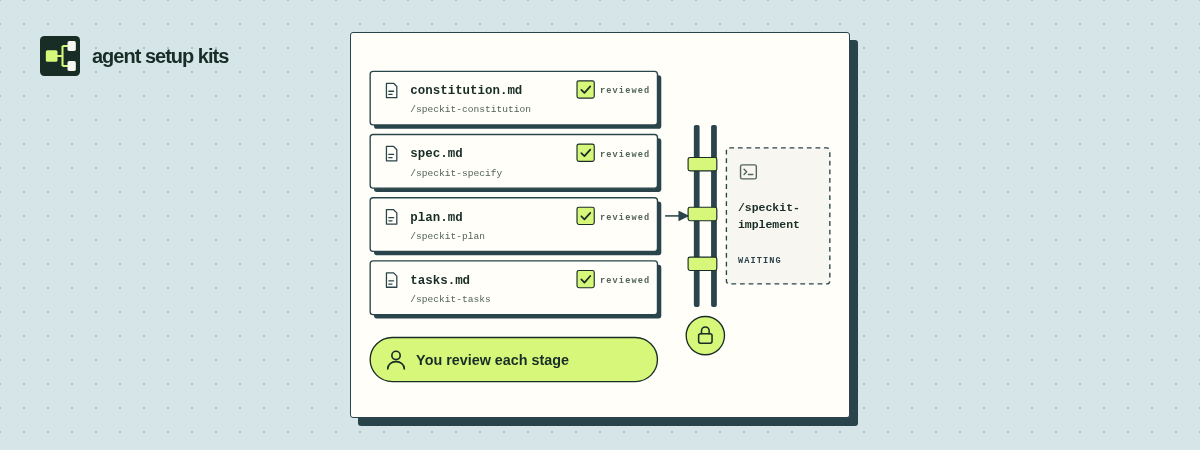
GitHub Spec Kit makes your coding agent write a specification, a technical plan and a task list before it writes code. The value comes from a person reading and fixing each of those files before the next step runs, so run the stages one at a time and keep implementation behind your say-so.
The agent drafts. You approve each stage.
What Spec Kit is (checked on v1.2.5)
Spec Kit is an MIT-licensed toolkit from GitHub. Its README describes it as giving "AI coding agents structured processes, reusable templates, and documented outcomes." The core process is Spec-Driven Development: define what to build and why, then turn that into a plan, tasks and working code. Bug fixing and idea assessment are bundled extensions you install when needed.
The specify command-line tool sets up a project for your agent. It supports several agents, including GitHub Copilot, Claude Code and Gemini CLI. Version 1.2.5 was released on 2026-10-28. We installed it and generated a Claude Code project to check what it creates.
Based on Spec Kit, by GitHub and contributors.
Step 1: Install a pinned version
The installation guide lists Python 3.11+ and uv as prerequisites, and recommends installing from the GitHub repository pinned to a release tag:
uv tool install specify-cli --from git+https://github.com/github/spec-kit.git@v1.2.5
specify version
The guide also says the PyPI package specify-cli is an official channel. Either way, pin the version so the templates don't change under you.
Step 2: Initialise the project
For Claude Code:
specify init my-project --integration claude
cd my-project
When we ran this, it created:
.specify/, with templates (spec-template.md,plan-template.md,tasks-template.mdand more), helper bash scripts, andmemory/constitution.md.claude/skills/, with skills such asspeckit-constitution,speckit-specify,speckit-plan,speckit-tasks,speckit-implementandspeckit-converge, plus optionalspeckit-clarify,speckit-checklistandspeckit-analyze
Read the scripts before your first run. They're short, and they're what the skills execute in your repo.
Step 3: Stop the agent starting stages on its own
In v1.2.5 the generated skills have disable-model-invocation: false in their front matter. Claude Code's skills documentation says this setting controls whether Claude can invoke a skill on its own, and that disable-model-invocation: true stops it, so the skill runs only when you type it.
For the stages that change things, set it to true in:
.claude/skills/speckit-implement/SKILL.md(writes code).claude/skills/speckit-taskstoissues/SKILL.md(creates GitHub issues)
You can do the same for every Spec Kit skill if you want each stage to start only when you type it. Re-check these files after upgrading Spec Kit, in case an upgrade rewrites them.
Step 4: Run the stages one at a time
The README is clear: run the skills in your agent's chat "one at a time, reviewing each result before continuing." The minimal flow is:
/speckit-constitution Create principles focused on code quality, testing, and maintainability.
/speckit-specify Build a photo organizer with albums grouped by date and a tile preview of each album.
/speckit-plan Use Vite with vanilla JavaScript. Keep images local and store metadata in SQLite.
/speckit-tasks
/speckit-implement
/speckit-converge
(Those example prompts are from the README.) Here's what to check at each stage.
Constitution: your project rules
Run once per project. It fills in .specify/memory/constitution.md. Read it as if a new teammate wrote it: are these really your rules for testing, dependencies and security? Edit it by hand where it's wrong. Every later stage leans on it.
Specify: what and why
This writes the feature spec into a numbered folder under specs/. In v1.2.5 the specify skill limits the agent to at most three [NEEDS CLARIFICATION] markers and makes reasonable guesses for the rest. That means some decisions in the spec are guesses. Read every requirement and correct the ones that aren't yours.
If the feature is fuzzy, run the optional /speckit-clarify before planning. It asks structured questions about unclear areas.
Plan: how
Check the stack, data storage and any new dependencies. This is the cheapest place to say no to a library or an architecture.
Tasks: the work list
Read tasks.md line by line. Remove tasks you don't want, split ones that are too big, and check the order. Optionally run /speckit-analyze, which checks the spec, plan and tasks for consistency before implementation.
Step 5: The approval gate before implement
/speckit-implement is where files change. Before you type it:
- Commit the reviewed spec, plan and tasks on a branch, so you can see exactly what the agent changes next.
- Make sure your agent's own permission settings still ask before running commands or editing outside the project.
- If you made checklists with
/speckit-checklist, finish them. In v1.2.5 the implement skill stops and asks whether to proceed if any checklist items are unchecked. Answer no unless you mean it.
After implement, review the diff like any pull request. The skill marks finished tasks [X] in tasks.md, but a tick means the agent believes it's done, not that a person has checked it. /speckit-converge assesses the code and adds remaining work as new tasks. The README says to repeat implement and converge until converge reports Converged. Review each round.
About the GitHub issues step
/speckit-taskstoissues turns tasks into GitHub issues through the GitHub MCP server. In v1.2.5 it's marked deprecated in favour of a bundled github extension. Either way it writes to your repository's issue tracker, so run it only by hand, after the task list is final. If you connect GitHub to Claude Code, start read-only as in our GitHub MCP with Claude Code kit and grant issue writes only when you need them.
Takeaway
Spec Kit turns "build me X" into files you can read and correct before any code exists. Pin the version, stop the agent invoking implement on its own, run one stage at a time, and treat each file as a draft for you to fix. The spec is only as good as your review of it.
Next step: run /speckit-constitution and /speckit-specify on a small feature in a test repo, and count how many requirements you had to correct.
How we check the tools we list is on our verification page.
Good setups, worth keeping. Request email updates on the home page, then confirm by email. No subscription starts until you confirm. Or find an agent for the job.
Part of: Which setup should I use to add human approval to an agent?