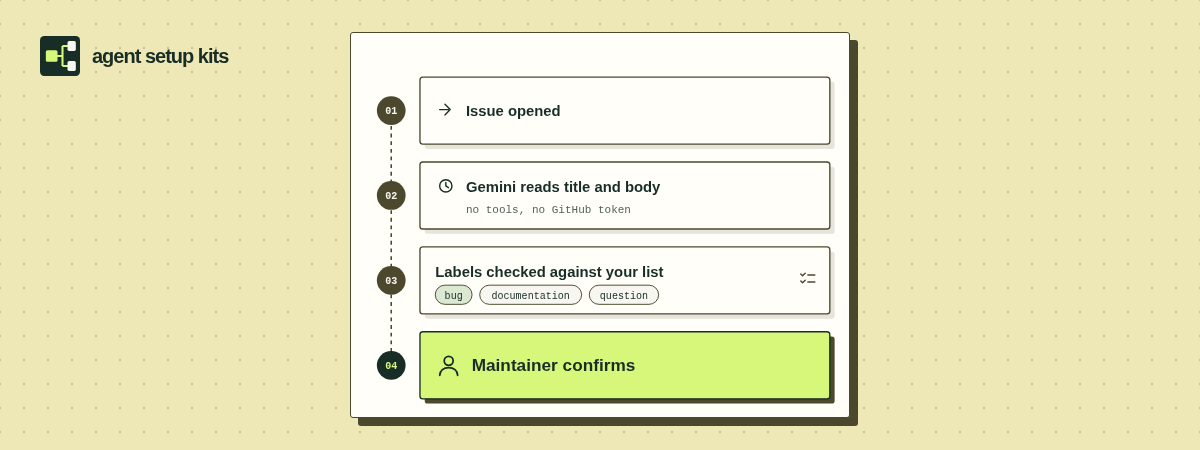
Google's run-gemini-cli GitHub Action can read each new issue and pick labels for it from the labels your repository already has. Its example triage workflow keeps the model away from tools and tokens; with one small change, it suggests labels and a maintainer confirms them.
This guide covers the example workflow, the security choices built into it, and that change.
Based on run-gemini-cli, by Google's google-github-actions team, Apache-2.0 license. The latest release is v0.1.22, published 2026-04-24. We checked the repo and its example workflows on 2026-10-28.
What you get
The repo ships issue triage workflows in two parts:
- Real-time triage (
gemini-triage.yml) runs when an issue is opened or reopened. - Scheduled triage (
gemini-scheduled-triage.yml) runs on a cron schedule and picks up issues with no labels or with thestatus/needs-triagelabel.
Both depend on gemini-dispatch.yml, a router workflow that decides which job to run for each event. Maintainers can also comment @gemini-cli /triage on an issue to run it by hand. The prompts live in TOML files you can copy into .gemini/commands/ and edit.
Before you start
- A Gemini API key from Google AI Studio, saved as a repository secret named
GEMINI_API_KEY. The action also supports Vertex AI and Workload Identity Federation, which the best practices guide recommends for Google Cloud users. - Labels already defined in your repository. The workflow fails if there are none.
- These lines in
.gitignore, per the README:.gemini/andgha-creds-*.json.
Setup
You can run /setup-github inside the Gemini CLI, or copy the workflow files by hand from the examples folder into .github/workflows/. If you only want triage, the triage README says to comment out or remove the other jobs in your copy of gemini-dispatch.yml.
How the example keeps the model contained
Read gemini-triage.yml before you use it. The safety work is already there:
Two jobs with different permissions. The triage job that runs Gemini has only read access to contents, issues, and pull requests. A separate label job, which never runs the model, holds issues: write.
No token for the model. The Gemini step sets GITHUB_TOKEN: '' with the comment "Do NOT pass any auth tokens here since this runs on untrusted inputs."
No tools. The settings block sets "tools": {"core": []}, so the model just reads the context and answers. The trust guidance says that when processing untrusted data, you must strictly limit which tools Gemini CLI can execute.
Labels from your list only. The label job filters Gemini's answer against the repository's existing labels, with a comment saying this is "just in case someone was able to prompt inject malicious labels."
Who can trigger it by comment. The dispatch workflow only honors @gemini-cli comments from users whose association is OWNER, MEMBER, or COLLABORATOR, and it skips pull requests from forks.
Short leash. The triage job has a 7-minute timeout and a 25-turn session cap.
The trust guidance also explains GEMINI_CLI_TRUST_WORKSPACE. The example sets it to true, which the guidance says is safe for trusted data, or for untrusted data only after you harden the workflow as above. Issue bodies from the public are untrusted, so keep those protections if you edit the file.
The human approval step: suggest, then confirm
As shipped, the label job applies labels directly with GitHub's set labels API, which, per GitHub's REST docs, "removes any previous labels and sets the new labels." That means a wrong answer can also wipe labels a person already set.
For a human-confirmed setup, change only the final script: in the label job so it comments instead of labeling. Keep the filtering lines above it, and replace the setLabels call with:
if (selectedLabels.length > 0) {
  await github.rest.issues.createComment({
    owner: context.repo.owner,
    repo: context.repo.repo,
    issue_number: issueNumber,
    body: `Suggested labels: ${selectedLabels.join(', ')}. A maintainer will confirm.`,
  });
}
Now Gemini proposes, and a maintainer applies the labels from the issue sidebar. Once you have watched it for a few weeks and trust its picks, you can decide whether to switch back to automatic labeling. If you do, consider GitHub's add labels endpoint instead, which keeps existing labels.
Pin the version
The examples reference run-gemini-cli@v0, a moving major tag. The best practices guide recommends pinning the action to prevent unexpected changes. For the strictest pin, use the full commit SHA of the release you reviewed (for v0.1.22, f77273f4c914e4bf38440cf36a0369cb64a37489), and set the GEMINI_CLI_VERSION repository variable to a specific CLI version rather than the default latest.
Next step
Install the triage workflow on a test repository with a handful of labels, open three or four sample issues, and compare Gemini's suggested labels with what you would have chosen. For a Claude-based alternative, see our Claude issue triage kit, or find an agent for the job.
Good setups, worth keeping. Request email updates on the home page, then confirm by email. No subscription starts until you confirm.