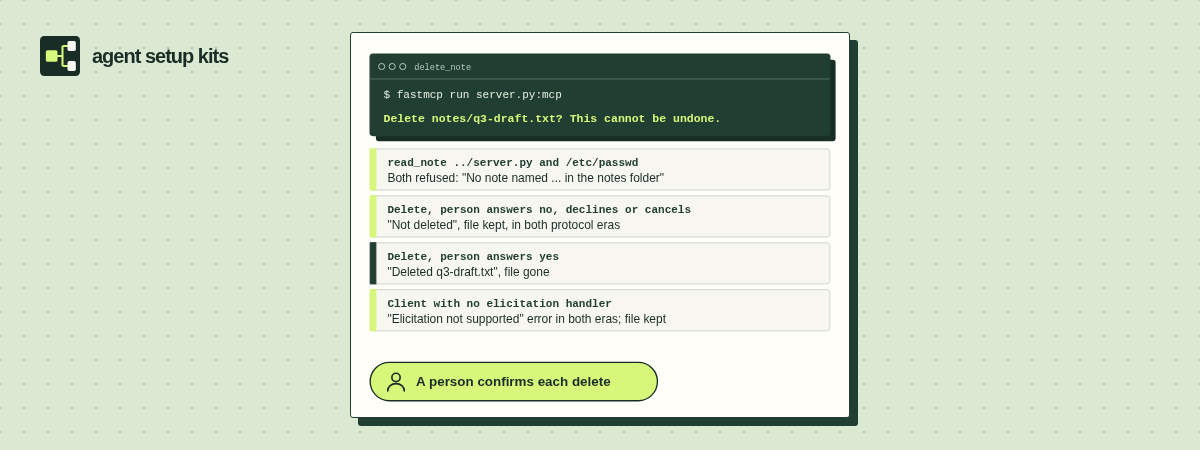
FastMCP turns Python functions into MCP tools with a decorator. We built a notes server with two read-only tools that cannot leave one folder, and one delete tool that asks a person before it removes anything. In our test the file was deleted only when the person said yes, and a client that could not ask got an error, not a deletion.
The agent proposes which note to read or remove. A person approves every delete in the client's prompt.
What FastMCP is (checked on 2026-10-30)
FastMCP is an open-source Python framework for building MCP servers and clients, under the Apache-2.0 licence. The PyPI page lists version 4.1.4 and Python 3.10 or newer. The installation docs recommend pinning an exact version for production use. It runs locally with no account or key.
Based on FastMCP, by Jeremiah Lowin, Nate Nowack and contributors.
The setup at a glance
- Trigger: an agent in an MCP client needs to look at or tidy a folder of notes.
- Permissions: read files in one
notesfolder; delete one file there only after a yes. No network, no other paths. - Output: a note list, a note's text, or "Deleted" / "Not deleted".
- Human approval:
delete_notesends a confirm question through MCP elicitation. Nothing is removed unless the person accepts and ticks confirm.
Step 1: Install
python3 -m venv .venv && . .venv/bin/activate
pip install "fastmcp==4.1.4"
fastmcp version
Step 2: Two read-only tools, confined to one folder
from pathlib import Path
from fastmcp import FastMCP, Context
from mcp.types import ToolAnnotations

NOTES = Path(__file__).parent / "notes"
mcp = FastMCP("Notes")

def safe(name: str) -> Path:
    p = (NOTES / name).resolve()
    if p.parent != NOTES.resolve() or not p.is_file():
        raise ValueError(f"No note named {name!r} in the notes folder")
    return p

@mcp.tool(annotations=ToolAnnotations(readOnlyHint=True, openWorldHint=False))
def read_note(name: str) -> str:
    """Read one note by file name."""
    return safe(name).read_text()
list_notes is the same idea and returns the file names. The safe() check is what keeps the tool in the folder. The tools docs say annotations are advisory hints that "won't enforce security boundaries on their own". They also say clients such as Claude and ChatGPT use readOnlyHint to decide when to skip confirmation prompts, so only mark a tool read-only when it truly is.
Step 3: A delete tool that asks first
Mark it destructive, then ask. FastMCP 4 speaks two protocol eras, and the elicitation docs cover both. On the 2026-07-28 protocol the tool returns an InputRequiredResult and reads the answer from ctx.input_responses when the client calls again. On older protocols it calls ctx.elicit().
from mcp.types import InputRequiredResult, ElicitRequest, ElicitRequestFormParams

@mcp.tool(annotations=ToolAnnotations(readOnlyHint=False, destructiveHint=True, openWorldHint=False))
async def delete_note(name: str, ctx: Context) -> str | InputRequiredResult:
    """Delete one note. A person must confirm first."""
    p = safe(name)
    question = f"Delete notes/{p.name}? This cannot be undone."
    if ctx.request_context.protocol_version >= "2026-07-28":
        r = ctx.input_responses
        if r is None:
            return InputRequiredResult(result_type="input_required", input_requests={"ok": ElicitRequest(
                method="elicitation/create", params=ElicitRequestFormParams(message=question,
                requested_schema={"type": "object", "properties": {"confirm": {"type": "boolean"}}, "required": ["confirm"]}))})
        a = r["ok"]
        ok = a.action == "accept" and bool((a.content or {}).get("confirm"))
    else:
        res = await ctx.elicit(question, response_type=bool)
        ok = res.action == "accept" and bool(res.data)
    if not ok:
        return f"Not deleted: {p.name}"
    p.unlink()
    return f"Deleted {p.name}"

if __name__ == "__main__":
    mcp.run()
Step 4: Run it and connect a client
fastmcp run server.py:mcpThat starts it on stdio, which is what desktop MCP clients launch. The client must support elicitation for deletes to work. The client elicitation docs show how a FastMCP client supplies the handler that shows the question to a person.
What our test showed
| Check | Result |
|---|---|
| Tool list | list_notes and read_note reported readOnlyHint: true; delete_note reported destructiveHint: true |
read_note on a note in the folder | Returned the note |
read_note ../server.py and /etc/passwd | Both refused: "No note named ... in the notes folder" |
| Delete, person answers no, declines or cancels | "Not deleted", file kept, in both protocol eras |
| Delete, person answers yes | "Deleted q3-draft.txt", file gone |
| Question schema | confirm on 2026-07-28; FastMCP wrapped bool as value on 2025-11-25 |
| Client with no elicitation handler | "Elicitation not supported" error in both eras; file kept |
| qwen2.5:3b agent, no system prompt | Guessed the name "q3 draft" and was refused; nothing deleted |
| qwen2.5:3b agent, told to list first | Found q3-draft.txt, then asked in chat whether to delete; it never called delete_note, so nothing was deleted |
| Same agent, user then types "Yes, go ahead." in chat | Called delete_note; the server still asked the person. A no kept the file; a yes deleted it |
The qwen2.5:3b weights are under the "Qwen RESEARCH LICENSE AGREEMENT", for non-commercial use only; check the model card before any commercial use.
One thing to watch: in that last run, when the person said no at the server's prompt, the 3B model told the user "there was an issue deleting the note". The server's answer was clear, the model's summary was not. The raw output is kept with our test records.
Things to know
- Annotations are labels for the client. Real limits, like the folder check, belong in your code.
- A server that asks needs a client that can show the question. Without one, our delete failed safely.
- The answer arrives in a different shape per protocol era, so read it by era, as in Step 3.
- A user typing "yes" in chat is not the same as the server's confirm prompt. In our test the server still asked.
- Pin the version. FastMCP 4 changed how elicitation works on the newest protocol.
Takeaway
FastMCP makes a small, scoped MCP server a few dozen lines of Python. Keep the read tools truly read-only in code, mark the delete tool destructive, and make it ask a person before it touches a file.
Next step: build the server with three throwaway notes and try a delete with a no answer before you point it at anything real.
How we check the tools we list is on our verification page.
Good setups, worth keeping. Request email updates on the home page, then confirm by email. No subscription starts until you confirm. Or find an agent for the job.
Part of: Which setup should I use to add human approval to an agent?