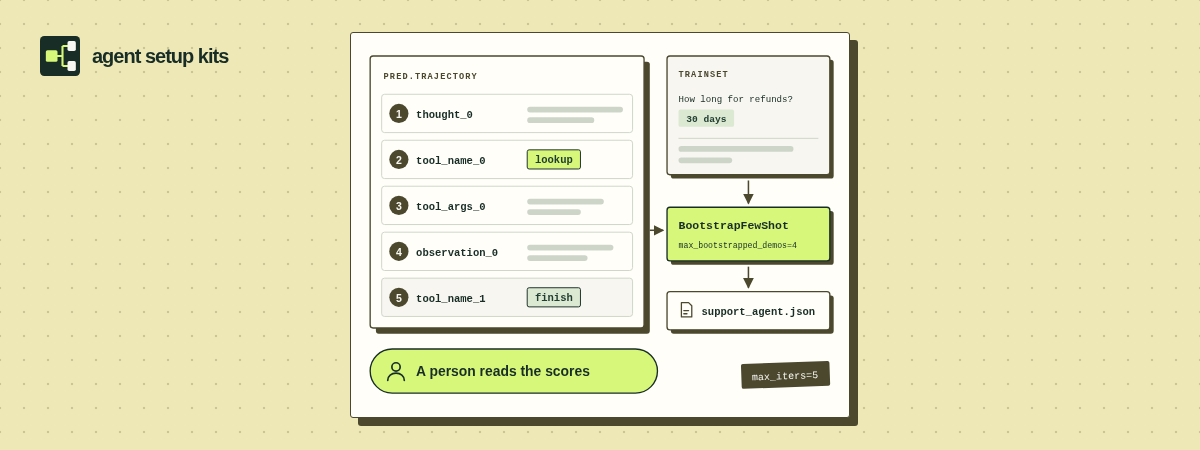
To run a DSPy ReAct agent, describe the task as a signature such as "question -> answer", pass Python functions as tools to dspy.ReAct, and call it like a function. To tune it, give dspy.BootstrapFewShot a metric and a handful of labeled examples, then save the compiled program.
We tested this on dspy 3.4.1 with DSPy's built-in stand-in model. The agent called its tool, finished, and returned an answer. Tuning returned a new program, not the one we passed in.
What it is (checked on 2026-10-30)
DSPy is a framework for programming language models with Python modules instead of hand-written prompts. It's MIT licensed, and its LICENSE file names Stanford Future Data Systems. The latest release on PyPI is 3.4.1 (uploaded 2026-10-12), for Python 3.10 up to 3.15.
dspy.ReAct(signature, tools, max_iters=20) runs a think, act, observe loop. Each turn the model writes a thought, picks a tool and its arguments, and reads the result. When it picks the built-in finish tool, a separate step writes the final answer.
Based on DSPy, by Stanford NLP and contributors.
The setup at a glance
- Trigger: your code calls the agent with a question.
- Permissions: whatever your tool functions can do. Start with read-only tools.
- Output: the fields in your signature, plus a trajectory of every step.
- Human approval: a person checks write actions inside the tool, and reviews the tuned program before it replaces the old one.
Step 1: Install and pick a model
python -m venv .venv
. .venv/bin/activate
pip install dspyimport dspy
dspy.configure(lm=dspy.LM("openai/gpt-4o-mini"))Use any provider DSPy supports. That one needs an OPENAI_API_KEY.
Step 2: Build the agent
def lookup(query: str) -> str:
    """Look up a fact in the support notes."""
    return search_your_notes(query)

agent = dspy.ReAct("question -> answer", tools=[lookup], max_iters=5)
pred = agent(question="How long do customers have to ask for a refund?")
print(pred.answer)
print(pred.trajectory)
The function name, type hints and docstring become the tool description, so write the docstring for the model. Keep max_iters low while testing. Each turn is a model call.
Step 3: Put approval inside write tools
We didn't find an approval hook in the ReAct docs. So if a tool changes something, the check goes in the tool itself:
def update_ticket(ticket_id: str, status: str) -> str:
    """Change a support ticket's status."""
    answer = input(f"Set {ticket_id} to {status}? (y/N): ")
    if answer.strip().lower() != "y":
        return "A person declined this change. Do not retry."
    return set_ticket_status(ticket_id, status)
ReAct catches tool errors and hands them back to the model as observations. A refusal written as a plain result string works the same way, and the model can read it.
Step 4: Tune it on a small example set
The optimizer guide calls BootstrapFewShot "the safe first try". It runs your program on training examples, keeps the runs that pass your metric, and uses them as worked examples.
def metric(example, pred, trace=None):
    return example.answer.lower() in pred.answer.lower()

trainset = [
    dspy.Example(question="How long for refunds?", answer="30 days").with_inputs("question"),
    # add 10 to 20 real questions with checked answers
]
devset = [...]  # different questions, same format

tuned = dspy.BootstrapFewShot(metric=metric, max_bootstrapped_demos=4).compile(
    agent, trainset=trainset)
print(dspy.Evaluate(devset=devset, metric=metric)(agent))
print(dspy.Evaluate(devset=devset, metric=metric)(tuned))
tuned.save("support_agent.json")
Score both on the dev set, not the training set. A person reads the scores and a few saved runs, and only then swaps the tuned file in.
What our test showed
We ran this on 3.4.1 with DummyLM, DSPy's stand-in model that replays fixed answers (no API key):
| Test | Result |
|---|---|
Tool call, then finish | Tool ran once; trajectory had thought_0, tool_name_0, tool_args_0, observation_0, then the same for step 1 |
Model never picks finish, max_iters=3 | Tool ran 3 times; the extract step still returned an answer |
BootstrapFewShot on 3 examples | Returned a new program; the original was unchanged |
save() | Wrote a JSON file with demos for the react and extract.predict steps |
| Evaluate on the training set | 100%, which tells you nothing |
The second row is the one to watch. Hitting the turn limit doesn't raise an error. You still get an answer, so log the trajectory length and flag runs that hit max_iters.
Things to know
From the DSPy docs:
- The guide warns that GEPA and MIPROv2 "can spend hundreds of dollars in LM calls on a single run". Start with
BootstrapFewShotand a small set. - For agent and tool-use tasks, the guide suggests
AvatarOptimizeror GEPA once you have a clean pass or fail metric. - Demo-tuning tends to overfit, so keep a separate dev set.
dspy.ReActV2is experimental. Its design becomes thedspy.ReActimplementation in DSPy 3.5, and theReActV2name goes away in 3.6. Code that readspred.trajectorywill need changes then, so pin your DSPy version.
Takeaway
DSPy turns an agent into a short program you can test and tune. Approval isn't built into ReAct, so put it in your write tools, cap max_iters, and only swap in a tuned program after a person compares dev set scores.
Next step: write 20 real questions with checked answers, split them 10 and 10, and score your untuned agent before you run any optimizer.
Good setups, worth keeping. Request email updates on the home page, then confirm by email. No subscription starts until you confirm. Or find an agent for the job.