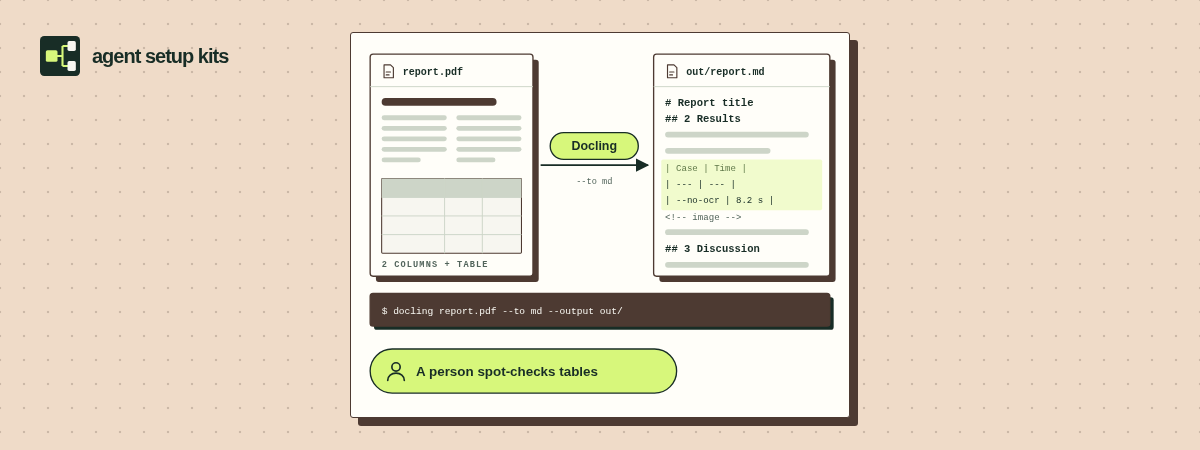
Docling turns PDFs and other documents into Markdown or JSON that keeps headings, reading order and tables, so an agent or a RAG index gets structure instead of a wall of text. Install it with pip, run docling file.pdf, and pick OCR on or off depending on whether the PDF has a text layer.
We tested the CLI, the Python chunker and the Docling MCP server on a Linux box with no GPU. Conversion worked well. The MCP server needed two settings that the main Docling docs page does not mention.
What it is (checked on 2026-10-30)
Docling parses PDF, DOCX, PPTX, XLSX, HTML, images and many other formats into a structured document you can export as Markdown, HTML or lossless JSON, among others. The code is under the MIT licence. The README adds that for the AI models it downloads, you should check each model's own licence. The latest release on PyPI is 2.145.0, uploaded on 2026-10-29, and it needs Python 3.10 or newer. The design is described in the Docling technical report.
Based on Docling, by the Docling Project and contributors.
The setup at a glance
- Trigger: a new PDF lands in a folder, or an agent is asked about a document.
- Permissions: read access to the input files and write access to one output folder. The first run downloads Docling's layout and table models from Hugging Face, so it needs network access once.
- Output: a Markdown file per document, plus JSON or chunks for a search index.
- Human approval: a person spot-checks tables and OCR text in the Markdown before the documents go into the index the agent answers from. Bad extraction becomes wrong answers later.
Step 1: Convert from the command line
pip install docling
docling report.pdf --to md --output out/
docling report.pdf --no-ocr --image-export-mode placeholder --to md --output out/
The CLI reference lists every option. Two matter most for agents. OCR is on by default, which is slow on a CPU and not needed when the PDF already has text. Images are embedded in the Markdown as base64 by default, which bloats it. The placeholder mode writes an image comment instead.
Step 2: Chunk it for retrieval
The chunking page describes the HybridChunker. It starts from the document's own hierarchy and then splits or merges chunks to fit the tokenizer of your embedding model. In our run, each chunk carried the headings it sat under.
from docling.document_converter import DocumentConverter
from docling.chunking import HybridChunker

doc = DocumentConverter().convert("report.pdf").document
for chunk in HybridChunker().chunk(dl_doc=doc):
    print(chunk.meta.headings, chunk.text[:80])
Store the headings and page numbers with each chunk, so an answer can point back to the page.
Step 3: Give an agent the MCP server
The Docling MCP page shows a client entry that runs uvx --from=docling-mcp docling-mcp-server. With docling-mcp 3.4.0 we needed two more settings, both covered in the docling-mcp README. We ran the same arguments from a pip install of docling-mcp[local] rather than through uvx:
{
  "mcpServers": {
    "docling": {
      "command": "uvx",
      "args": ["--from=docling-mcp[local]", "docling-mcp-server", "--transport", "stdio", "conversion", "generation"],
      "env": { "DOCLING_MCP_CONVERSION_MODE": "local" }
    }
  }
}
The default transport is streamable-http, so a desktop client that expects stdio waits for a reply that never comes. The default conversion mode is remote, which needs a Docling Serve URL.
What our test showed
We used the 9-page Docling technical report as the test PDF.
| Case | What happened |
|---|---|
| CLI, OCR on (default) | Converted in 46.2 seconds. 21 table lines in the Markdown |
| CLI, --no-ocr | Converted in 8.2 seconds |
| Default image mode | Markdown was 578 KB, almost all base64 images |
| --image-export-mode placeholder | Markdown was 29 KB with 5 image placeholders |
| Page 1 saved as an image-only PDF, OCR on | 308 words recovered in 35 seconds, with small OCR slips such as "Omenetti i" |
| Same scan, --no-ocr | 3 words. The text was lost |
| HybridChunker | 40 chunks, each with its heading path and page number |
| MCP server, client config from the docs page | Server started on HTTP port 8000. Our stdio client timed out |
| MCP server with --transport stdio, defaults | Listed 21 tools. Conversion failed: DOCLING_MCP_SERVICE_URL is not set |
| Same with DOCLING_MCP_CONVERSION_MODE=local | Converted in 37 seconds, then exported 34 KB of Markdown |
| Tool groups "conversion generation" | 16 tools instead of 21. The manipulation tools that edit or delete document items were gone |
Things to know
- Check for a text layer first. Scanned PDFs need OCR. In our test, a PDF that already had text converted more than five times faster without it. A simple rule is to try --no-ocr and fall back to OCR when the output is nearly empty.
- Use placeholder images for agents. Base64 images waste context and index space.
- Trim the MCP tools. The default set includes tools that edit and delete items in cached documents, and save_docling_document writes files to disk. If the agent only reads documents, load the tool groups you need.
- The two docs disagree on defaults. The main Docling MCP page says the server converts locally by default. The installed 3.4.0 package and its README default to remote. Trust the README and set the mode yourself.
- We ran on CPU only. Docling has GPU and vision-model pipelines that we did not test.
Takeaway
Docling gives agents structured Markdown and heading-aware chunks from messy PDFs, and it runs fine on a CPU. Turn OCR off for born-digital files, use placeholder images, and have a person check tables before indexing. For the MCP server, set the transport, the conversion mode and the tool groups explicitly.
Next step: convert five of your own PDFs with --no-ocr and placeholder images, open the Markdown next to the originals, and only then index them.
Good setups, worth keeping. Request email updates on the home page, then confirm by email. No subscription starts until you confirm. Or find an agent for the job.