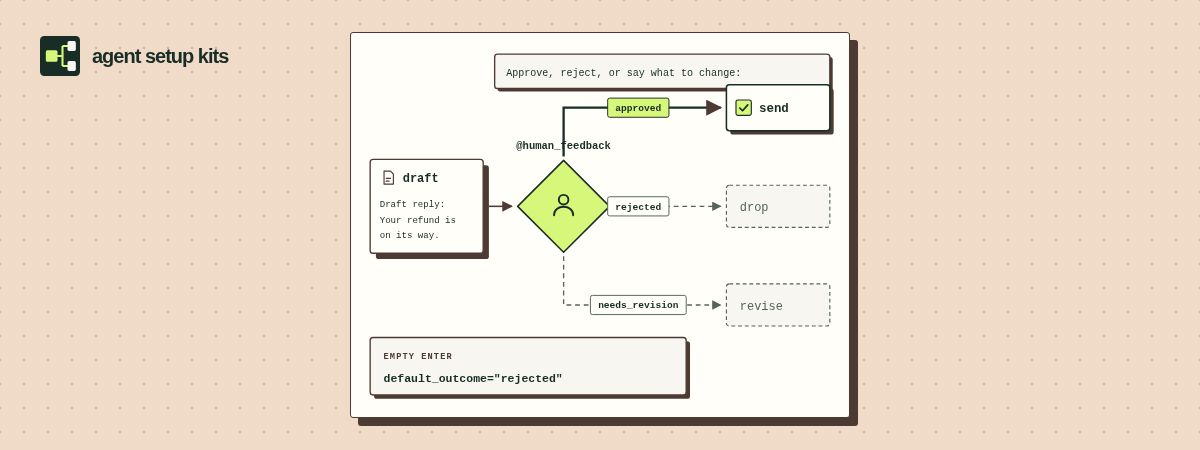
To add human review to a CrewAI Flow, put the @human_feedback decorator on the step that produces a draft, list the outcomes in emit, and attach a @listen handler to each one. Always set default_outcome to a safe choice like rejected, because in our test an empty Enter with no default picked the first outcome in the list.
We tested this on CrewAI 1.15.33 with four reviewer responses, and only the ones that said "approve" reached the send step once the default was set.
What it is (checked on 2026-10-30)
CrewAI is a Python framework for agent teams ("crews") and event-driven workflows ("Flows"). It's MIT licensed (LICENSE). The latest release on PyPI is 1.15.33, uploaded on 2026-10-28, and it needs Python 3.10 to 3.13.
The @human_feedback decorator needs CrewAI 1.8.0 or later. It shows a step's output to a person, waits for feedback, then routes the flow based on what they said.
Based on CrewAI, by crewAIInc and contributors.
The setup at a glance
- Trigger: you start the flow with
flow.kickoff(). - Permissions: whatever your later steps do, such as sending an email. Those steps should only run after approval.
- Output: a
HumanFeedbackResultwith the draft, the feedback, the chosen outcome and a timestamp. - Human approval: a reviewer reads the draft in the console and types a reply. An LLM maps that reply to one of your outcomes.
Step 1: Install
pip install crewaiThe routing step calls an LLM, so set the key for the model you name in llm, for example OPENAI_API_KEY for gpt-4o-mini.
Step 2: Gate the draft
from crewai.flow.flow import Flow, start, listen
from crewai.flow.human_feedback import human_feedback

class ReplyReview(Flow):
    @start()
    @human_feedback(
        message="Approve, reject, or say what to change:",
        emit=["approved", "rejected", "needs_revision"],
        llm="gpt-4o-mini",
        default_outcome="rejected",
    )
    def draft(self):
        return "Draft reply: Your refund is on its way."

    @listen("approved")
    def send(self, result):
        # the only step that acts
        return "sent"

    @listen("rejected")
    def drop(self, result):
        return "dropped"

    @listen("needs_revision")
    def revise(self, result):
        return f"revise: {result.feedback}"

ReplyReview().kickoff()
The console shows the draft and the message, then waits with "(Press Enter to skip, or type your feedback)". Each reply is stored in human_feedback_history, which gives you an audit trail.
Step 3: Log what the reviewer decided
The result passed to each handler is a HumanFeedbackResult. It holds output (the draft), feedback (what the person typed), outcome, timestamp and method_name. Write those fields to your own log in the send step, so you can show later what was approved, with what feedback, and when.
What our test showed
We ran the flow above with piped input. To skip API calls, we replaced the LLM routing step with a simple stand-in: replies containing "approve" became approved, and anything else became rejected. So this tests the routing and defaults, not how well the LLM reads replies.
| Setup | Reviewer reply | Outcome | Send ran? |
|---|---|---|---|
No default_outcome | Enter (empty) | approved | Yes |
default_outcome="needs_revision" | Enter (empty) | needs_revision | No |
default_outcome="rejected" | Enter (empty) | rejected | No |
default_outcome="rejected" | "approve" | approved | Yes |
default_outcome="rejected" | "no, wrong tone" | rejected | No |
The first row is the risk. With no default and approved first in emit, an empty Enter sent the reply.
Things to know
- The docs advise "Always Provide a Default Outcome" and use
needs_revisionas the safe default. Their revision-loop example setsdefault_outcome="approved", though, so an empty Enter publishes. Change it before you copy it. - A revision loop needs
@listen(or_("generate", "revise"))on the review step. In our tests, it asked again on everyneeds_revision, so plan how a reviewer ends the loop. - For a single task,
Task(human_input=True)asks for input before the agent gives its final answer (docs). It doesn't route to different steps. - Free-text replies are interpreted by the LLM in
llm. Keep the outcome names clear, and checkresult.outcomein logs.
Takeaway
@human_feedback gives a CrewAI Flow a real review gate with an audit trail. Put the only action that matters behind @listen("approved"), and set default_outcome to rejected or needs_revision so silence never counts as yes.
Next step: add default_outcome="rejected" to every @human_feedback call in your flows, then press Enter at the prompt and confirm nothing gets sent.
Good setups, worth keeping. Request email updates on the home page, then confirm by email. No subscription starts until you confirm. Or find an agent for the job.
Part of: Which setup should I use to add human approval to an agent?