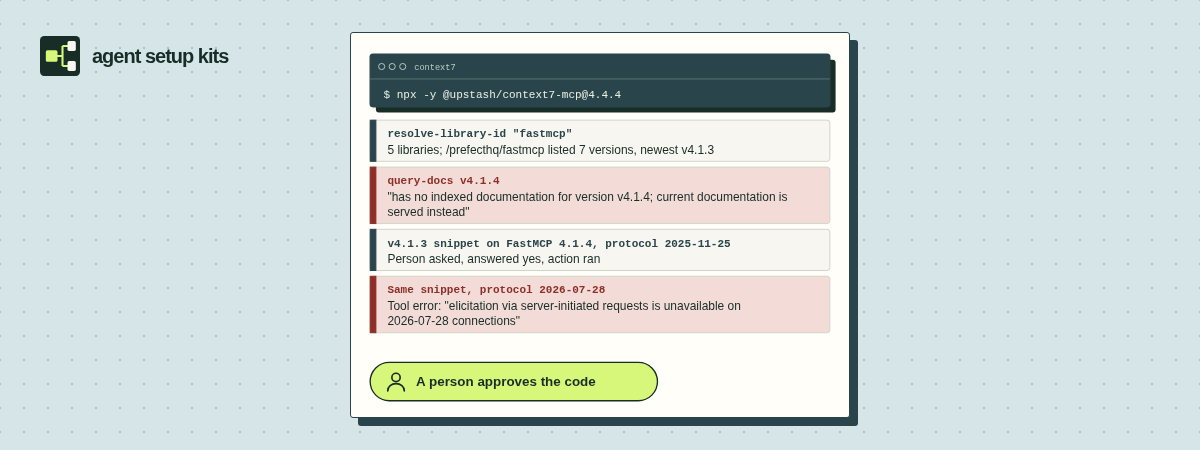
Context7 is an MCP server that hands a coding agent library docs and code snippets for the version you name, so it writes less code from stale memory. We ran it locally with no API key, pinned FastMCP to a version, and ran the top snippet it returned. It worked on the older MCP protocol and was refused on the newer one, and a version Context7 had not indexed came back as current docs with a note. Useful, but the code still needs a person's review.
The agent fetches the docs and drafts the code. A person checks the code against the version you actually run, and approves it.
What Context7 is (checked on 2026-10-30)
Context7 is made by Upstash. The repo holds the MIT-licensed MCP server, a ctx7 CLI and SDKs. Its README says the API backend, parsing engine and crawling engine are private, and that library docs are community-contributed, so Context7 cannot guarantee their accuracy, completeness or security. We tested @upstash/context7-mcp 4.4.4.
The README recommends a free API key "for higher rate limits". Our calls worked without one. The plans page says a free account with a key gets 1,000 API calls a month. It does not give a number for calls without a key.
Based on Context7, by Upstash and contributors.
The setup at a glance
- Trigger: a coding agent is about to write code against a library it may know only from older training data.
- Permissions: two tools, both marked
readOnlyHint: trueandopenWorldHint: true. They read nothing on your machine, but every query goes to Context7's servers. - Output: a ranked list of library IDs, then doc sections and code snippets with links to their source files.
- Human approval: a person reviews and approves any code the agent writes from those docs before it is merged, and decides what may go into a query.
Step 1: Run the server locally, pinned
npx -y @upstash/context7-mcp@4.4.4 --helpIt runs over stdio by default and takes --api-key or the CONTEXT7_API_KEY environment variable if you add a key later. Most MCP clients accept a block like this; check your client's format:
{ "mcpServers": { "context7": { "command": "npx", "args": ["-y", "@upstash/context7-mcp@4.4.4"] } } }The installation page leads with npx ctx7 setup, which signs you in with OAuth and creates a key. We skipped it to stay keyless.
Step 2: Resolve the library, then pin the version
resolve-library-id takes a library name and your question. For "fastmcp" it returned five matches, including an unrelated TypeScript project also titled FastMCP. Each had a Context7 ID, and the PrefectHQ entry listed its indexed versions.
Pick the ID yourself, then add the version you run: /prefecthq/fastmcp/v4.1.3. The tips page says an ID in the prompt skips the matching step.
Step 3: Check the snippet against your version
query-docs takes the ID, the question and an optional language. Run the snippet it returns before you trust it.
What our test showed
| Check | Result |
|---|---|
tools/list | resolve-library-id and query-docs, both read-only and open-world |
| Keyless calls | All succeeded, no key set |
resolve-library-id "fastmcp" | 5 libraries; /prefecthq/fastmcp listed 7 versions, newest v4.1.3 |
query-docs latest | Confirmation snippet, plus the newer-protocol pattern (InputRequiredResult 4 times) |
query-docs v4.1.3 | Same top snippet using ctx.elicit; no InputRequiredResult in the result |
query-docs v2.14.4 | An older form of the snippet, response_type=None |
query-docs v4.1.4 | "has no indexed documentation for version v4.1.4; current documentation is served instead" |
| v4.1.3 snippet on FastMCP 4.1.4, protocol 2025-11-25 | Person asked, answered yes, action ran |
| Same snippet, protocol 2026-07-28 | Tool error: "elicitation via server-initiated requests is unavailable on 2026-07-28 connections" |
The snippet was correct for the older protocol. The v4.1.3 result also explained that the newer protocol works differently, but an agent that copies only the top snippet would miss that. The FastMCP elicitation page covers both.
Things to know
- Queries leave your machine. The server sends your question and library name to
context7.comas URL parameters, so keep secrets, customer data and private code out of them. - Treat returned docs as untrusted input. They are community-sourced, and the README asks you to report harmful content.
- The version you run may not be indexed. Read the version note before you rely on the result.
- Two projects can share a name. Check the ID and description before you pin it.
Takeaway
Context7 gives an agent fresher docs than its memory, but not proof. Pin the version, read the version note, run the snippet, and have a person approve the code.
Next step: pick one library your agent uses, find its Context7 ID with the version you run, and test the top snippet before you let the agent use it.
How we check the tools we list is on our verification page.
Good setups, worth keeping. Request email updates on the home page, then confirm by email. No subscription starts until you confirm. Or find an agent for the job.