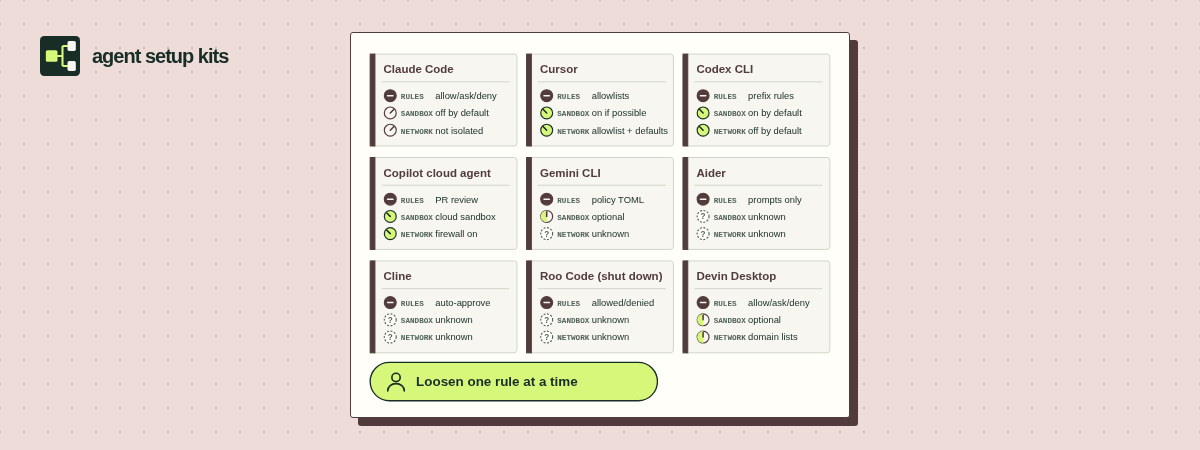
Before you give a coding agent your repo, decide what it can touch: what runs without asking, what it can read, and where it can send data.
This page compares how nine coding agents handle that, using only their own official docs. Every cell links to its source. A blank we could not confirm says unknown. We did not guess.
Checked 25 Nov 2026. These products change monthly. If a doc has moved on, the doc wins. Tell us and we'll fix the page.
The short answer
- Strongest local defaults: OpenAI Codex CLI and Cursor. Both run commands in an OS sandbox that limits writes to the workspace and blocks network by default (Codex, Cursor).
- Most fine-grained rules: Claude Code. It has allow, ask and deny rules for each tool, admin-only rule sets, and an optional OS sandbox with a domain allowlist. The sandbox is off by default (permissions, sandboxing).
- Cloud agents (Copilot cloud agent, Cursor Cloud Agents) don't ask before each action. Their safety comes from the VM, a network firewall or allowlist, and a pull request that a person must review (Copilot, Cursor).
- Least built-in containment: Aider and Cline. They have approval prompts, but their docs describe no OS-level sandbox or network control. Cline's CLI runs a prompt in YOLO mode unless you opt out (Cline CLI).
Three things that surprised us
- "Let a model decide" is now the default in two of the biggest tools, and every vendor says it isn't a security boundary. Claude Code v2.1.283+ starts interactive sessions in auto mode, where a classifier reviews actions instead of you (source). Cursor shipped Auto-review as its recommended default in v3.6 (source). Codex offers Auto-review / "Approve for me" (source), and Devin Desktop (formerly Windsurf) has Smart mode (source). Cursor says plainly: "Auto-review is not a security boundary." Codex calls it "not a deterministic security guarantee." Claude Code says auto mode "does not guarantee safety." Pair a classifier with a sandbox. Don't use it instead of one.
- Ignore files and deny rules usually don't stop the shell. Cursor's docs say terminal and MCP tools can't be blocked by
.cursorignore(source). Cline says.clineignore"is not a security or access-control boundary" (source). Claude Code'sReaddeny rules don't cover a script that reads files indirectly (source). Codex deny-read globs are captured when each sandboxed process starts, so a.envcreated later can still be read (source). To keep secrets safe, use an OS sandbox or keep them off the machine. - Cline's CLI is YOLO by default when you pass a prompt, and it has no shell allow or deny list. The CLI reference says a prompt "runs in yolo mode by default; pass
--auto-approve false(or--act/--plan) to opt out." It also says "the CLI has no allow or deny list for shell commands," so you block commands with aPreToolUsehook (source). The VS Code extension recommends the opposite: leave edits, commands, browser and MCP off (source).
Also worth knowing:
- Roo Code shut down. The extension was shut down and its repo archived on May 15, 2026 (docs, GitHub).
- Windsurf's docs now redirect to Devin Desktop. Its new agent, Devin Local, uses Devin CLI's permission model (source).
- GitHub now calls it the "Copilot cloud agent" (formerly the coding agent).
- Codex removed
approval_policy = "untrusted". That setting can now stop Codex from starting (source).
Table 1: Approvals, rules and YOLO switches
| Tool | Approval modes | Allow / deny lists | Auto-run / YOLO switch |
|---|---|---|---|
| Claude Code | default (Manual), acceptEdits, plan, auto (classifier), dontAsk, bypassPermissions. Auto is the starting mode for interactive sessions from v2.1.283 (modes) | allow, ask, deny rules per tool, e.g. Bash(npm run *), Read(./.env). Evaluated deny → ask → allow; an allow can't override a deny (permissions) | --dangerously-skip-permissions or --permission-mode bypassPermissions. Docs say use only in isolated containers or VMs. Refused under root/sudo (modes) |
| Cursor (local agent) | Run Modes: Auto-review (recommended default), Allowlist, Run Everything. "Ask Every Time" deprecated in v3.5 (run modes) | terminalAllowlist and mcpAllowlist in permissions.json, plus autoRun guidance for the classifier (permissions.json). CLI: permissions.allow / deny, deny wins (CLI permissions) | Run Everything mode (run modes). CLI: -f/--force, alias --yolo (CLI parameters) |
| Cursor Cloud Agents | None. "Cloud Agents do not use Run Modes … the agent never asks you to approve an action" (run modes) | Network domain allowlist only (see Table 2) (secrets & network) | Always auto-runs terminal commands (cloud security) |
| OpenAI Codex CLI | approval_policy: on-request, never, or granular. untrusted is retired. Optional approvals_reviewer = "auto_review" (approvals & security) | prefix_rule entries in .rules files, e.g. ~/.codex/rules/default.rules (rules). Path and domain allow/deny in permission profiles (permissions) | --dangerously-bypass-approvals-and-sandbox, alias --yolo, means no sandbox and no approvals. -a never turns off prompts but keeps the sandbox (approvals & security) |
| GitHub Copilot cloud agent | No approval for each action. A person must review the draft PR, and workflows wait for Approve and run workflows (risks & mitigations) | Firewall allowlist for network (Table 2) (firewall). Copilot CLI (separate product) has --allow-tool / --deny-tool (Copilot CLI) | Always autonomous inside its environment. For Copilot CLI: --allow-all-tools (Copilot CLI) |
| Gemini CLI | default, auto_edit, plan (experimental), yolo (configuration). Read-only tools allowed, write and shell tools ask by default (policy engine) | Policy-engine TOML rules with allow / deny / ask_user and priorities, e.g. commandPrefix = "rm -rf". Also --allowed-tools and tools.core (policy engine, configuration) | --yolo or --approval-mode=yolo (configuration) |
| Aider | Yes/no confirmations. It offers to run suggested shell commands (history). It edits only files you add to the chat (usage) | unknown: no allow/deny rule system documented | --yes-always: "Always say yes to every confirmation" (options) |
| Cline | Per-category Auto Approve toggles: read, edit, safe commands, all commands, browser, MCP (auto-approve) | No fixed allowlist: "The model marks each command with a requires_approval flag" (auto-approve). CLI: no shell allow/deny list, use a PreToolUse hook (CLI) | YOLO mode checkbox approves everything (auto-approve). The CLI defaults to YOLO when given a prompt (CLI) |
| Roo Code (shut down May 15, 2026) | Auto-approve dropdown with per-permission toggles (auto-approve) | "Allowed Commands" and "Denied Commands" prefix lists; longest prefix wins (auto-approve) | Allowed command * approves every command (auto-approve) |
| Windsurf → Devin Desktop (Devin Local) | Code (default), Smart (classifier), Ask, Plan, Bypass Permissions (modes) | Allow / Ask / Deny rules, e.g. Exec(git status), Read(**/*.pem). Deny is highest priority (permissions, terminal) | Bypass Permissions. Admin deny and ask rules still apply (modes) |
Table 2: Sandbox, network and file scope
| Tool | Sandboxing | Network default | File scope |
|---|---|---|---|
| Claude Code | Optional OS sandbox for Bash: Seatbelt on macOS, bubblewrap on Linux/WSL2. Off by default. Turn on with /sandbox or sandbox.enabled (sandboxing) | Without the sandbox, network isn't isolated. WebFetch asks except for preapproved doc domains (permissions). With the sandbox, a proxy checks allowedDomains, which starts empty (sandboxing) | Reads allowed without asking inside working and added directories. Edits ask in Manual mode (permissions) |
| Cursor (local agent) | Shell commands run in a sandbox when possible: Seatbelt on macOS, Landlock + seccomp on Linux (kernel 6.2+). Otherwise Cursor asks (run modes) | Sandbox network blocked except sandbox.json allowlist + Cursor defaults (default mode) (run modes, sandbox.json) | Workspace files editable without approval, except config files. .git/config, .git/hooks, .vscode protected (agent security, run modes) |
| Cursor Cloud Agents | Dedicated Firecracker microVM for each agent (cloud security) | Three modes: Allow all, Default + allowlist, Allowlist only (secrets & network). Which one is the default: unknown | Only repos the triggering user can already reach (cloud security) |
| OpenAI Codex CLI | OS sandbox on by default: Seatbelt on macOS, bwrap + seccomp on Linux, MXC on Windows (approvals & security) | Off by default. Turn on with [sandbox_workspace_write] network_access = true or a profile with network_proxy domain rules (approvals & security, permissions) | Writes limited to workspace + temp. .git, .agents, .codex, .aws stay read-only (approvals & security) |
| GitHub Copilot cloud agent | Runs in a cloud sandbox, a GitHub Actions runner, or a remote environment (about) | Firewall on by default, with a recommended allowlist of package registries. It covers Bash-started processes and Playwright MCP, and can be bypassed (firewall) | One repo. Pushes only to its copilot/ branch or the PR branch it was asked to work on (risks & mitigations) |
| Gemini CLI | Optional: -s / tools.sandbox (default undefined). Methods: Seatbelt, Docker/Podman, Windows native, gVisor, LXC (sandbox, configuration) | Default Seatbelt profile permissive-open allows network. *-proxied profiles route through a proxy (sandbox). Without the sandbox: unknown (not documented) | Sandbox limits writes to the project directory (sandbox). .geminiignore filters tools that support it (ignore) |
| Aider | unknown: no built-in sandbox documented. Official Docker images exist (docker) | unknown | Edits only files added to the chat (usage). .aiderignore and --subtree-only (options) |
| Cline | unknown. The CLI has a "sandbox mode" tied to isolated state (--data-dir, CLINE_SANDBOX), but no OS isolation is described (CLI) | unknown | Workspace vs "all files" toggles for read and edit (auto-approve). .clineignore isn't a boundary (clineignore) |
| Roo Code | unknown | unknown | Workspace only by default. Outside-workspace and protected-file (.roo/, .rooignore) toggles (auto-approve). .rooignore (rooignore) |
| Windsurf → Devin Desktop | Optional OS-level sandbox: filesystem isolation and domain filtering ("when enabled"). A sandboxed session switches to Autonomous mode (overview, modes) | With the sandbox: domain allow and deny lists (overview). Without the sandbox, HTTP fetches follow permission rules (permissions) | Reads and edits within the workspace by default (overview). Can read gitignored files unless you turn that off (devinignore) |
Table 3: Config files and admin controls
| Tool | Config file names and locations | Enterprise / admin controls |
|---|---|---|
| Claude Code | ~/.claude/settings.json (user), .claude/settings.json (shared project), .claude/settings.local.json (local) (settings) | managed-settings.json: macOS /Library/Application Support/ClaudeCode/, Linux /etc/claude-code/, Windows C:\Program Files\ClaudeCode\, or MDM. Keys include disableBypassPermissionsMode and allowManagedPermissionRulesOnly (managed settings, permissions) |
| Cursor (local agent) | ~/.cursor/permissions.json + <repo>/.cursor/permissions.json (permissions.json). ~/.cursor/sandbox.json + <repo>/.cursor/sandbox.json (sandbox.json). CLI: ~/.cursor/cli-config.json, <project>/.cursor/cli.json (CLI permissions). .cursorignore (ignore) | Admin dashboard settings override permissions.json and the IDE (permissions.json). Admins control available modes, sandbox networking and the team read policy (run modes) |
| Cursor Cloud Agents | Dashboard (user, environment, team) (secrets & network) | Enterprise Lock Network Access Policy. Protected Git Scopes. Runtime secrets redacted from transcripts (secrets & network, cloud security) |
| OpenAI Codex CLI | ~/.codex/config.toml, project .codex/config.toml (trusted projects only), /etc/codex/config.toml (config basics). Rules: ~/.codex/rules/*.rules (rules) | requirements.toml with allowed_approval_policies, allowed_permission_profiles and legacy allowed_sandbox_modes. Managed profiles (managed configuration, permissions) |
| GitHub Copilot cloud agent | .github/workflows/copilot-setup-steps.yml for the environment (environment). Firewall under Settings → Copilot → Internet access (firewall) | Enterprise "Copilot in the cloud" policy (admin). Org firewall settings, including blocking repo custom rules (firewall). Branch protection and an extra required approval for its PRs (risks & mitigations) |
| Gemini CLI | ~/.gemini/settings.json, .gemini/settings.json (configuration). Policies: ~/.gemini/policies/*.toml (workspace policies disabled) (policy engine). .geminiignore (ignore) | System settings.json (e.g. /etc/gemini-cli/settings.json). security.disableYoloMode. Enforced tools.sandbox (enterprise). Admin policy directories such as /etc/gemini-cli/policies (policy engine). Trusted Folders, off by default (trusted folders) |
| Aider | .aider.conf.yml in home, git root or current directory (config file). .aiderignore in git root (options) | unknown: none documented |
| Cline | Extension: settings panel (auto-approve). CLI: ~/.cline/ (overridable with CLINE_DIR) (CLI). .clineignore (deprecating) (clineignore) | Remote config yoloModeAllowed: false (enterprise YOLO). MCP controls mcpMarketplaceEnabled, allowedMCPServers, blockPersonalRemoteMCPServers (MCP controls) |
| Roo Code | VS Code settings roo-cline.allowedCommands / denied list. .rooignore (auto-approve, rooignore) | unknown |
| Windsurf → Devin Desktop | Devin Local settings (Allow / Deny / Ask) (terminal). Devin CLI files: .devin/config.json, ~/.config/devin/config.json (CLI permissions). Whether Desktop reads those files: unknown | Org-wide allow, ask and deny rules, enforced sandbox, network allow and deny, limits on which modes members can use. Legacy Cascade auto-run and allowlists still apply as a fallback (terminal, overview) |
Safe-default starter configs
Each one starts tight: read freely, ask before commands, block secrets, no network you didn't choose. Loosen one rule at a time. These are our own starting points, not vendor defaults. Test them on a throwaway repo first.
Claude Code: `.claude/settings.json`
{
  "permissions": {
    "defaultMode": "default",
    "allow": ["Bash(npm run *)", "Bash(git status)", "Bash(git diff *)"],
    "ask": ["Bash(git push *)", "Bash(git commit *)"],
    "deny": ["Read(./.env)", "Read(./.env.*)", "Read(./secrets/**)"],
    "disableBypassPermissionsMode": "disable"
  },
  "sandbox": {
    "enabled": true,
    "allowUnsandboxedCommands": false,
    "network": { "allowedDomains": ["registry.npmjs.org"] }
  }
}
Why: default is Manual mode, which asks. This matters because new sessions otherwise start in auto mode. The sandbox stops a script from reading what Read denies can't cover. allowUnsandboxedCommands: false turns off the unsandboxed retry. Sources: permissions, modes, sandboxing.
Verify on your setup: terminal sessions read defaultMode from this project file and show ⏸ manual mode on, but the VS Code extension ignores project settings for the starting mode. There, set claudeCode.initialPermissionMode to default (modes).
Cursor: `.cursor/permissions.json` + `.cursor/sandbox.json`
// .cursor/permissions.json
{
  "terminalAllowlist": ["git status", "git diff", "npm test"],
  "mcpAllowlist": []
}// .cursor/sandbox.json
{
"type": "workspace_readwrite",
"readBoundary": "workspace",
"disableTmpWrite": true,
"networkPolicy": { "default": "deny", "allow": ["registry.npmjs.org"], "deny": [] }
}Then in Settings → Agents → Approvals & Execution, pick Allowlist with sandboxing on (fully predictable), or Auto-review if you accept a classifier. Keep File-Deletion and External-File Protection on. readBoundary: "workspace" needs a recent Cursor version (v3.23 added it). The terminalAllowlist string format is from the reference page. Check it against your version. Sources: run modes, permissions.json, sandbox.json.
Cursor Cloud Agents: set network to Allowlist only, mark secrets as Runtime Secrets, and require PR review (secrets & network).
OpenAI Codex CLI: `~/.codex/config.toml`
approval_policy = "on-request"
default_permissions = "project-edit"
web_search = "disabled"

[permissions.project-edit]
extends = ":workspace"          # keeps .git/.codex/.agents/.aws read-only

[permissions.project-edit.filesystem.":workspace_roots"]
"**/*.env" = "deny"

[permissions.project-edit.network]
enabled = false
Why: the workspace is writable, network is off, and .env reads are denied. Never use --yolo outside a disposable container. Sources: permissions, approvals & security. The extends plus deny-glob pairing matches the docs' "Extend a profile" example. We ran it under codex sandbox (Codex CLI 0.172.0, Linux): .env reads were denied, .git stayed read-only and network was blocked. On Linux and Windows, Codex warns about the unbounded **; add glob_scan_max_depth = 3 under [permissions.project-edit.filesystem] to cap it. Run /status to confirm what's active.
GitHub Copilot cloud agent: repo and org settings
- Settings → Copilot → Internet access: firewall Enabled, recommended allowlist Enabled. At org level, turn off Allow repository custom rules unless you need it (firewall).
- Keep the default: workflows don't run on Copilot PRs until someone with write access clicks Approve and run workflows. Keep branch protection and required reviews (risks & mitigations).
- Put setup steps in
.github/workflows/copilot-setup-steps.ymland keep secrets out of it (environment).
Gemini CLI: `~/.gemini/settings.json` + `~/.gemini/policies/safe.toml`
{
  "security": {
    "disableYoloMode": true,
    "folderTrust": { "enabled": true }
  },
  "tools": { "sandbox": "docker" }
}[[rule]]
toolName = "run_shell_command"
commandPrefix = "rm -rf"
decision = "deny"
priority = 100
[[rule]]
toolName = "run_shell_command"
commandPrefix = "git push"
decision = "ask_user"
priority = 100On macOS, you can use Seatbelt with SEATBELT_PROFILE=restrictive-proxied instead of Docker if you want network through a proxy. The default permissive-open allows network. Sources: enterprise, trusted folders, sandbox, policy engine.
Aider: `.aider.conf.yml` at the git root
yes-always: false
auto-commits: true            # every LLM edit becomes a reviewable commit
dirty-commits: true
git-commit-verify: true       # don't skip your pre-commit hooks
aiderignore: .aiderignore
Aider has no sandbox we could find, so for anything risky, run the official Docker image mounted to one repo only. Sources: options, config file, docker.
Cline
- Extension: turn on Read project files only. Leave edits, commands, browser and MCP off until you need them, and use Checkpoints (auto-approve).
- CLI: always pass
--auto-approve false(or--act/--plan) with a prompt, and add aPreToolUsehook to block commands (CLI, clineignore hook). - Teams: set
"yoloModeAllowed": falsein remote config (enterprise YOLO).
Roo Code
The extension is shut down, so move off it (docs). If you still run it, deny * and allow only specific prefixes like git, npm run, as Roo's own "production template" says (auto-approve).
Windsurf / Devin Desktop: Devin rules (`.devin/config.json` syntax)
{
  "permissions": {
    "allow": ["Read(src/**)", "Exec(git status)", "Exec(git diff)", "Exec(npm run lint)"],
    "deny": ["Exec(rm)", "Exec(sudo)", "Write(.env*)", "Read(**/*.pem)"],
    "ask": ["Write(**)", "exec"]
  }
}
Use Code mode, turn on the sandbox if your plan allows it, and turn off Gitignore access. This is Devin's own "Locked-Down Enterprise" example plus one .pem deny (CLI permissions, modes, devinignore).
How we checked
- Sources: official vendor docs only (code.claude.com, cursor.com/docs, learn.chatgpt.com, docs.github.com, geminicli.com, aider.chat, docs.cline.bot, Roo Code's docs site, docs.devin.ai). No blogs, no forum posts.
- Checked 25 Nov 2026 against the live pages linked in each cell. Old URLs that now redirect (docs.windsurf.com → docs.devin.ai, older Copilot "coding agent" paths) are cited at their current address.
- Unknown means the docs we read don't say. It doesn't mean the feature is missing.
- We re-check monthly. See our editorial standard.
Related guides: Run a coding agent on one repo, with limits (Codex CLI) · Give Claude Code read access to GitHub · Let Claude Code use a browser, with limits · Add a human approval step