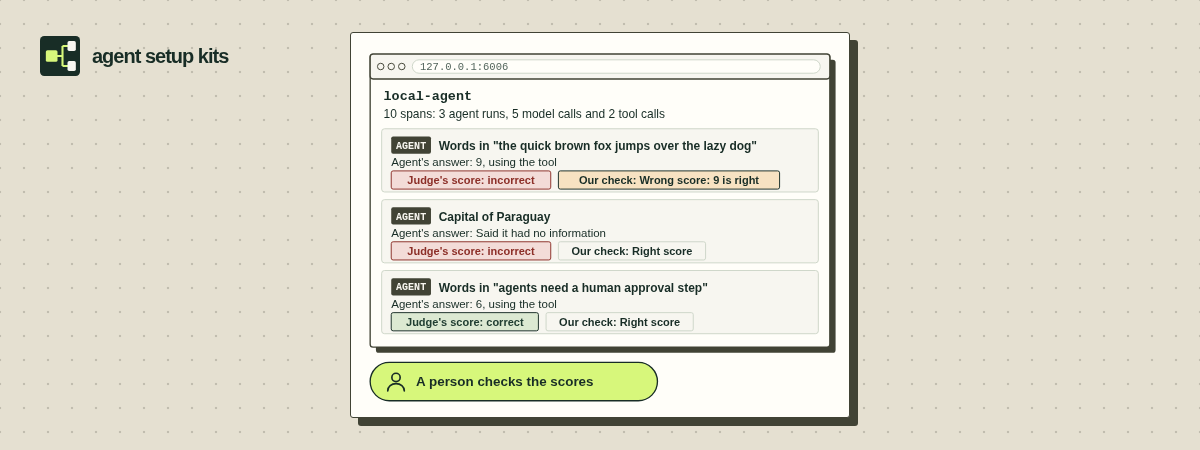
Arize Phoenix is a tracing and evaluation server you can run on your own machine with pip install arize-phoenix and phoenix serve, then send your agent's OpenTelemetry traces to it. In our test it recorded every model call and tool call from a local agent, and its built-in correctness judge, running on a small local model, got one of three scores wrong, so a person still has to check the scores.
Phoenix shows you what the agent did. You decide whether it did it well.
What Phoenix is (checked on 2026-10-30)
Phoenix collects traces (each model call, tool call and agent step, with inputs and outputs) and lets you attach evaluation scores to them. Traces use the OpenInference conventions on top of OpenTelemetry. Version 21.0.0 went up on PyPI on 2026-10-30 and needs Python 3.11 to 3.15.
Licence: Phoenix is under the Elastic License 2.0. Arize's docs say self-hosting is free with no feature gates. ELv2 is a source-available licence, not an OSI-approved one, and it limits offering Phoenix to others as a hosted service. Read it before you build a product on it. This is not legal advice.
Based on Phoenix, by Arize AI and contributors.
The setup at a glance
- Trigger: you run the agent; every run is traced.
- Permissions: Phoenix listens on 127.0.0.1 only by default. The agent calls a local model through Ollama.
- Output: traces in a local SQLite database, plus a correctness score on each agent run.
- Human approval: a person reads the flagged runs and the judge's scores before any score drives a change to the agent.
Step 1: Start Phoenix locally
python -m venv .venv && source .venv/bin/activate
pip install "arize-phoenix==21.0.0" arize-phoenix-otel openinference-instrumentation-openai openai
export PHOENIX_WORKING_DIR="$PWD/phoenix-data"
export PHOENIX_TELEMETRY_ENABLED=false
phoenix serve
The UI opens at http://127.0.0.1:6006. Traces arrive over OTLP on port 4317 (gRPC) or at /v1/traces on port 6006 (HTTP).
Two settings from the configuration docs are worth knowing. PHOENIX_TELEMETRY_ENABLED is on by default and sends basic web analytics; the docs say no trace data is collected, and we turned it off anyway. PHOENIX_HOST defaults to 127.0.0.1. If you bind it to another address, the docs say authentication switches on automatically.
Step 2: Trace a small agent
Our test agent used the OpenAI Python client pointed at Ollama, with one tool, word_count. Three lines connect it to Phoenix:
from phoenix.otel import register
tracer_provider = register(project_name="local-agent", auto_instrument=True)
tracer = tracer_provider.get_tracer(__name__)
auto_instrument=True picks up the installed OpenInference instrumentors, so each chat.completions.create call becomes an LLM span. We wrapped the agent loop in @tracer.agent and the tool in a span of kind tool:
with tracer.start_as_current_span("word_count", openinference_span_kind="tool") as span:
    span.set_input(args)
    out = word_count(**args)
    span.set_output(out)
The client used base_url="http://127.0.0.1:11434/v1" and the placeholder key "ollama", which Ollama ignores. No paid key is needed.
Step 3: Score the runs with a judge model
The evals tutorial pulls spans into a dataframe, binds a built-in evaluator to the span fields and logs the scores back. The custom endpoint guide shows how to point the judge at any OpenAI-compatible server, so ours ran on the same local model:
from phoenix.client import Client
from phoenix.evals import bind_evaluator, evaluate_dataframe
from phoenix.evals.llm import LLM
from phoenix.evals.metrics import CorrectnessEvaluator
from phoenix.evals.utils import to_annotation_dataframe

client = Client()
spans = client.spans.get_spans_dataframe(project_identifier="local-agent")
agent_spans = spans[spans["span_kind"] == "AGENT"]
judge = LLM(provider="openai", model="qwen2.5:3b",
            base_url="http://127.0.0.1:11434/v1", api_key="ollama")
ev = bind_evaluator(evaluator=CorrectnessEvaluator(llm=judge),
    input_mapping={"input": "attributes.input.value", "output": "attributes.output.value"})
results = evaluate_dataframe(dataframe=agent_spans, evaluators=[ev])
client.spans.log_span_annotations_dataframe(dataframe=to_annotation_dataframe(dataframe=results))
The qwen2.5:3b weights are under the "Qwen RESEARCH LICENSE AGREEMENT", for non-commercial use only; check the model card before any commercial use.
What our test showed
We asked the agent three questions and then ran the judge.
| Question | Agent's answer | Judge's score | Our check |
|---|---|---|---|
| Words in "the quick brown fox jumps over the lazy dog" | 9, using the tool | incorrect | Wrong score: 9 is right |
| Capital of Paraguay | Said it had no information | incorrect | Right score |
| Words in "agents need a human approval step" | 6, using the tool | correct | Right score |
Phoenix recorded 10 spans: 3 agent runs, 5 model calls and 2 tool calls, and the three scores showed up on the agent spans. The traces made the second failure easy to explain: the model never tried to answer, because our system prompt only talked about the tool. The judge took 88 seconds for three rows on CPU, with another job sharing the model.
Things to know
- A 3B judge is a weak judge. It marked a correct answer incorrect. Use a stronger model for judging if you can, and read a sample of scores by hand either way.
- Traces hold full prompts and outputs. Keep Phoenix on localhost, or turn on authentication, before it holds anything private.
- Wrap evaluation runs in
suppress_tracing(), as the tutorial does, if you trace in the same process. Otherwise the judge's own calls end up in your project. registerwarned that its default SimpleSpanProcessor isn't meant for production and suggested a BatchSpanProcessor.
Takeaway
Pin Phoenix 21.0.0, run it on localhost with telemetry off, trace with register(auto_instrument=True), score runs with a judge, and have a person check the scores before acting on them.
Next step: trace ten real runs of your agent and read the three the judge marked worst.
How we check the tools we list is on our verification page.
Good setups, worth keeping. Request email updates on the home page, then confirm by email. No subscription starts until you confirm. Or find an agent for the job.