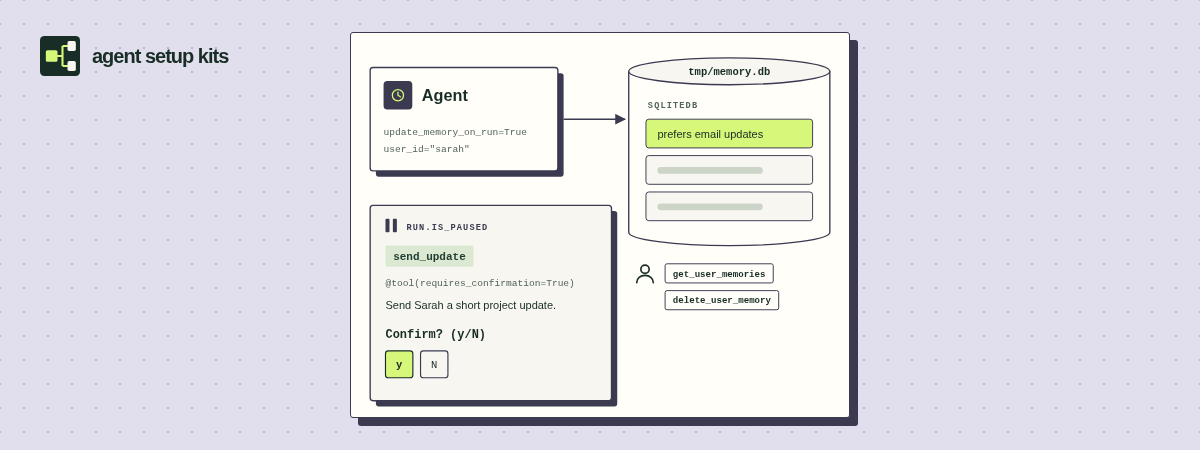
An Agno agent can remember facts about each user across conversations by storing them in a database such as SQLite. Set it up so a person confirms any tool call that changes something, and so someone can list and delete what the agent has stored about a user.
The agent remembers and proposes. A person confirms actions and owns the memory.
What Agno is (checked on v3.1.11)
Agno is an Apache-2.0 Python framework for building agents, teams and workflows. Version 3.1.11 was released on 2026-10-27. We installed it and checked the parameters below against the package.
Based on Agno, by Agno and contributors.
Step 1: Install, pinned
pip install "agno==3.1.11" openai "sqlalchemy[asyncio]"
export OPENAI_API_KEY="..."   # set it in your shell; never commit or print it
export AGNO_TELEMETRY=false
Two notes from our install:
- The docs install plain
sqlalchemy. In our environment that pulled SQLAlchemy 2.1.6 withoutgreenlet, and importingagno.db.sqlitefailed with an error asking forsqlalchemy[asyncio]. Installing that extra fixed it. - In v3.1.11,
Agenthastelemetry=Trueby default, and the code sends a record of each run (session ID, run ID, SDK version and run data) in the background. SettingAGNO_TELEMETRY=falseor passingtelemetry=Falseturns this off.
Step 2: Add memory, and choose the mode on purpose
The memory docs describe two modes:
- Automatic (
update_memory_on_run=True): every user message is processed into memories. - Agentic (
enable_agentic_memory=True): the model gets anupdate_user_memorytool and decides when to use it.
Both default to False in v3.1.11, so nothing is remembered unless you turn it on. The docs also say automatic extraction can add, update and delete memories, while agentic mode only creates and updates them unless you configure the memory manager to allow deletion.
Automatic mode is easier to predict, so start there:
from agno.agent import Agent
from agno.db.sqlite import SqliteDb
from agno.models.openai import OpenAIResponses

db = SqliteDb(db_file="tmp/memory.db")

agent = Agent(
    model=OpenAIResponses(id="gpt-5.4-mini"),
    db=db,
    update_memory_on_run=True,
    telemetry=False,
)

agent.print_response("I prefer email updates and morning meetings.",
                     user_id="sarah", session_id="onboarding")
agent.print_response("How should you schedule my project updates?",
                     user_id="sarah", session_id="project-planning")
This follows the docs example. Memories are tied to user_id, so the second session can recall the first. Use a stable ID from your own app, not something a user can type in.
Step 3: Confirm tool calls that change things
Agno's user confirmation feature pauses a run before a marked tool is called. Mark the tool with @tool(requires_confirmation=True). The run comes back with is_paused set, and you confirm or reject each requirement before calling continue_run().
from agno.tools import tool

@tool(requires_confirmation=True)
def send_update(to: str, body: str) -> str:
    """Send a project update. Demonstration only: nothing is sent."""
    return f"Update queued for {to}"

agent = Agent(
    model=OpenAIResponses(id="gpt-5.4-mini"),
    tools=[send_update],
    db=db,                      # needed to continue a run by run_id
    update_memory_on_run=True,
    telemetry=False,
)

run = agent.run("Send Sarah a short project update.", user_id="sarah")

while run.is_paused:
    for req in run.active_requirements:
        if not req.needs_confirmation:
            continue
        t = req.tool_execution
        print(f"{t.tool_name}({t.tool_args})")
        if input("Confirm? (y/N) ").strip().lower() == "y":
            req.confirm()
        else:
            req.reject()
            t.confirmation_note = "Rejected by reviewer. Do not retry."
    run = agent.continue_run(run_id=run.run_id, requirements=run.requirements)

print(run.content)
The loop and confirmation_note come from the docs. For toolkits, requires_confirmation_tools=[...] marks only some of a toolkit's tools. The docs also note that application code "must authorize the caller's access to that session and its pending requirements", so in a real app, check that the person confirming is allowed to.
Step 4: Review and delete what the agent remembers
The docs show how to list a user's memories:
for m in agent.get_user_memories(user_id="sarah") or []:
    print(m.memory_id, m.memory)
In v3.1.11 the SQLite database also has delete_user_memory(memory_id, user_id). Make it a routine:
- After the first few conversations, list each test user's memories and read them.
- Delete anything wrong, sensitive or that the user didn't mean to share.
- Give users a way to ask what's stored and have it removed.
The docs say stored memories are added to the model's context on later runs. Anything wrong in memory becomes part of the next answer, so the review matters.
Memories are stored in a table named agno_memories by default. The database file holds personal data, so keep it out of git and back it up like any user data.
Takeaway
Agno makes memory a couple of parameters. Pin v3.1.11, turn telemetry off if you prefer, start with automatic memory in SQLite, mark every tool that changes something with requires_confirmation=True, and make reviewing and deleting memories part of the job.
Next step: run the memory example with a test user, list what it stored, and delete one entry to confirm your clean-up path works.
How we check the tools we list is on our verification page.
Good setups, worth keeping. Request email updates on the home page, then confirm by email. No subscription starts until you confirm. Or find an agent for the job.
Part of: Which setup should I use to add human approval to an agent?