We gave smolagents, PydanticAI and LangGraph the same small job on the same local model: look up an order, then refund it, with an approval step before the refund. In our runs a script gave the yes or no. The code was about the same size in all three. The approval hooks were not. And on a 3B model, the approval prompt mattered more than the framework: it showed refund amounts of 100, 500 and 1 for an order that cost 59.90.
A person approves every refund after seeing the order number and amount. Nothing is refunded without a yes.
Based on smolagents, by Hugging Face and contributors; PydanticAI, by the Pydantic team and contributors; and LangGraph, by LangChain and contributors.
The task
Two tools and one fake order, shared by all three scripts:
lookup_order("1042")returns{"item": "desk lamp", "total": 59.9, "status": "delivered"}.issue_refund(order_id, amount)appends to a list instead of moving money. It must not run without a person's yes.- The prompt: "Order 1042 arrived damaged. Look it up, then refund the full amount."
The model was qwen2.5:3b on Ollama 0.40.13, on the same machine. Each framework ran twice with a script answering yes and twice with it answering no, piped in so each run could be repeated. LangGraph used temperature 0 through ChatOllama. smolagents and PydanticAI used their default sampling, so treat this as a small sample, not a benchmark.
The qwen2.5:3b weights are under the "Qwen RESEARCH LICENSE AGREEMENT", for non-commercial use only; check the model card before any commercial use.
How each framework asks a person (checked 2026-10-30)
| smolagents 1.26.0 | PydanticAI 2.64.0 | LangGraph 1.2.19 | |
|---|---|---|---|
| Licence (GitHub API) | Apache-2.0 | MIT | MIT |
| Approval hook | None built in that we found; we asked inside the tool | requires_approval=True on the tool | interrupt() inside the tool, plus a checkpointer |
| What the run returns while waiting | Nothing; the tool blocks on input() | DeferredToolRequests with the pending calls | A result with __interrupt__ and the payload |
| How you answer | Return a value from the tool | DeferredToolResults, True or ToolDenied("...") | Command(resume=...) on the same thread_id |
| Script lines (plus 12 shared) | 21 | 20 | 22 |
| Venv on disk, Python 3.13 | 89 MB | 62 MB (pydantic-ai-slim[openai]) | 67 MB (with langchain-ollama) |
We searched the installed smolagents package for an approval setting and found none. It has step_callbacks and final_answer_checks, which run after steps, not before a tool. So the yes or no lives inside our tool.
PydanticAI's docs describe the flow we used: the run ends with the pending approvals, you decide, then you run again with the message history and the results. The same page calls a HandleDeferredToolCalls capability "the recommended way" when the approver lives in the same process, so the run continues in one call. We used the end-and-resume flow because it is easier to see.
LangGraph's interrupt docs warn that on resume "the runtime restarts the entire node from the beginning", so any code before interrupt() runs again. Put side effects after it.
The code
The PydanticAI version, which shows the shape of all three:
from pydantic_ai import Agent, DeferredToolRequests, DeferredToolResults, ToolDenied
from pydantic_ai.models.ollama import OllamaModel
import common
agent = Agent(OllamaModel("qwen2.5:3b"), output_type=[str, DeferredToolRequests])
@agent.tool_plain
def lookup_order(order_id: str) -> str:
    """Look up an order."""
    return common.lookup(order_id)
@agent.tool_plain(requires_approval=True)
def issue_refund(order_id: str, amount: float) -> str:
    """Refund money on an order."""
    return common.refund(order_id, amount)
r = agent.run_sync(common.TASK)
while isinstance(r.output, DeferredToolRequests):
    res = DeferredToolResults()
    for c in r.output.approvals:
        a = c.args_as_dict(); ok = common.ask(a.get("order_id"), a.get("amount"))
        res.approvals[c.tool_call_id] = True if ok else ToolDenied("The person denied this refund.")
    r = agent.run_sync(message_history=r.all_messages(), deferred_tool_results=res)
OllamaModel reads the server address from OLLAMA_BASE_URL, which we set to http://127.0.0.1:11434/v1. In LangGraph the refund tool calls interrupt({"order_id": order_id, "amount": amount}) and the loop resumes with Command(resume=answer). In smolagents the tool calls input() itself.
LangGraph 1.2.19 printed a deprecation warning in both runs where we kept the full output: create_react_agent "has been moved to langchain.agents", with create_agent as the new import. It still ran. We kept it to avoid installing the larger langchain package. interrupt() itself is part of LangGraph and is not affected.
What happened in twelve runs
| Framework | Scripted answer yes (2 runs) | Scripted answer no (2 runs) |
|---|---|---|
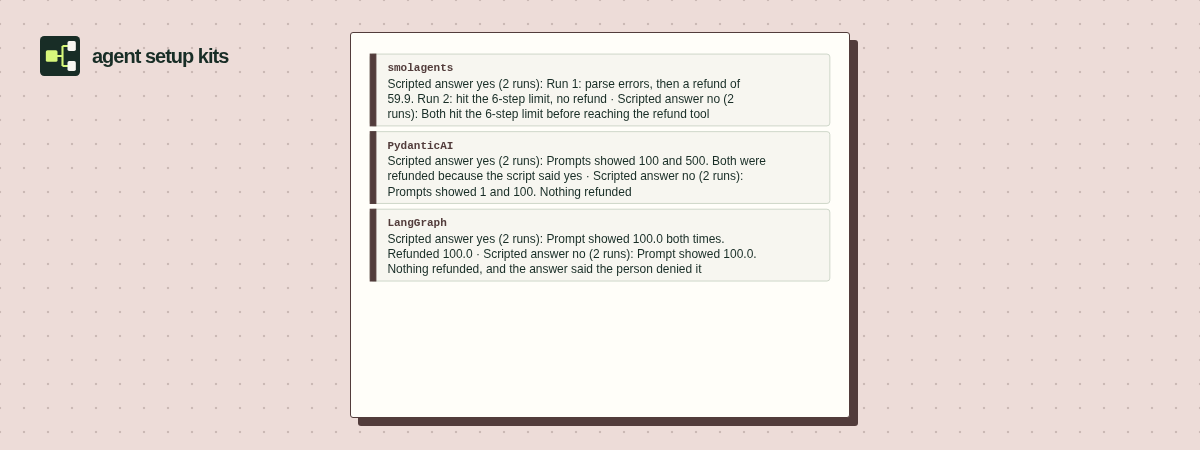
| smolagents | Run 1: parse errors, then a refund of 59.9. Run 2: hit the 6-step limit, no refund | Both hit the 6-step limit before reaching the refund tool |
| PydanticAI | Prompts showed 100 and 500. Both were refunded because the script said yes | Prompts showed 1 and 100. Nothing refunded |
| LangGraph | Prompt showed 100.0 both times. Refunded 100.0 | Prompt showed 100.0. Nothing refunded, and the answer said the person denied it |
- smolagents and this model did not get along. In three of four runs,
ToolCallingAgentlogged errors such as "Tool call needs to have a key 'name'" and stopped atmax_steps=6. In one no run, the final answer said "I will now proceed to refund the full amount for this order" when it never had. - The amount was usually wrong. PydanticAI and LangGraph looked up the order and then proposed 100, 500 or 1 instead of 59.9. Our scripted "yes" approved them. A person reading the prompt would have caught it.
- Denials were handled. No framework refunded after a no. The final answers ranged from clear ("the refund for this order has been denied by the person") to vague ("Could you please check and resolve the denial").
What we learned
- The approval prompt is the safety feature. Show the order and the amount, not just "allow issue_refund?".
- Check arguments in code too. A rule that refuses any refund above the looked-up total would have blocked 100 and 500 before a person saw them.
- Pick the hook you can live with. PydanticAI and LangGraph let the run pause and resume later. smolagents leaves it to your tool, which is fine for a terminal script and harder for a web app.
- Small models are a real limit. In our separate LangGraph human-in-the-loop test, on the same model at temperature 0, the prompt "refund its total of 59.90" produced 59.9 in every run, where "refund the full amount" produced 100.0 here. That is one comparison, not a controlled test.
Licence notes come from each repository's GitHub API record on 2026-10-30. This is not legal advice; read each licence before you ship.
Takeaway
Among agentic AI frameworks, the code size barely differs for a small job. What differs is how a run waits for a person. Choose the one whose pause fits your app, then make the prompt show the exact action and check arguments in code.
Next step: run your own risky tool through one framework with a pause, answer no once, and read what the agent tells the user.
How we check the tools we list is on our verification page.
Good setups, worth keeping. Request email updates on the home page, then confirm by email. No subscription starts until you confirm. Or find an agent for the job.